Digital signatures can prove origin and integrity, but not secrecy or consent by themselves. Follow the signing flow and a four-layer verification test.
If you can still read a digitally signed document, nothing is broken. A digital signature is not meant to hide a file, and it is not the cursive mark you see on the page. A digital signature is a cryptographic result created with a private key and checked with the matching public key.
When the surrounding system is implemented and governed properly, that result helps a recipient answer two technical questions: did the signed data change, and was the signature generated with the private key paired to this public key? It does not, by itself, prove that the named person controlled the key, understood the document, intended a legal commitment, or kept the document confidential.
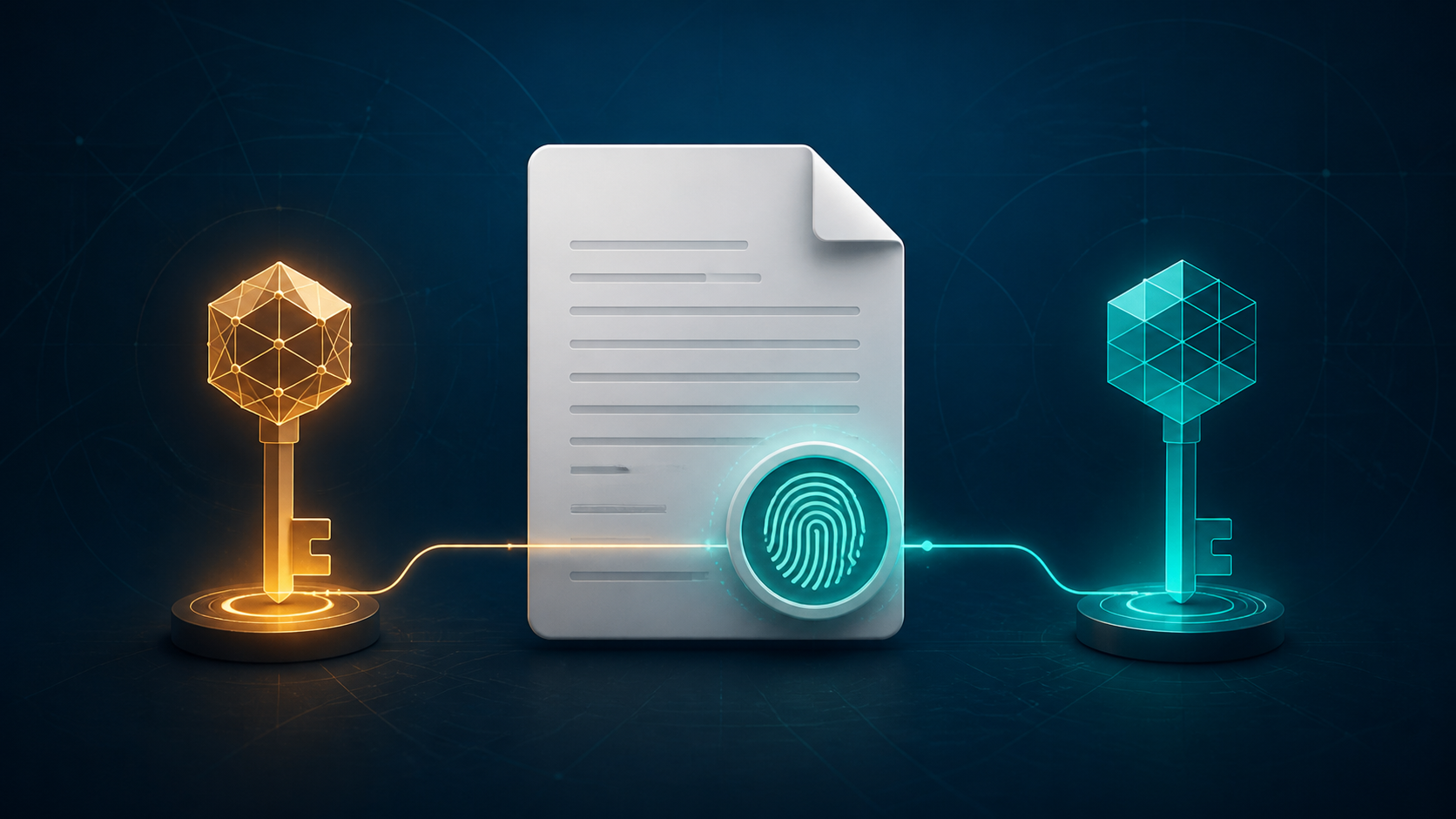
A digital signature answers two technical questions
NIST defines a digital signature as a cryptographic transformation of data that, when properly implemented, provides a mechanism for origin authentication, data integrity, and support for signer non-repudiation. In ordinary language, its core jobs are:
- Integrity: the verifier can detect whether the signed data changed after the signature was created.
- Origin authentication: the verifier can check that the signature corresponds to a particular public key and therefore to the holder of its paired private key.
The NIST Digital Signature Standard specifies approved algorithms for generating these signatures. The algorithm is only one layer, however. Connecting a public key to a real person or organization normally requires a certificate and a trust process. Connecting a technically valid signature to consent or legal effect requires an appropriate transaction process and the law that applies to it.
One boundary is especially important: signing is not the same as encrypting. NIST’s current digital identity guidelines state that digital signatures provide authenticity, integrity, and non-repudiation support, but not confidentiality. Anyone who is allowed to open the unencrypted file can still read it.
How a digital signature works: follow one document
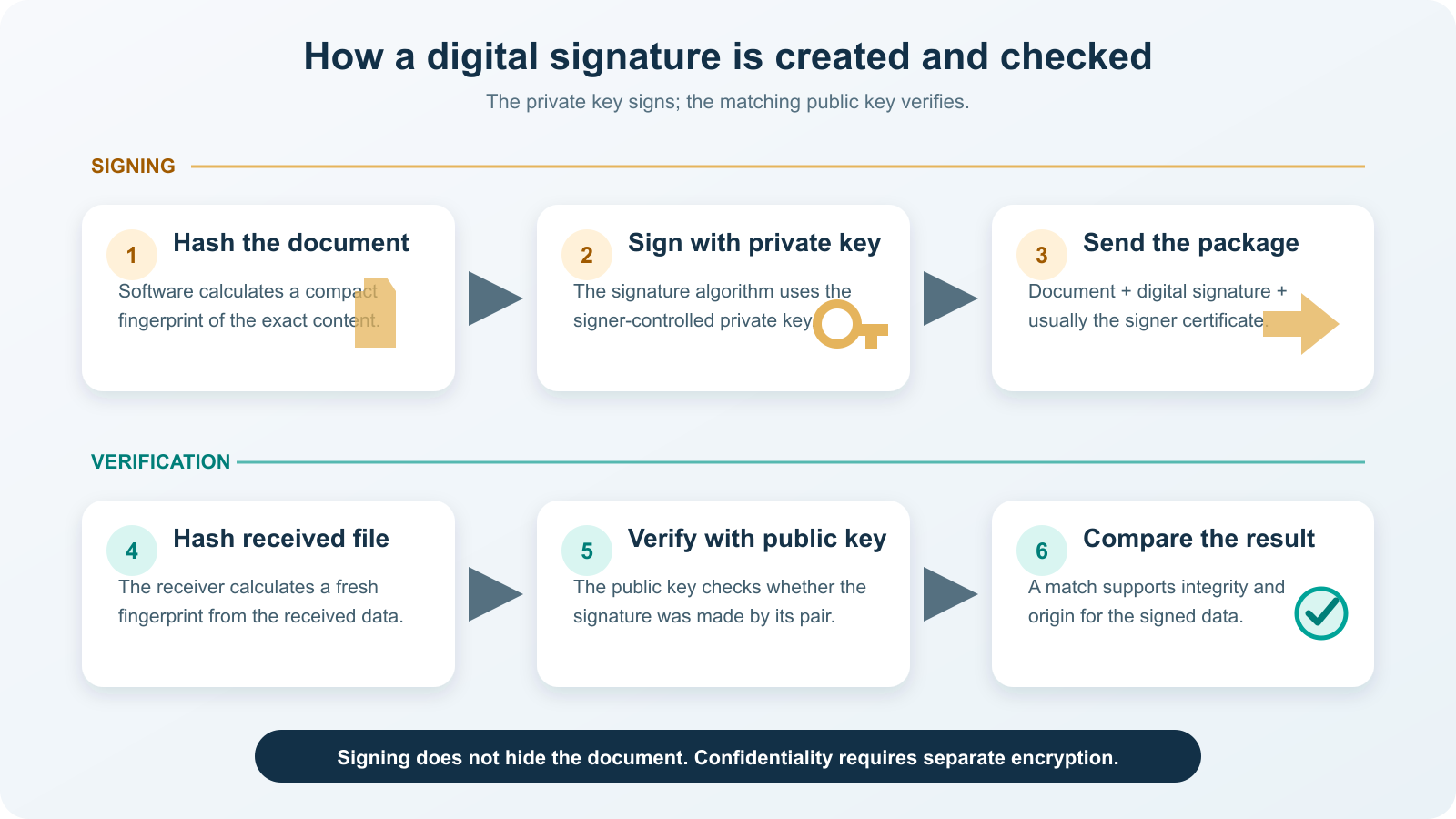
Imagine a company signs the final version of a purchase order. The software handles the mathematics, but the logical sequence looks like this:
- Create a hash. A hash function converts the exact document data into a fixed-length digest. Even a small change normally produces a different digest.
- Generate the signature. The signing algorithm uses the signer’s private key and the document digest to produce the digital signature. The private key must remain controlled by the signer or the signing service acting under an authorized policy.
- Send the signed package. The recipient gets the document, the signature, and usually a certificate containing the public key and identity information.
- Hash the received document. The recipient’s software calculates a new digest from the data it actually received.
- Verify with the public key. The verification algorithm checks the signature with the matching public key.
- Evaluate the result. If the cryptographic check succeeds, the signed data matches what that private key signed. The software then evaluates certificate trust, time, and any allowed document changes before presenting a useful status.
This is more precise than saying a digital signature “encrypts the hash.” That shortcut describes some older or algorithm-specific intuition, but modern signature schemes are better understood as purpose-built signing and verification operations. It is also different from a passkey: both use public-key cryptography, but a passkey authenticates an account login while a digital signature here authenticates the origin and integrity of particular data.
Digital signature vs. electronic signature vs. encryption
The three terms solve different problems. A product may combine them, but they are not interchangeable.
| Mechanism | Main purpose | What makes it work | What it does not automatically provide |
|---|---|---|---|
| Electronic signature | Record a person’s act or intent to sign electronically | A process such as a typed name, click-to-sign action, drawn mark, platform audit trail, or certificate-based signature | A specific cryptographic integrity check; the exact evidence depends on the method and workflow |
| Digital signature | Verify the origin and integrity of signed data | A signature algorithm, private/public key pair, hash function, and often a digital certificate | Confidentiality, proof that the human read the file, or universal legal validity |
| Encryption | Prevent unauthorized readers from understanding the content | An encryption algorithm and the appropriate secret or private decryption key | Proof that the content was approved or signed by a particular person |
| Scanned signature image | Display a visual mark | Pixels placed on a page | Cryptographic integrity, key-based origin verification, or resistance to copying |
The European Commission’s eIDAS overview describes an electronic signature broadly as a person’s agreement expressed in electronic form. A digital signature is the technical cryptographic mechanism that can support some electronic-signature workflows. Qualified electronic signatures under the EU framework have specific legal effects, but those effects come from the full regulated service and identity process—not from the presence of cryptographic bytes alone. Other jurisdictions use different categories and rules.
Run the four-layer trust test
A useful verification decision separates four layers instead of treating one green checkmark as a universal guarantee.
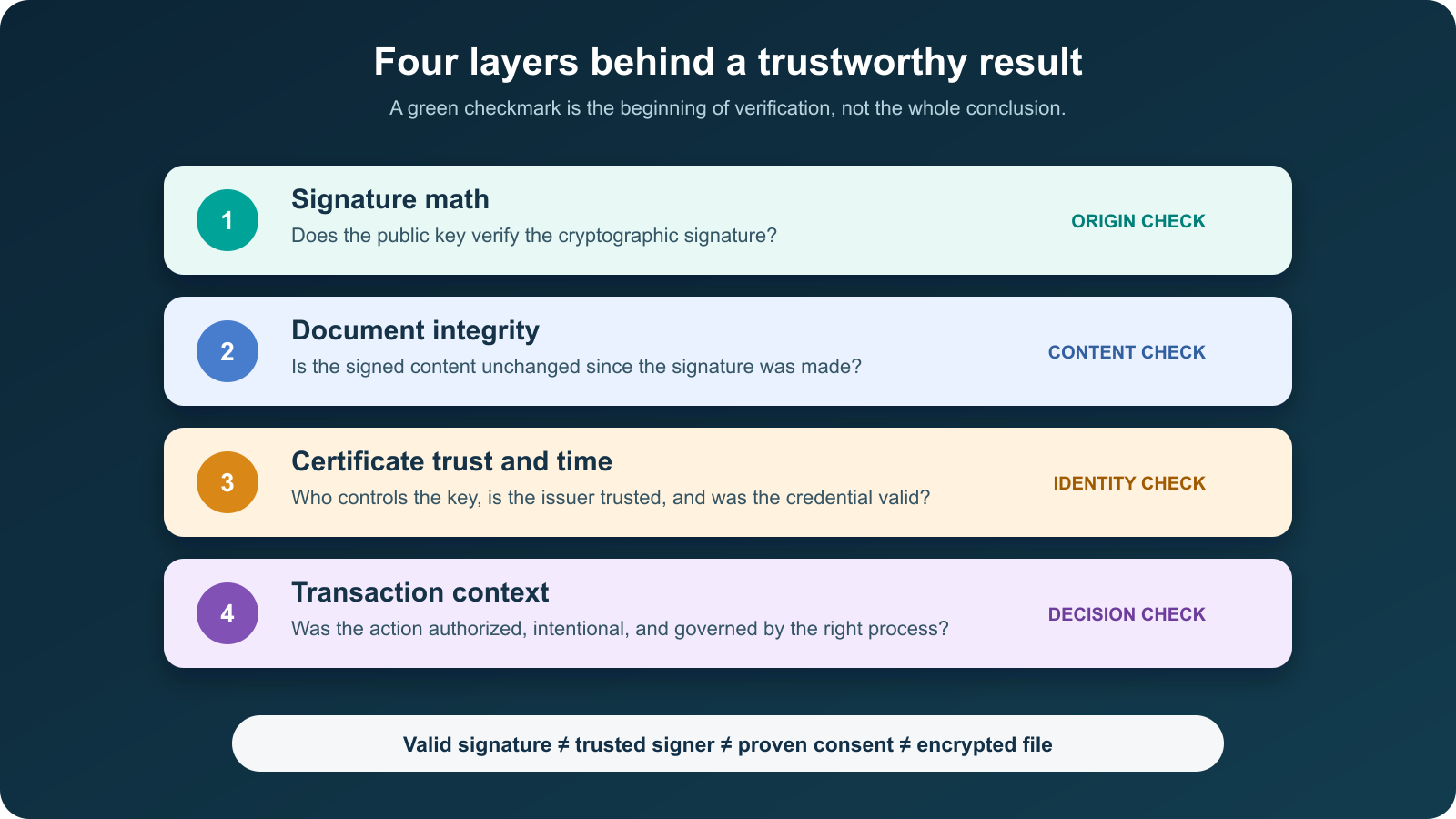
- Signature math: does the public key successfully verify the digital signature?
- Document integrity: does the application report that the signed content is unchanged, or are later changes permitted and clearly identified?
- Certificate trust and time: is the public key bound to the claimed signer through a trusted chain? Was the certificate valid at the relevant time, and can the application obtain suitable revocation and timestamp evidence?
- Transaction context: was the key under the right person’s control, was the action authorized and intentional, and does the workflow meet the applicable policy or legal requirements?
This distinction matters after key theft or credential sharing. A mathematically valid signature shows that the relevant private key was used. If someone else had access to that key, cryptography alone cannot reconstruct who pressed the button or whether the action was authorized.
Read common verification results correctly
Applications use different wording, but most results can be translated with this status decoder:
| Displayed result | Reasonable conclusion | Next check |
|---|---|---|
| Signature valid and signer trusted | The cryptographic check passed, the signed content is consistent, and the certificate chains to a trust source accepted by the application. | Confirm the certificate identity, signing time, permitted changes, and transaction context. |
| Signature valid but signer unknown or untrusted | The math may pass, but the application cannot establish that the public key belongs to an identity you trust. | Verify the certificate fingerprint or obtain the certificate through an authenticated channel. Do not trust it merely to remove the warning. |
| Signature invalid or document altered | The current data does not validate against the signature, or the signature object is damaged. | Stop relying on this copy. Obtain the original from the sender and compare the reported signed revision. |
| Certificate expired or revoked | The credential is not acceptable at the time being evaluated; this does not always reveal whether it was valid when signed. | Inspect a trusted timestamp and embedded revocation evidence, then follow the governing policy. |
| Timestamp unknown or unverified | The displayed signing time may come only from the signer’s device, or the timestamp authority is not trusted. | Distinguish a local clock value from a verifiable trusted timestamp. |
Adobe’s official Acrobat validation guide illustrates this separation: it tells recipients to validate the signature, inspect the signer’s certificate, and review whether the time is merely from the signer’s computer or from a trusted timestamp server.
Where certificates and timestamps fit
A public key is just data until a verifier can associate it with an entity. A digital certificate normally contains the public key, information about the subject, an expiration period, an issuer, and the issuer’s own digital signature. The issuer—often a certificate authority—attests to the binding under its validation policy. The FDA’s digital-certificate overview gives a concrete description of that binding and the fields commonly found in an X.509 certificate.
A certificate chain lets software work from the signer’s certificate through one or more issuers to a root it already trusts. That chain is not a popularity score. It means the application recognizes the trust anchor and can apply its rules. A self-signed certificate can still produce a mathematically valid signature, but the recipient needs a separate authenticated way to confirm the certificate fingerprint and decide whether to trust that identity.
A trusted timestamp answers another question: did a trusted service attest that the signature existed at a particular time? That can help long-term validation after a signing certificate expires, provided the timestamp and relevant validation data can themselves be verified. A date printed beside a visible signature is not equivalent; it can be ordinary page content or the signer’s local clock.
When a digital signature is the right tool
Digital signatures are especially useful when a recipient must later detect changes and verify the source of a document, message, software package, or transaction record. Certificate-based signing can add value for regulated filings, high-value approvals, long-lived records, inter-organization document exchange, and software release verification.
They are not automatically necessary for every electronic approval. A low-risk internal acknowledgment may be adequately supported by authenticated access, a clear consent screen, and an audit trail. Conversely, placing a scanned signature image on a sensitive contract may look formal while providing weak technical evidence. Choose the assurance level from the consequence of impersonation, alteration, or later dispute—not from how impressive the signature graphic looks.
Legal effect is jurisdiction- and context-specific. Confirm the rules for the transaction, required identity proofing, certificate type, record retention, and acceptable signature format. A cryptographically strong signature can still fail a mandated process, while another legally accepted electronic-signature method may not use a certificate-based digital signature.
Verify a signed document without trusting the picture
- Keep the original format. Open the original signed file in an application that understands its signature format. A PDF, for example, can store signature and certificate data that a flattened image cannot.
- Open the signature panel. Do not judge validity from a handwritten appearance, badge, or date printed on the page.
- Read the integrity result. Check whether the signed revision is unchanged and whether any later modifications were explicitly permitted.
- Inspect the certificate. Compare the subject to the expected person or organization, review the issuer and validity period, and look for revocation or trust warnings.
- Check the time basis. Identify whether the status uses a trusted timestamp, embedded validation evidence, or only a device clock.
- Confirm through a second channel when stakes are high. Use known contact details—not details supplied only in the suspicious document—to confirm an unexpected signer, key fingerprint, or transaction.
- Preserve the signed original. Editing, printing and rescanning, or using a PDF-to-Word conversion can remove signature data or produce a new file whose integrity is no longer covered by the original signature.
For signers, the matching rule is to protect the private key: use approved storage, strong authentication, prompt revocation after compromise, and a service that records enough evidence for the required assurance level. A perfectly designed verification process cannot compensate for a private key that was freely shared.
The decision rule
Use a digital signature when you need cryptographic evidence that particular data came from a particular key and remained unchanged. Then evaluate the certificate, time evidence, key control, and transaction process before deciding who signed and what the signature means. If your requirement is secrecy, add encryption; if your requirement is legally enforceable consent, verify the applicable electronic-signature process as well.