A session cookie is defined by the absence of Expires and Max-Age—not by its name, purpose, security, or the server's login timeout.
A session cookie is an HTTP cookie with no Expires or Max-Age attribute, so the browser treats it as temporary and normally removes it when the browser-defined session ends.
The common mistake is to make “session” mean more than it does. It does not prove that the cookie holds login data, disappears after a fixed number of minutes, is first-party, is strictly necessary, or is secure. Browser lifetime, server-session validity, purpose, scope, and protection are separate questions.

Recognize a session cookie by what is missing
A server creates a cookie by sending a Set-Cookie response header. If that header has neither Expires nor Max-Age, the cookie is a session cookie. If it includes either lifetime attribute, it is persistent until that limit—although a browser may remove it earlier.
Set-Cookie: __Host-session_id=RANDOM_OPAQUE_VALUE; Path=/; Secure; HttpOnly; SameSite=LaxThis example is a session cookie because it lacks both expiry attributes. The other attributes constrain transport, script access, request context, and scope. By contrast, this cookie asks the browser to retain the value for one hour:
Set-Cookie: preference=compact; Max-Age=3600; Path=/; Secure; SameSite=LaxThe HTTP cookie standard, RFC 6265, says a cookie with neither Max-Age nor Expires lasts until the current session is over as defined by the user agent. When both lifetime attributes exist, Max-Age takes precedence. The label therefore comes from attributes, not from a cookie name such as PHPSESSID, session, or sid.
Follow a session cookie through one login
HTTP requests are independent. After authentication, the application needs a safe way to associate later requests with the same signed-in context. A common server-side pattern works like this:
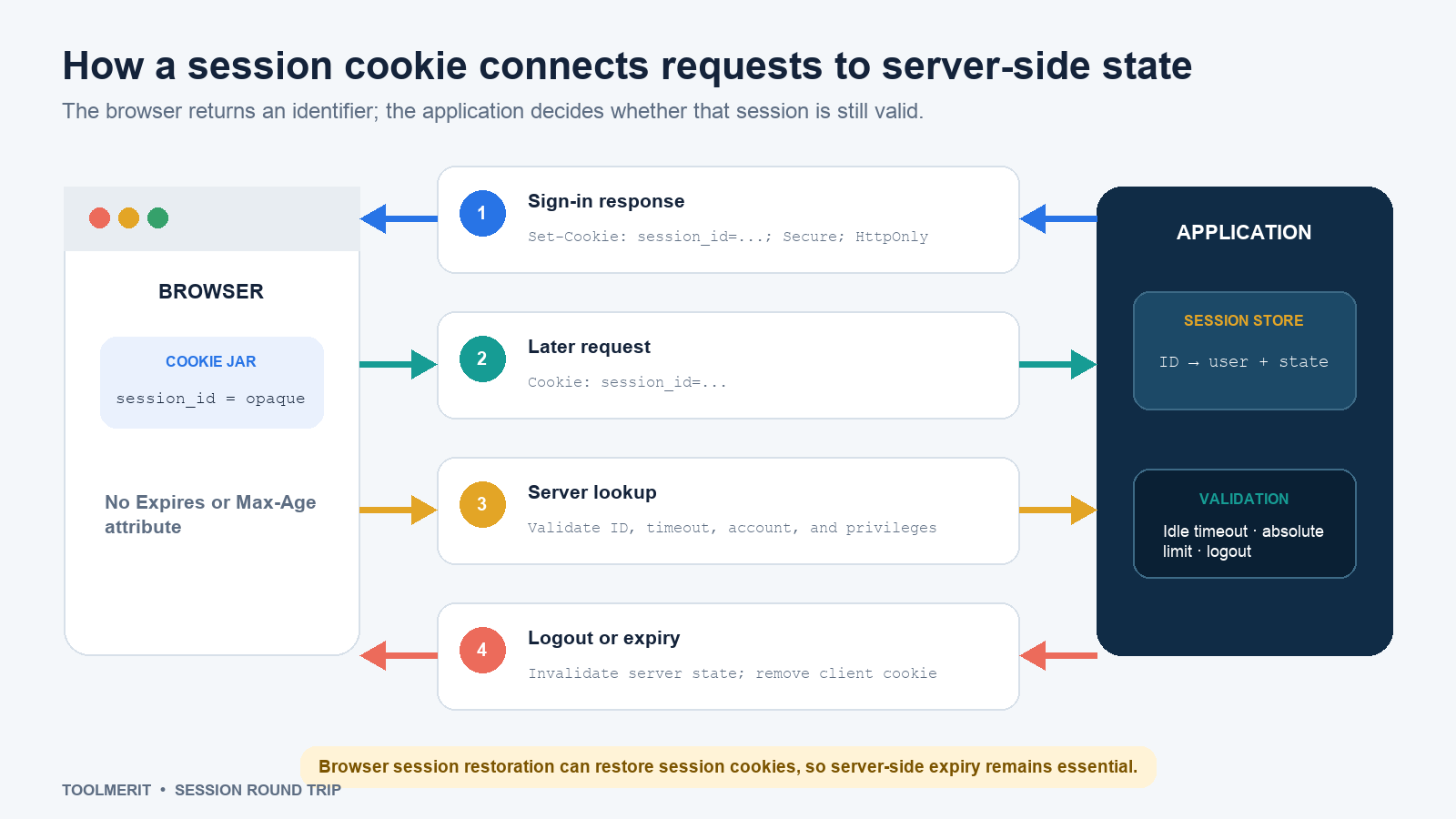
- Create: After successful sign-in, the server generates a high-entropy, unpredictable session identifier, stores a corresponding record, and returns the identifier in
Set-Cookie. - Return: On matching later requests, the browser automatically includes the cookie in the
Cookieheader according to its host, path, security, and same-site rules. - Validate: The server finds the session record and checks that it still exists, has not timed out, belongs to an active account, and carries the privileges required for the requested action.
- End: Logout, idle timeout, absolute lifetime, password change, risk event, or an administrator action can invalidate the server record. The server can also send an expired version of the cookie so the browser removes its copy.
The cookie should normally contain an opaque identifier, not a password, payment number, or a readable bundle of sensitive profile data. “Opaque” means the value reveals no useful meaning to the browser user or an attacker who merely sees its format. Even a signed or encrypted cookie increases exposure and revocation complexity when it carries more state than necessary.
Do not put a session identifier in a query string as a fallback. URLs can appear in history, logs, analytics, bookmarks, screenshots, and referrer data; our URL guide explains those components. OWASP recommends cookies as the session-ID exchange mechanism and advises applications not to accept alternate IDs from URL parameters.
Separate the cookie lifetime from the server session
Closing a browser and deleting its cookie prevents that browser copy from presenting the identifier. It does not automatically erase the server-side record. Conversely, the server may invalidate a session while the browser still stores and sends a cookie; the application must reject the stale identifier.
| Event | Browser cookie | Server session | Required behavior |
|---|---|---|---|
| Browser session ends | Normally removed if non-persistent | May still exist | Server expiry must not depend only on browser closure |
| Session restore | May be restored with tabs | Could still be valid | Apply server-side idle and absolute limits appropriate to risk |
| Idle timeout | May remain present | Invalidated after inactivity | Reject the ID and require authentication again |
| Logout | Explicitly expired or removed | Invalidated immediately | End both sides; do not only hide the signed-in interface |
| Privilege change | Old identifier may be replaced | Rotate or rebuild state | Prevent session fixation and stale privilege use |
MDN’s current Set-Cookie reference warns that browsers with session restoration can restore session cookies as though the browser never closed. That is why “it disappears when the window closes” is an unsafe authentication policy. The application needs server-enforced idle and absolute timeouts, logout invalidation, and reauthentication for high-risk actions.
Classify a cookie on four separate dimensions
A useful cookie inventory never has one column called “type.” It records at least four independent classifications.
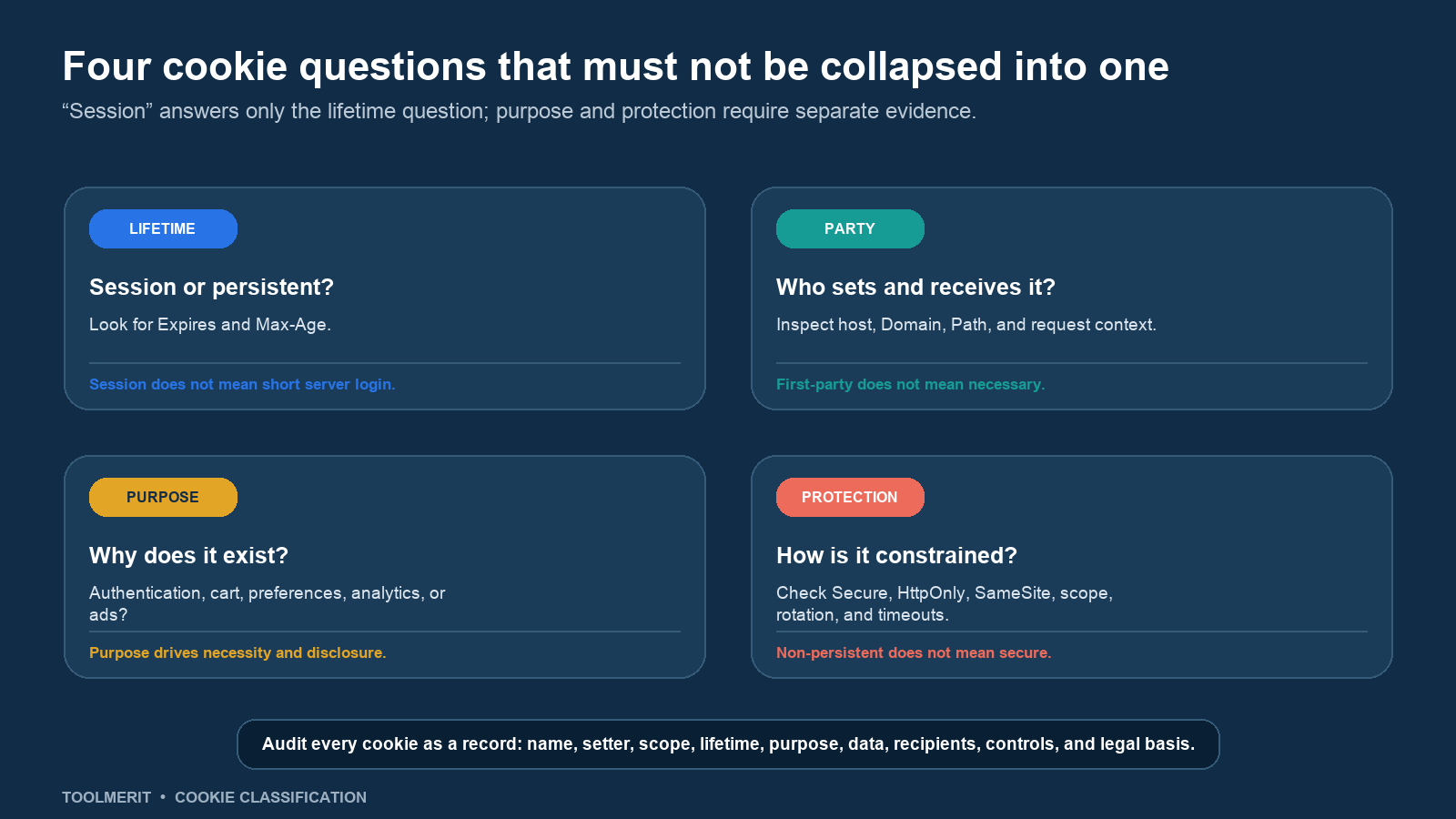
- Lifetime: Session or persistent? Inspect
ExpiresandMax-Age, then document server-side retention separately. - Party and scope: Which host set it, which hosts receive it, and in what context? An omitted
Domaincreates a more restrictive host-only cookie; adding a domain generally includes subdomains. - Purpose: Does it authenticate, maintain a cart, prevent fraud, store a language choice, measure traffic, personalize content, or support advertising?
- Protection: Are transport, script access, cross-site sending, host scope, session rotation, and server timeout appropriately constrained?
A first-party cookie is not automatically necessary. A third-party-looking service can sometimes provide essential infrastructure. A session cookie can perform analytics, and a persistent cookie can be necessary for a user-requested function. Evidence about actual behavior and purpose matters more than the name or lifetime.
Read the security attributes without treating them as guarantees
| Control | What it does | Important limit |
|---|---|---|
Secure |
Instructs the browser to send the cookie only over HTTPS. | It does not make an identifier unpredictable or secure a compromised server. |
HttpOnly |
Prevents JavaScript from reading the cookie through document.cookie. |
A script injection can still make authenticated requests from the page; fix XSS and apply other controls. |
SameSite |
Restricts when the browser sends the cookie in cross-site contexts. | Strict, Lax, and None have different usability and integration effects; it is defense in depth, not the entire CSRF strategy. |
| Host and path scope | Limits the requests that receive the cookie. | Path is a sending rule, not a strong security boundary between applications on the same host. |
__Host- prefix |
Requires Secure, no Domain, and Path=/ in supporting browsers. |
The application still needs strong IDs, rotation, timeouts, access checks, and secure code. |
OWASP’s Session Management Cheat Sheet recommends full-session HTTPS, secure cookie attributes, restricted scope, unpredictable identifiers, and server-side expiration. Regenerate the session ID after authentication and meaningful privilege changes. Invalidate it on logout. Do not use a long-lived browser cookie as a substitute for a deliberate server-session policy.
Authentication itself can use stronger credentials such as the public-key approach described in our passkey guide, but the application may still issue a session cookie after the user proves identity. The credential establishes identity; the session mechanism carries that authenticated context across later requests.
Do not derive consent from the word “session”
Cookie and device-storage rules vary by jurisdiction, and this is not legal advice. The engineering label describes lifetime, while privacy analysis considers purpose, necessity, data, recipients, transparency, and applicable law.
For a UK example, the Information Commissioner’s Office states in its cookie guidance that organizations should identify purpose, duration, party, information processed, and whether a cookie is strictly necessary. Its current exceptions guidance assesses necessity from the user’s requested service and lists activities such as authentication, recording user selections, security, and fraud prevention as likely candidates. Advertising does not become necessary because it funds the site.
Thus a short-lived cookie used only to keep a requested shopping basket may receive different treatment from a short-lived analytics or advertising identifier. “It is deleted at the end of the session” is useful transparency, but it is not a complete purpose or consent analysis. Review the jurisdictions and services in scope with qualified privacy counsel.
Audit a session cookie in the browser
Use a fresh private browsing window and a non-sensitive test account. In browser developer tools, open the storage or application panel, locate Cookies, and record each relevant entry before and after sign-in.
- Identify: Record name, setter, host,
Domain,Path, creation context, and whether it appears before authentication. - Confirm lifetime: Look for
ExpiresandMax-Age. If neither exists, label the browser cookie session-lived; separately obtain server timeout and retention values. - Inspect controls: Record
Secure,HttpOnly,SameSite, prefixes, and whether cross-site integrations require an exception. - Trace requests: In the network panel, verify which matching requests carry the cookie. Do not paste the live value into tickets, screenshots, analytics, or chat.
- Test transitions: Sign in, refresh, change privilege if the test plan permits, log out, and retry a protected request. Confirm the old server session is rejected rather than merely hidden in the interface.
- Document purpose: Name the feature, owner, data linked to the identifier, recipients, user benefit, necessity or consent analysis, retention, and review date.
Do not test a production session by stealing, replaying, or sharing identifiers. Security testing needs explicit authorization, isolated accounts, safe logs, and a defined cleanup plan. A cookie value is a credential when possession can authorize requests.
Keep the definition within its limit
The precise definition is intentionally narrow: no Expires or Max-Age means the browser treats the cookie as session-lived. Everything else needs independent evidence.
For users, logging out is safer than assuming window closure ended a sensitive login. For site teams, set the smallest practical scope, use HTTPS and appropriate attributes, keep identifiers opaque and unpredictable, rotate them at trust changes, enforce server-side timeouts, invalidate logout, control caches, document purpose, and audit real behavior. A session cookie can support secure, necessary functionality—but “session” alone proves neither security nor necessity.