Spot phishing by judging the request, sender identity, and destination together—then verify through a trusted path that does not depend on the message.
To spot phishing emails, evaluate the request, the claimed sender, and the link or attachment together. Pause when an unexpected message creates urgency, asks for a password, one-time code, payment, or sensitive data, uses a mismatched sender or reply-to domain, points to a deceptive destination, or includes an unrequested attachment. Do not click the message to investigate it. Open the known official app or website yourself, or contact the person through a trusted number. Report suspicious messages. If you entered credentials, approved a login, or sent money, act immediately through a clean, independent channel.
Ask one diagnostic question first: Would this request still make sense if the logo, colors, and display name disappeared? A convincing design can be copied. The action you are being pushed to take is harder to disguise.
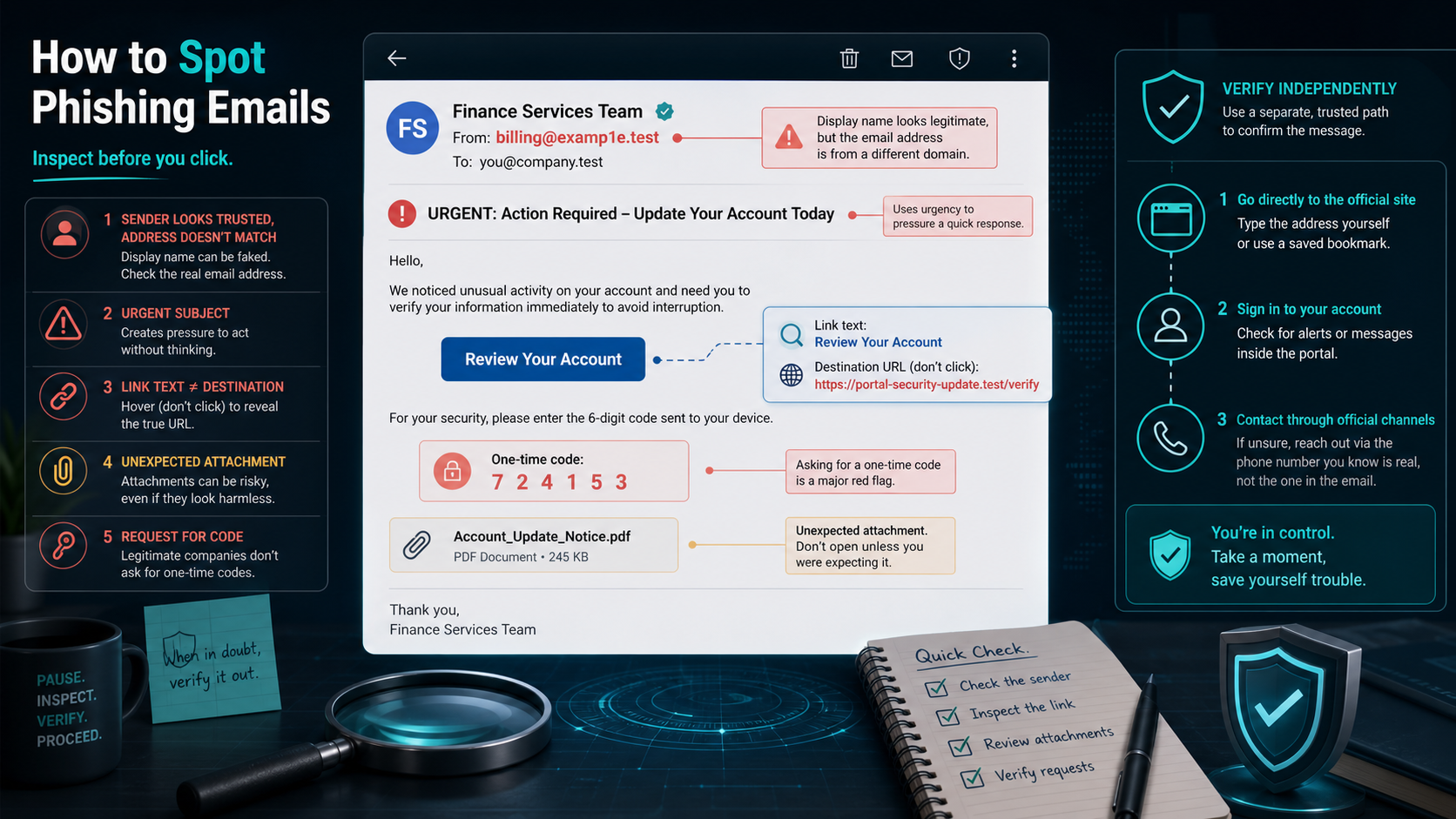
Use three questions, not one tell
No single clue proves that an email is legitimate or malicious. A typo can appear in a real message, while a phishing email can have perfect grammar. Build a decision from three questions:
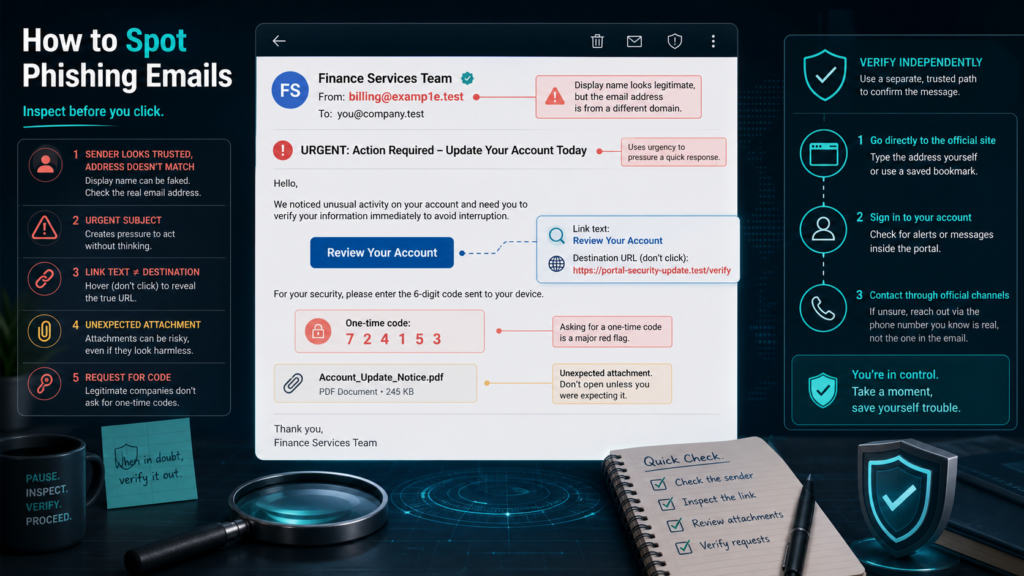
- What does the message want? Treat requests for credentials, one-time codes, remote access, gift cards, wire transfers, payroll changes, invoices, identity documents, or urgent account recovery as high-risk.
- Who actually sent it? Look past the display name. Compare the full sender and reply-to addresses with a domain you already know. Watch for added words, substituted letters, unexpected free-email accounts, and a reply address that differs from the sender.
- Where would it send you? Inspect the link destination without opening it. The meaningful part is the registered domain, not a familiar word placed earlier in a long URL. Treat an unexpected attachment or QR code as another destination, not as harmless decoration.
The FBI’s phishing guidance specifically warns that spoofed addresses and URLs can differ by a single character. That is why “the name looks right” is not enough.
Judge the request before the appearance
Phishing works by borrowing authority and compressing decision time. The message may claim that your password expires today, a package is waiting, an executive needs a private purchase, a bank detected fraud, or a shared document requires a fresh login. The story changes; the pressure pattern is stable.
Slow down when a message combines an unexpected event with a consequence and an immediate action: “verify now or lose access,” “pay before the account closes,” or “keep this confidential.” Also question an unusual change in a familiar workflow. A real supplier’s compromised mailbox can send a fraudulent bank-account update inside a genuine conversation thread.
The FTC’s consumer guidance notes that phishing messages commonly tell a story designed to make a recipient click a link or open an attachment. You do not need to prove the story false before refusing the unsafe route.
Inspect identity, links, and attachments
| What you see | Why it matters | Safe check |
|---|---|---|
| A familiar display name with an unfamiliar address | Display names are easy to imitate. | Expand the sender details and compare the full domain with a known record. |
| A reply-to address different from the sender | Replies may be diverted away from the organization being impersonated. | Do not reply; contact the organization independently. |
| A button whose destination does not match the claim | Button text can hide another domain. | Preview the link, but do not visit it to test it. |
| A login page reached from an email | A copied page can capture credentials and MFA codes. | Close it and open your saved app or typed official site. |
| An unexpected PDF, document, archive, or QR code | The file may deliver malware or route to a credential trap. | Confirm the file through a trusted channel before opening it. |
| A request for a one-time code or MFA approval | Those controls may be the final barrier protecting the account. | Deny the request and contact the provider directly. |
Do not forward a suspicious attachment to a coworker merely to ask whether it is safe; that spreads the risky object. Use your organization’s reporting button, security mailbox, or ticket process. If technical staff request the message headers, Gmail’s official full-header instructions show how to use “Show original” without opening an attachment.
Verify without using anything in the message
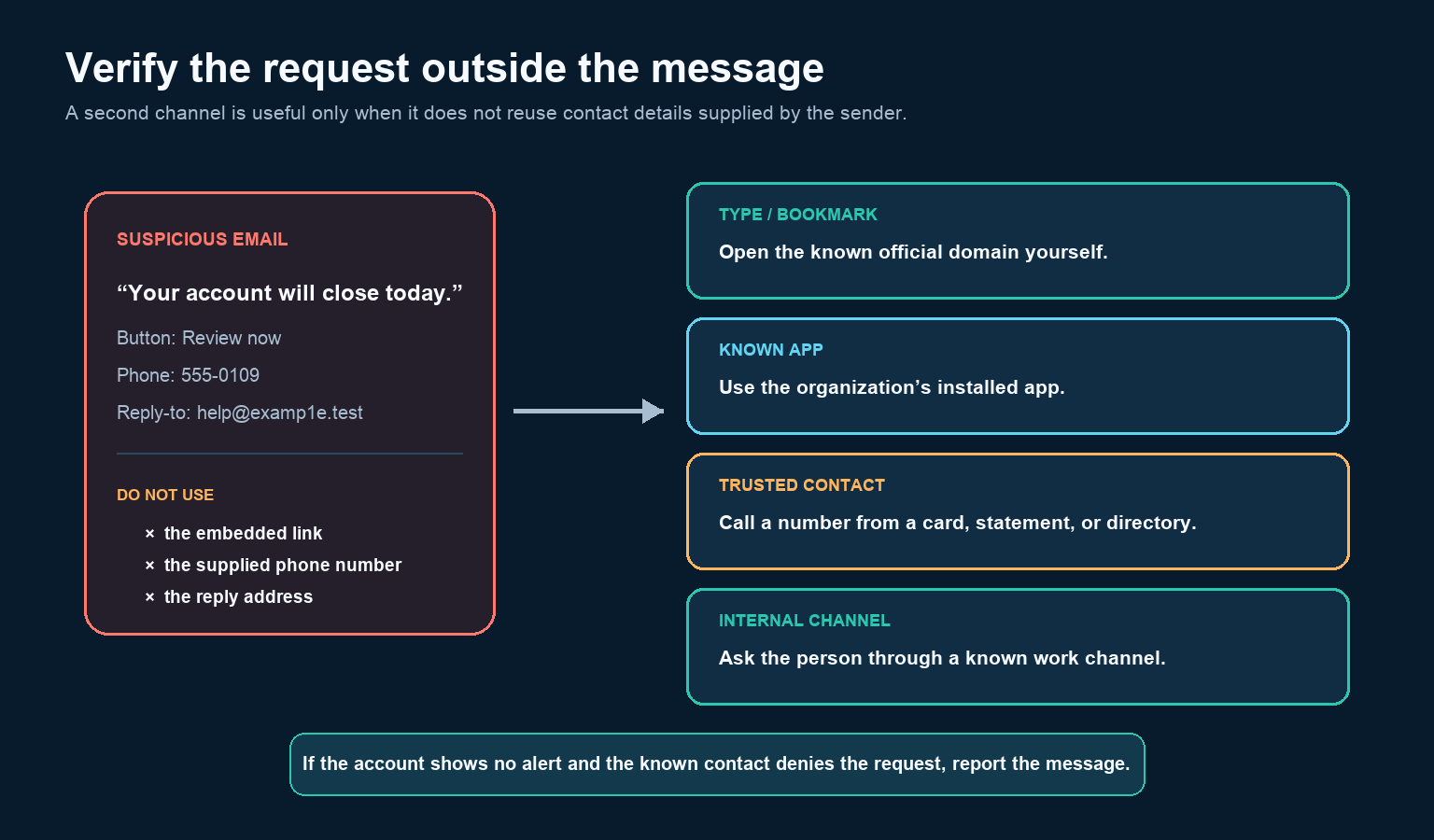
If an email says your account, payment, shipment, or shared file needs attention, leave the email. Open the organization’s app from your device, use a bookmark you created earlier, type the known official domain, or call a number from a card, statement, contract, or trusted directory. Check for the same alert after signing in through that clean route.
Do not call the phone number in the suspicious message, scan its QR code, or search for the company and automatically trust the first advertisement. Those paths can be controlled by the same scammer. For a message that appears to come from a colleague, start a new call or chat using contact details you already have. Ask about the request without replying to the email.
Google’s Gmail safety guidance similarly recommends going directly to the account notification page for a Google security email rather than relying on the embedded path.
Do not let a polished message clear itself
Modern phishing emails may use correct spelling, relevant job titles, familiar signatures, and information taken from public profiles or earlier breaches. None of the following is proof of safety:
- a company logo or professional layout;
- your real name, address, order number, or manager’s name;
- an HTTPS padlock on the destination page;
- a PDF rather than an executable file;
- a message inside a previously legitimate conversation;
- a sender display name already present in your contacts.
HTTPS protects traffic between you and a site; it does not certify the site owner’s honesty. A compromised real account may also pass some technical email-authentication checks. Headers and security banners are supporting evidence for trained investigators, not a substitute for independently verifying a risky request.
Report without destroying useful evidence
Use the email service’s “Report phishing” control or your employer’s designated reporting route. Reporting can help the provider block related messages and gives a security team the original metadata. Avoid replying, clicking an unsubscribe link, or continuing the conversation.
At work, follow the incident process before deleting the message or wiping a device. Preserve what the response team requests, such as the original email, headers, time received, link destination, and a factual account of what you clicked or entered. For US consumer fraud, the FTC directs reports to ReportFraud.ftc.gov; cyber-enabled crime can also be reported through the FBI’s Internet Crime Complaint Center.
If you already interacted, match the response
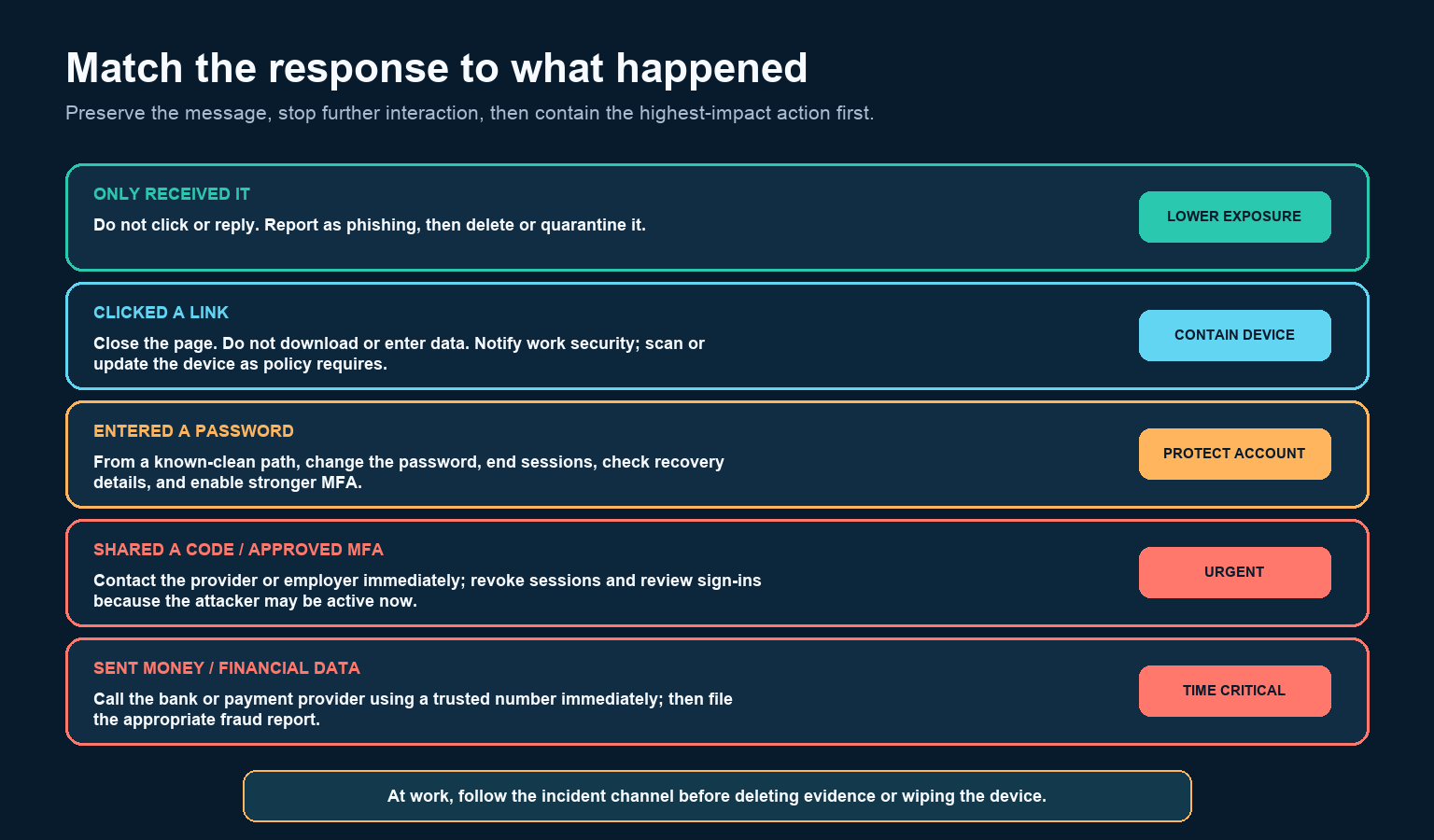
If you only received it: report it and then delete or quarantine it according to policy. If you clicked: close the page, do not download or enter anything, and notify workplace security if the device or account is managed. Update and scan the device according to the provider’s or employer’s instructions.
If you entered a password: from a known-clean route, change that password, end active sessions, review recovery email and phone details, and check recent sign-ins. Replace the same or similar password anywhere else it was used. Enable stronger multi-factor authentication where available.
If you shared a code or approved an MFA prompt: contact the provider or security team immediately. The attacker may already have the password and an active session. The FBI’s IC3 warning on impersonation scams says not to provide login information, passwords, PINs, or one-time codes to unsolicited contacts.
If you sent money or financial details: call the bank or payment provider immediately using a trusted number. Ask about stopping or recalling the transaction, secure affected accounts, and make the appropriate fraud report. Speed matters more than embarrassment.
Make the safe action your default
Use unique passwords, a password manager, strong MFA or passkeys where supported, automatic software updates, and email-service reporting controls. Organizations should also define a second-channel approval process for payment, payroll, account-recovery, and bank-detail changes. A security control that depends on one urgent email is fragile.
The practical rule is simple: a message does not earn trust by looking familiar. When the requested action could expose an account, device, identity, or money, stop and rebuild the route from a source you already trust. Report the email, and if you interacted, respond to what happened—not merely to how convincing the message looked.