A diagnostic productivity system for turning limited time and attention into completed valuable outcomes without treating constant activity as progress.
Productivity is not the number of actions completed, minutes scheduled, or messages answered. A fast day can still produce the wrong result, while a valuable plan can still be impossible because the calendar has no real capacity.
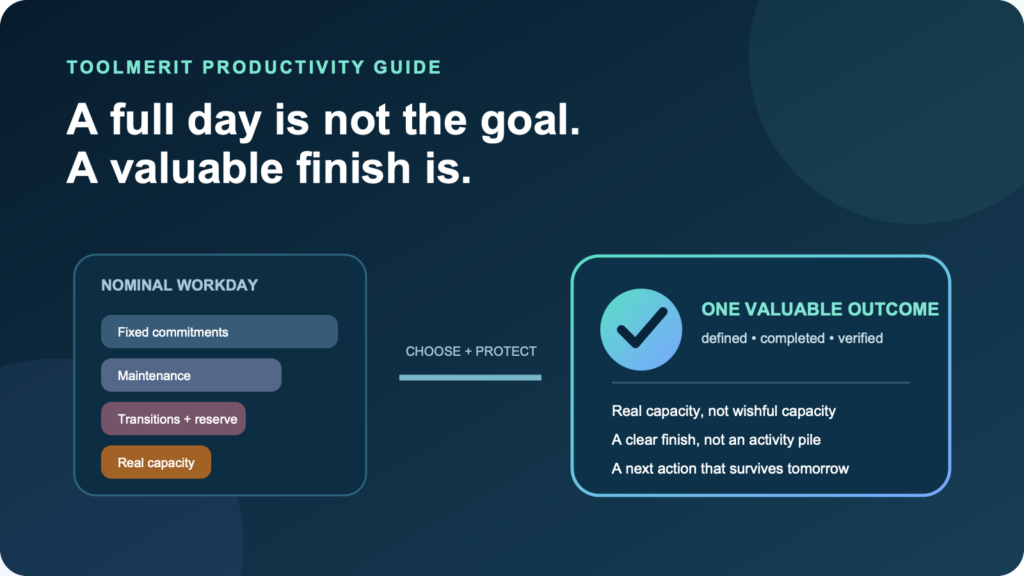
To be productive, choose one valuable outcome, limit active work to available capacity, protect an execution block, capture interruptions, and close the day with a specific next action. The best technique depends on which part of that chain is failing. A timer cannot repair impossible workload, and a new task app cannot define an unclear deliverable.
This system is designed for knowledge workers, creators, and small teams. It treats productivity as reliable completion of valuable work within real constraints—not as squeezing maximum activity from every hour.
Find the bottleneck before choosing a productivity method
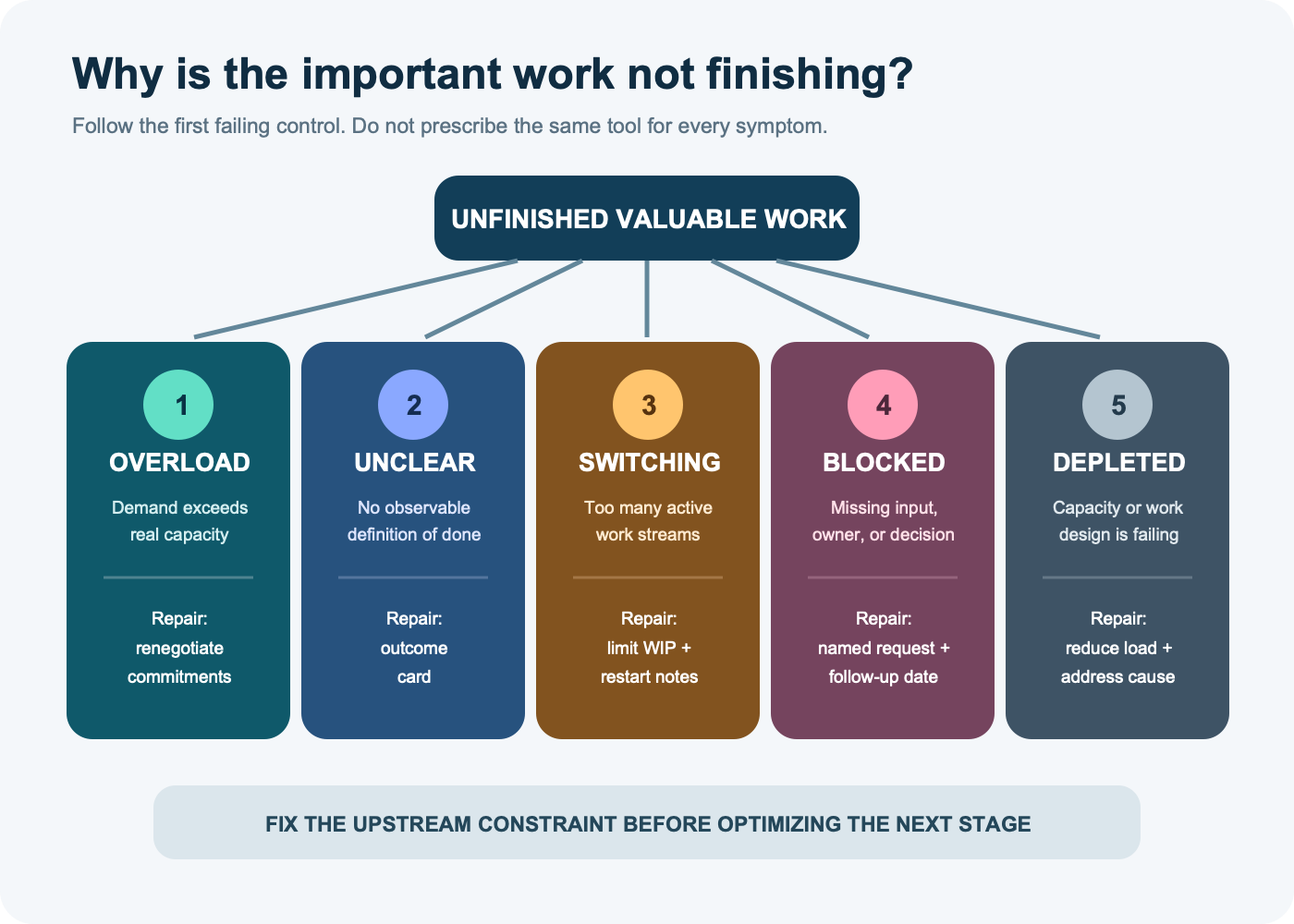
Start with the symptom that is visible at the end of a normal week. The same unfinished task can have very different causes.
| Visible symptom | Likely bottleneck | Quick test | First repair |
|---|---|---|---|
| The calendar is full before important work is added | Demand exceeds capacity | Subtract fixed commitments, maintenance, transitions, and typical unplanned work from the day | Reduce, defer, delegate, or renegotiate commitments before optimizing execution |
| A task stays open because nobody knows what “done” looks like | Unclear outcome | Ask what artifact, state change, recipient, and acceptance check will close it | Write a daily outcome card |
| Many items move, but few cross the finish line | Excessive switching or work in progress | Count how many distinct projects were touched versus finished | Choose one active outcome and park the rest with explicit return points |
| Work repeatedly stops while waiting for a person, approval, or input | Blocked dependency | Name the missing input, owner, request date, and next follow-up | Move the item to a visible blocked state and pull executable work |
| Even a clear, bounded task feels consistently unsustainable | Depleted capacity or a work-design problem | Compare the pattern across tasks, days, workload, sleep, health, and working conditions | Reduce load and address the underlying condition; do not frame it as an app-setting failure |
Use one primary diagnosis for the day. There may be several problems, but the upstream constraint controls the result. If eight hours of demand are being forced into three hours of controllable time, better keyboard shortcuts are not the first intervention.
Build a capacity budget from the day you actually have
A workday is not fully controllable time. Meetings, operational maintenance, collaboration, breaks, transitions, and unexpected work all consume capacity. Build the budget before accepting the daily commitment.
Controllable capacity = work window
  − fixed commitments
  − required maintenance
  − transitions and recovery

Commitment capacity = controllable capacity
  − evidence-based unplanned-work reserve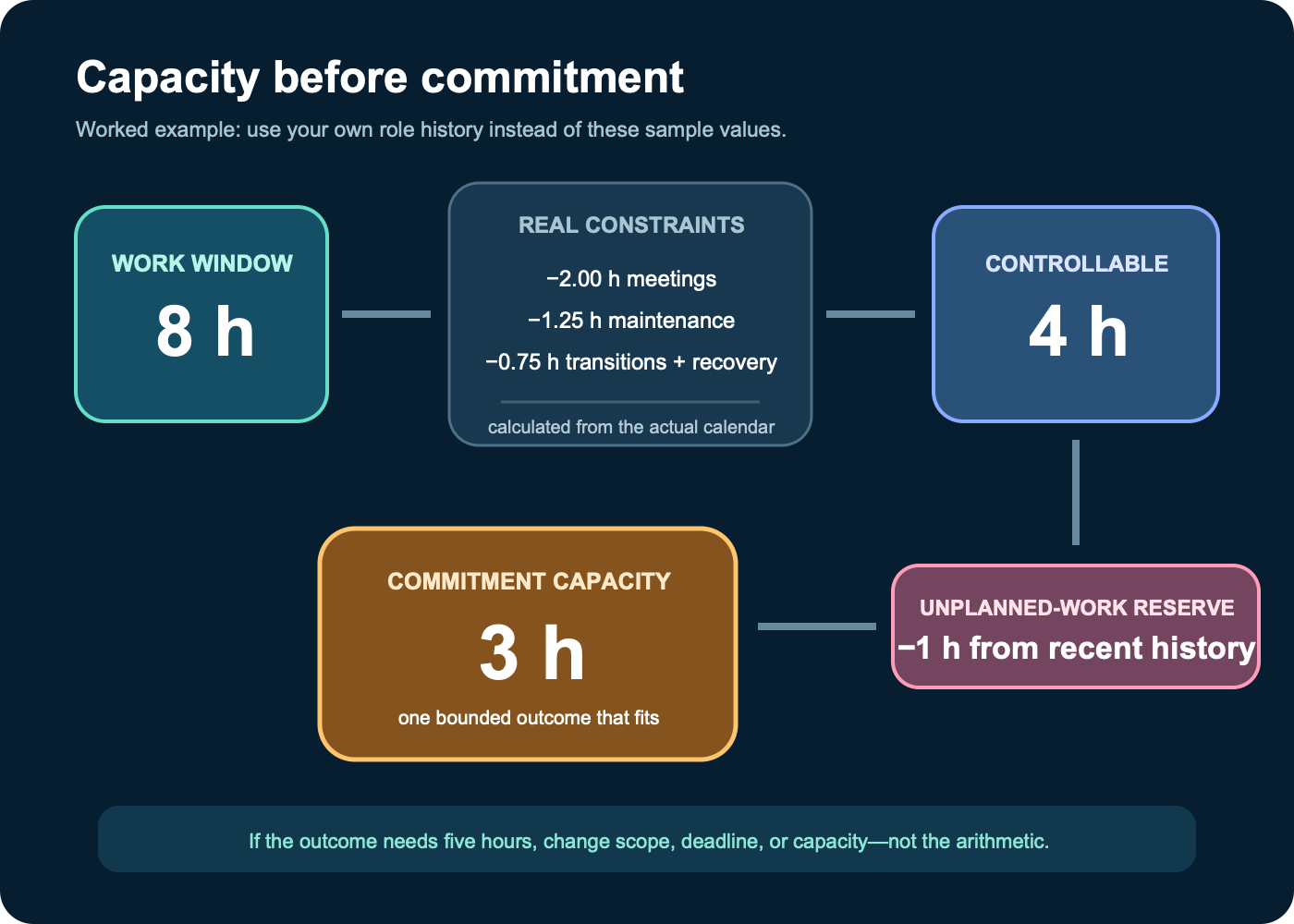
Example: an eight-hour work window contains two hours of meetings, 75 minutes of required communication and administration, and 45 minutes for transitions and recovery. That leaves four hours of controllable capacity. If recent days show roughly one hour of genuine unplanned demand, the evidence-based commitment capacity is three hours.
Those numbers are an example, not a target. Estimate each category from the last five to ten comparable days. The original research on the planning fallacy is a reason to distrust a plan built only from the ideal sequence in your head. Actual calendars, task histories, and completed projects provide a better starting reference.
Do not hide breaks or recovery by calling them wasted capacity. If they are required for sustainable, accurate work, include them explicitly. The budget is useful because it makes the tradeoff visible before the day fails.
When memory is too optimistic, the timesheet field and workflow guide shows what to record so the next capacity budget starts from observed time.
Write one daily outcome card
A task such as “work on campaign,” “deal with report,” or “prepare website” creates activity without a stopping condition. Convert the most valuable commitment that fits the budget into this card:
By [time], [artifact or state change]
is ready for [recipient or next process],
done means [observable acceptance conditions],
verified by [check or evidence].

First visible action: [verb + object].
Not included today: [explicit boundary].
For example:
By 3:00 p.m., the campaign content calendar is ready for the marketing lead. Done means six approved publishing slots have a channel, owner, due date, asset status, and call to action; dates do not conflict with the launch plan. Verify by filtering for blank owners and unresolved dates. First action: open the launch brief and extract the six required messages. Not included today: drafting the final assets.
When several outcomes compete, compare value, real deadline, risk, and what other work each one unlocks. A roadmap should help make that tradeoff rather than acting as a pile of promises; the outcome-led product roadmap framework shows how to keep strategy, evidence, and changeable solution bets separate.
Specific outcomes help only when the person has the ability, information, and feedback needed to act. A major review of goal-setting research and its moderators does not justify assigning an impossible target and calling the pressure motivational. Reduce scope or resolve the dependency when the acceptance conditions cannot fit the capacity budget.
Protect an execution block that matches the work
Set up one block around a concrete part of the outcome, not around the vague intention to “focus.” There is no universally correct block length. Use the smallest interval that can produce a reviewable change, then stop at a natural checkpoint.
Before the block:
- Open the required input, working file, and acceptance check.
- Write the first visible action at the top of the page.
- Close unrelated work and silence nonurgent alerts where your role permits.
- Tell collaborators which channel remains available for genuinely urgent work.
- Define the checkpoint that will make restarting cheap if the block ends early.
Research on task switching found measurable switching-time costs that increased with rule complexity. Separate experiments on attention residue from unfinished work found that attention can remain attached to the prior task and impair the next one. The practical response is not to eliminate every switch—many roles cannot—but to make fewer unplanned transitions and leave a restart note when a transition is necessary.
An implementation intention turns a fragile preference into a pre-decided action: If the 9:15 focus block begins, then I open the campaign brief and draft the six message rows before checking team chat. A meta-analysis of implementation intentions found that specifying when, where, and how can improve goal attainment across many tested contexts, but the plan still needs a feasible goal and a recognizable trigger.
Use an interruption protocol instead of relying on willpower
Interruptions are sometimes essential. The failure is allowing every signal to make its own priority decision. Use a four-part protocol:
- Capture. Put the request in one trusted intake location with the sender, requested outcome, and deadline.
- Triage. Apply a written urgent rule. Examples may include immediate safety or security risk, a live customer outage, or a deadline that will expire before the block ends. Adapt the rule to the role.
- Park or act. If it is not urgent, acknowledge it with a review time. If it is urgent, write the current task’s exact restart point before switching.
- Resume. Return to the saved checkpoint, reopen the acceptance condition, and complete the smallest next unit.
An experimental study of interrupted work found that participants compensated by working faster, while reporting more stress, frustration, time pressure, and effort. That result does not prove every real-world interruption is harmful, but it does challenge the assumption that unchanged completion time means interruption was free.
Teams need a communication design that supports this protocol. Use the team collaboration tools collection to separate urgent alerts, normal requests, decisions, and durable documents instead of expecting one chat stream to serve every job.
Limit active work and expose blocked dependencies
Keep only three operational states:
- Active: someone can perform the next action now and expects to move the item in the current capacity window.
- Queued: deliberately not active; ordered against other commitments.
- Blocked: unable to move until a named input arrives, with an owner and follow-up date.
Do not count a blocked item as active to make the board look busy. A blocked card without an owner, request, and review date is only an anxiety reminder. Move it out of the execution lane, send the specific request, and pull another item that can finish.
The right work-in-progress limit depends on role and coordination cost; it is not always one task. The limit should be low enough that accepted work finishes and high enough to use capacity when one stream is genuinely blocked. A suitable system from the project management tools collection should make active, queued, and blocked states visible without requiring constant board maintenance.
Worked example: a productive day with four hours of controllable capacity
A small-team marketing manager has an eight-hour work window. The capacity budget identifies:
- two hours of fixed meetings;
- 75 minutes of operational communication and approvals;
- 45 minutes of transitions and recovery;
- four hours of controllable capacity.
Recent days contain about one hour of unexpected but legitimate requests, so only three hours are committed to the primary outcome. The outcome card is the six-slot campaign calendar described earlier.
| Work segment | Job | Exit evidence |
|---|---|---|
| Start of day | Confirm capacity and write the outcome card | Three-hour commitment boundary and first action are visible |
| Execution block 1 | Extract messages and create six calendar rows | All rows have message, channel, and provisional date |
| Campaign meeting | Resolve owner and launch constraints | Named decisions, owners, and unresolved dependencies |
| Execution block 2 | Apply decisions, check conflicts, and finish the acceptance test | No blank owners or unresolved dates; lead receives review link |
| Reserve and maintenance | Handle qualified unexpected work and required communication | Requests are finished, scheduled, delegated, or explicitly declined |
The content calendar builder can provide the working artifact, while the small-team marketing meeting agenda keeps the fixed meeting focused on decisions and accountable owners. Neither tool expands capacity; both reduce ambiguity inside the capacity already budgeted.
If the unexpected-work reserve is unused, the manager may pull a queued task or stop at the planned boundary. Filling every saved minute with new work would teach the system to depend on perfect days.
Close the day so tomorrow starts cheaply
A day does not need an empty inbox. It needs a trustworthy handoff to the next work period.
- Record what crossed the acceptance condition and where the evidence lives.
- For unfinished work, write the next visible action, not a summary such as “continue report.”
- Assign every open dependency an owner and follow-up date.
- Move meeting decisions out of chat or memory into the operating record.
- Compare actual capacity with the morning budget and note the largest variance.
Studies of unfulfilled goals and plan making found that making specific plans reduced later cognitive interference in the tested tasks. A restart note is useful because it is a credible plan, not because writing itself magically completes the work. When meetings create the open loops, the meeting-minutes workflow converts discussion into decisions, owners, due dates, and unresolved questions that can survive the handoff.
Run a weekly demand capacity audit
Use the week to improve the operating system, not to grade your character. Review six pieces of evidence:
- Demand accepted: outcomes and maintenance work added during the week.
- Capacity available: controllable time after fixed commitments and real interruptions.
- Throughput: valuable outcomes that met their acceptance conditions.
- Carryover: commitments moved forward and the diagnosed reason.
- Blockers: waiting time, missing owners, and slow decisions.
- Rework: outputs reopened because the definition of done or quality check failed.
Then change one control for the next week. Reduce accepted demand, shorten a meeting, protect a decision window, clarify an outcome, alter the urgent-work rule, or improve the dependency request. Do not add a new tool unless the current system cannot perform the required job.
If demand repeatedly exceeds demonstrated capacity, the productive action is renegotiation. Present the tradeoff: With the current meetings and support load, two of these three outcomes fit. Which should move, shrink, or receive more capacity? That is more honest and useful than carrying all three as silent overdue work.
If the same dependency or decision is rediscovered every week, move the durable answer into a system designed with the knowledge-base operating model.
For a marketing team, the marketing tool-stack audit is a specific branch for finding duplicated software, unclear ownership, and maintenance work that consumes capacity.
Know the boundary of a productivity system
A workflow cannot repair chronic understaffing, unsafe expectations, harassment, illness, caregiving pressure, or persistent exhaustion by itself. The World Health Organization describes burn-out as an occupational phenomenon associated with chronic workplace stress that has not been successfully managed, with dimensions including exhaustion, increased mental distance or cynicism, and reduced professional efficacy. It is not a diagnosis to assign from an article or a bad afternoon.
When depleted capacity persists, use appropriate support: workload redesign, a manager or client conversation, leave, accommodations, or qualified health guidance as relevant. Do not interpret a health or work-system constraint as a personal failure to optimize.
For the next workday, take one bounded action: calculate controllable capacity from the actual calendar, write one outcome card that fits, and reserve the first execution block. At close, record whether the bottleneck was the one you predicted. That evidence determines the next repair.