A practical knowledge-base model built around reusable answer contracts, retrieval tests, clear ownership, and demand-driven maintenance.
A knowledge base is a maintained collection of reusable answers, procedures, and reference facts that people or software can retrieve for a specific task.
The word maintained is the dividing line. A folder of documents stores information; a working knowledge base gives each answer a defined audience, searchable language, a scope, an owner, and a way to improve or retire it. The content may be human-readable articles, structured facts used by software, or both. This guide focuses on the practical internal and customer-facing knowledge bases used for support, operations, and product education.

A knowledge base needs three systems at once
Software is only the container. The knowledge base itself has three interdependent systems:
| System | Its job | Observable proof |
|---|---|---|
| Answer system | Turn experience, policy, and product facts into scoped, actionable knowledge units. | A reader can complete the named task or make the named decision. |
| Retrieval system | Match a user’s words and context to the right knowledge unit. | The correct answer appears before a plausible but wrong one. |
| Maintenance system | Assign ownership, respond to feedback and change, preserve history, and retire unsafe content. | A change has an owner and outdated advice no longer competes in search. |
If any one is missing, the result fails differently. Good articles with weak search become invisible. Strong search over unscoped material returns confident ambiguity. Useful content without maintenance becomes a catalog of old instructions.
Store answers, not every artifact the organization produces
A knowledge base should preserve what another person needs to reuse, not mirror every email, ticket, chat, specification, or meeting. Raw artifacts can be evidence and source material, but they usually contain local context, superseded decisions, private data, or unfinished discussion.
For example, clear meeting minutes can record a decision and its owner. The knowledge-base article should translate the approved decision into the current rule or procedure, state who it applies to, and link back to the source when the audience has permission. The minutes remain the record; the article becomes the reusable answer.
| Source material | Reusable knowledge unit | What to remove or resolve |
|---|---|---|
| Support ticket | Symptom, environment, cause, verified fix, escalation boundary | Names, account data, guesses, and one-customer history |
| Policy approval | Current rule, scope, exceptions, effective date, responsible owner | Debate, rejected wording, and obsolete drafts |
| Repeated internal question | Direct answer, procedure, verification, and related decision path | Assumed context that a new employee would not know |
| Product specification | Task guidance or exact reference facts for the intended audience | Implementation detail that does not change the reader’s action |
Do not remove useful limitations to make an answer shorter. A short article that omits a permission requirement, irreversible consequence, regional rule, or unsupported version is harder to use safely than a longer scoped answer.
Use one answer contract for every knowledge unit
An answer contract is a compact template that tells readers, search systems, and maintainers what an article promises. The same fields work in a wiki, help center, documentation platform, or custom knowledge system.
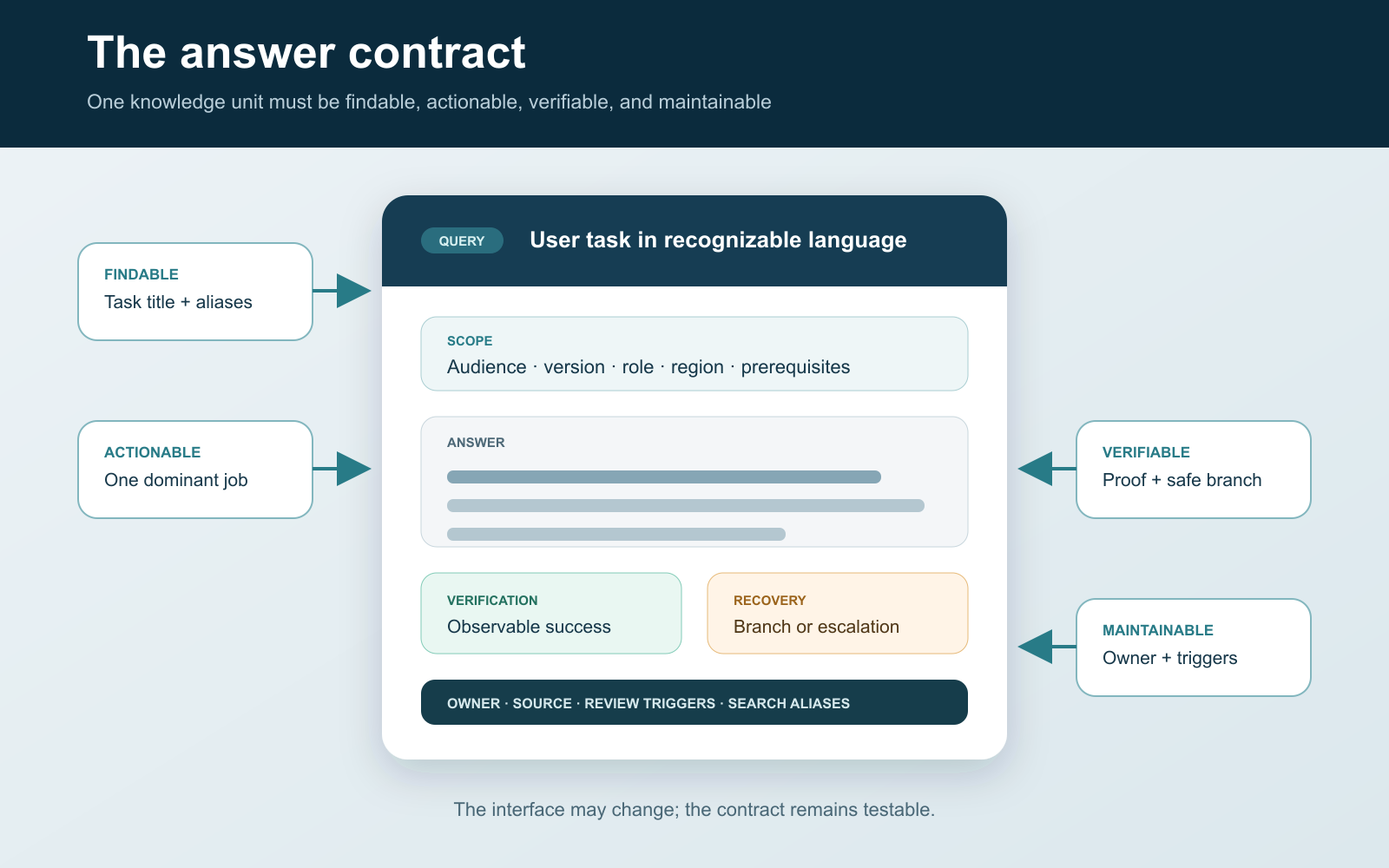
- Task title: the user’s action or question in recognizable words.
- Applies to: audience, product, version, plan, region, role, and prerequisites that control the answer.
- Answer or procedure: the minimum complete information needed to act.
- Verification: the visible result that proves the task worked.
- Recovery: common branch conditions, safe rollback, or escalation route.
- Source and owner: the authoritative input, responsible maintainer, and review triggers.
- Search language: genuine aliases, symptoms, and requestor phrases that mean the same task.
The Consortium for Service Innovation’s KCS Solve Loop similarly emphasizes capturing requestor context, using a simple template, reusing what exists, and improving knowledge while it is being used. A template should make the answer easier to act on, not force every article into identical prose.
Filled example: export quarterly invoices
Consider a hypothetical subscription product called Acorn Ledger. A weak article titled “Reports” might describe several menus and leave a reader to infer which export contains invoice totals. Here is the same knowledge as one task-shaped unit:
| Task title | Export quarterly invoices as a detailed CSV |
|---|---|
| Applies to | Web application; account owners and billing administrators; posted invoices only |
| Outcome | A CSV containing one row per invoice with invoice ID, date, status, net amount, tax, and total |
| Procedure | Open Billing Reports, select Invoices, set the quarter using invoice date, choose Detailed CSV, then export. |
| Verification | Open the file, confirm the expected quarter in the earliest and latest dates, and compare the row count with the filtered report. |
| Recovery | If the file is empty, clear status filters; if tax is absent, confirm Detailed CSV; if export is unavailable, request the billing-administrator role. |
| Owner and triggers | Billing Operations; review after report navigation, permission, field, or invoice-date behavior changes. |
| Search language | download invoices, quarterly billing CSV, invoice spreadsheet, export tax totals |
The product and interface are fictional, but the acceptance logic is concrete. A reader knows whether the article applies, which export to choose, what a correct file contains, and where the process branches. A maintainer knows which changes invalidate it.
Choose the page form from the reader’s moment
A single knowledge base can contain different forms of knowledge. The Diátaxis documentation framework separates tutorials, how-to guides, reference, and explanation because they answer distinct user needs:
| Reader moment | Best form | Example knowledge-base page |
|---|---|---|
| Learning with guidance | Tutorial | Set up a first project using a safe sample |
| Completing a known task | How-to guide | Restore a deleted project within the retention window |
| Looking up exact facts | Reference | Import file fields, limits, and validation rules |
| Understanding a mechanism or tradeoff | Explanation | How role inheritance changes workspace access |
Troubleshooting and policy pages add other useful forms. The important rule is to give one page one dominant job. Mixing a beginner tutorial, complete API field reference, conceptual history, and emergency recovery path makes each harder to scan and maintain.
A knowledge base is not the same as its interface
| Adjacent term | Primary role | Relationship to a knowledge base |
|---|---|---|
| Document repository | Stores and controls files | May hold source evidence; retrieval is often file-centered rather than task-centered. |
| Wiki | Supports collaborative page editing and linking | Can host a knowledge base when content has scope, retrieval, and governance. |
| Help center | Presents support content to customers | Often the external delivery layer for selected knowledge-base articles. |
| FAQ | Answers a small set of common questions | One content format, not a complete knowledge system. |
| Documentation site | Teaches and specifies a product or API | Can be the product-facing portion of a broader knowledge base. |
| AI assistant | Retrieves, summarizes, or generates a response | A delivery layer that still needs governed source knowledge and permission-aware retrieval. |
An AI answer does not repair stale source material. Require it to identify the supporting knowledge unit, respect audience permissions, preserve decisive limitations, and admit when retrieval found no authoritative answer. Otherwise the interface can make weak knowledge sound stronger than it is.
Build the lifecycle around demand, not a document inventory
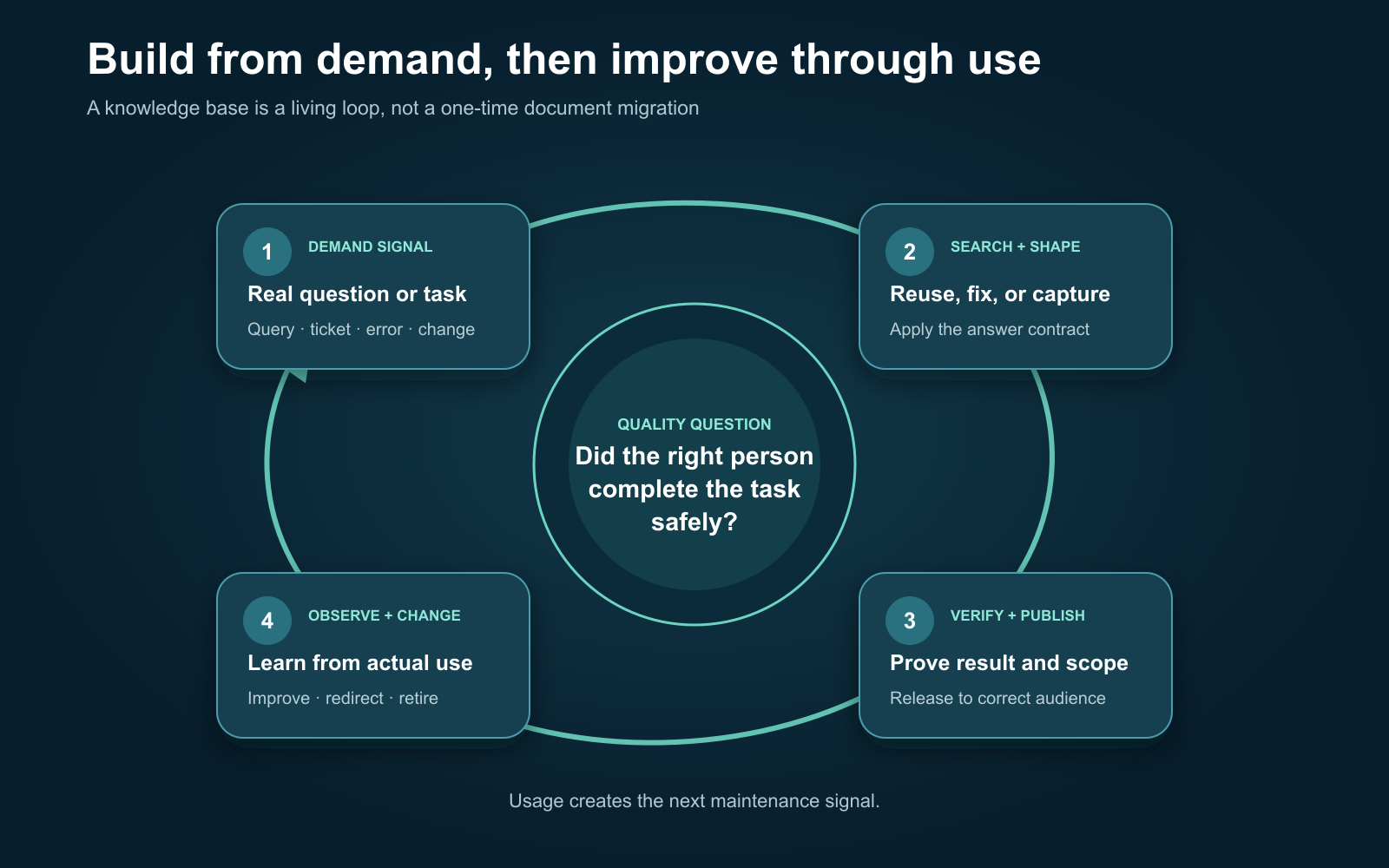
Start with repeated tasks, search logs, support contacts, onboarding friction, and operational errors. The GOV.UK guidance on user needs recommends grounding content in the person, the action they need to take, and the reason for that action, supported by evidence such as analytics and contact-center data.
For each demand signal, search before creating. Reuse a correct article, fix a close one, or create a new unit only when no current answer meets the need. Verify the procedure, publish to the narrowest correct audience, and observe what happens next. A failed search, product change, repeated escalation, misleading duplicate, or reader correction should enter the maintenance queue.
Useful lifecycle states are simple: draft, verified, review needed, and retired. “Published” is visibility, not proof of accuracy. High-risk procedures may need approval before public release; low-risk internal guidance can allow trained contributors to fix it during use.
Run a retrieval acceptance test before calling it finished
Test the answer with the language that caused the need. For the invoice example, use at least three query shapes:
- Task: “export quarterly invoices”
- Desired artifact: “invoice CSV with tax”
- Problem state: “invoice export missing tax column”
The article passes when the correct result is easy to distinguish from near matches, its scope is visible before the procedure, the reader can verify completion, and the recovery branch handles the likely failure. If a wrong or obsolete page competes for the same phrases, adjust titles, aliases, redirects, or retirement state instead of adding more keywords to both.
Measure the system through unresolved demand: searches with no useful result, repeated query reformulations, tasks that still become support contacts, negative feedback with a reason, corrections after a page view, and high-use articles with an overdue risk review. Article count and page views alone reward accumulation, not solved tasks.
The W3C’s web accessibility writing guidance also supports retrieval after the click: unique informative titles, meaningful heading structure, descriptive links, clear instructions, and useful alternative text make an answer easier to scan and navigate with assistive technology.
Choose software only after defining the operating contract
A small team can begin with a well-structured wiki or documentation tool. Move to dedicated knowledge-base software when the operating requirements demand stronger search analytics, article states, audience controls, review workflows, ticket integration, localization, or self-service publishing.
Before buying, run one real article through the full contract and verify:
- search supports aliases, filters, and useful zero-result reporting;
- permissions apply to search results, previews, APIs, and AI answers—not only page URLs;
- version history, ownership, review triggers, redirects, and retirement are visible;
- authors can create accessible headings, links, tables, images, and instructions;
- feedback reaches a responsible owner with the query and article context;
- content and metadata can be exported in a documented, reusable format.
Use the Acorn Ledger example as the proof. If the platform can store its scope, retrieve it from all three query shapes, show only the permitted version, capture a correction, and retire the old answer without breaking its link, it supports the knowledge-base workflow. If it merely offers an attractive editor and folders, the team still has to build the missing answer, retrieval, and maintenance systems itself.