A vendor-neutral explanation of ERP using one order-to-cash workflow, a system-boundary map, software comparisons, readiness signals and implementation safeguards.

An ERP system can have an impressive dashboard and still fail to connect a business. The harder work happens underneath: deciding what a customer, item, supplier, account, location and approved transaction mean—then making every department use those definitions consistently.
ERP stands for enterprise resource planning. It is a category of software that connects core business processes—such as finance, purchasing, inventory, orders, manufacturing, projects, and sometimes HR—through shared data and coordinated workflows. Its main value is not merely storing records; it reduces duplicate entry, keeps transactions consistent across departments, and creates a governed system of record.
The word enterprise does not mean only huge corporations can use ERP. It describes the scope of the planning: resources and transactions are coordinated across the organization rather than optimized inside one department. A small distributor with several sales channels and warehouses can have a stronger ERP need than a much larger but operationally simple services firm.
How ERP works: follow one customer order
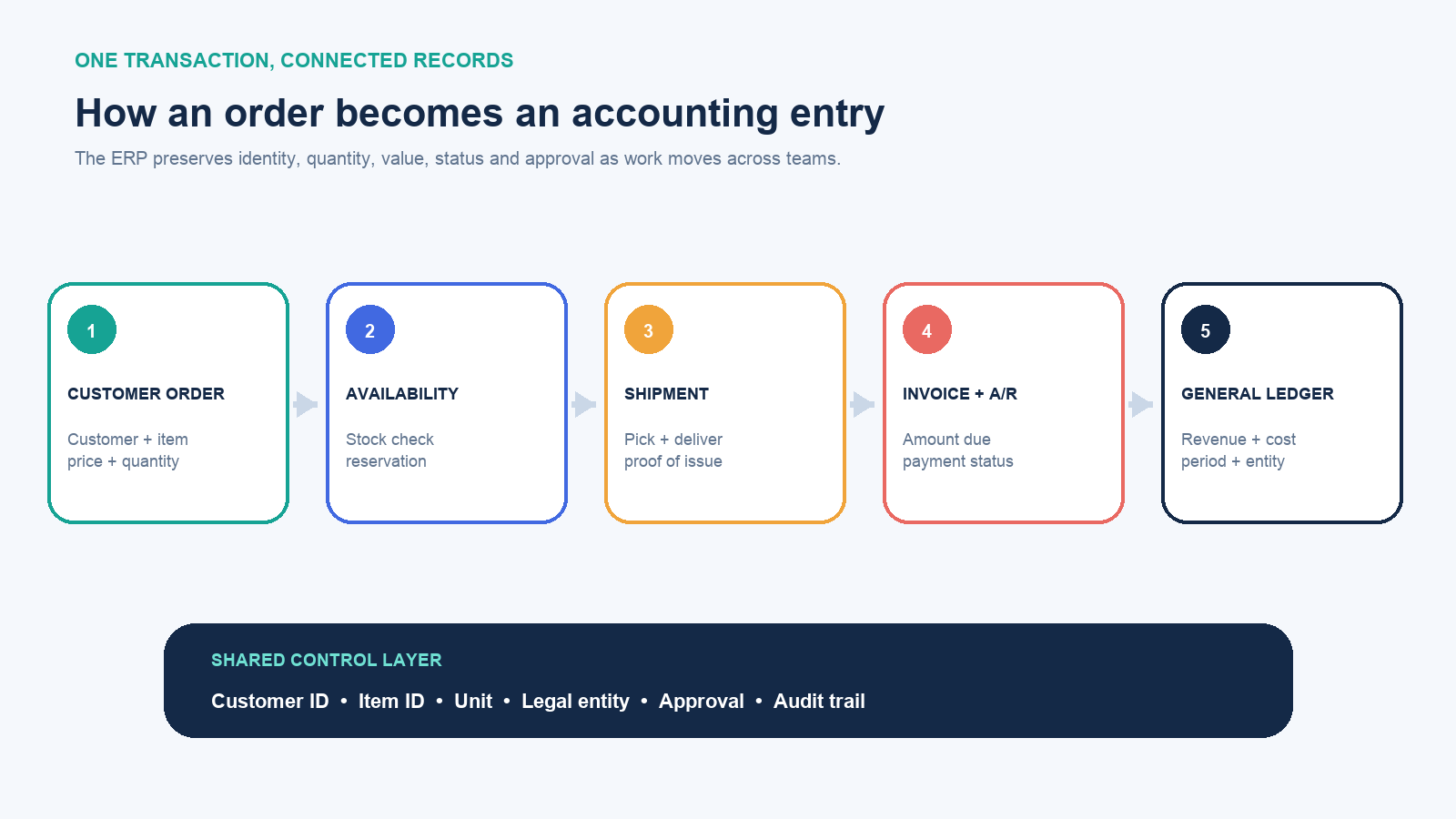
Suppose a customer orders 20 units. In disconnected applications, sales may record the order, a warehouse may retype the SKU and quantity, finance may create an invoice from an email, and accounting may summarize the result later. Each handoff can introduce a different customer name, quantity, tax treatment or date.
In an ERP workflow, the sales order becomes a controlled source transaction. The system can check customer status, price rules and available inventory. A warehouse document reserves or picks the same item and quantity. Shipment can trigger invoicing; the invoice creates an accounts-receivable balance; and the approved accounting entries reach the general ledger. The records are not necessarily one row in one technical database. They are linked by shared identifiers, business rules and status changes.
That distinction explains the real benefit. ERP does not merely move numbers between screens. It preserves relationships:
- which customer and legal entity own the transaction;
- which item, unit of measure, warehouse and lot were involved;
- who approved a discount, purchase or payment;
- what was ordered, shipped, invoiced, paid and posted;
- which exceptions remain open and who must resolve them.
When those records are reliable, operations can answer questions before month-end: Which orders are waiting for stock? Which invoices remain unpaid? What inventory is available rather than merely present? Which costs belong to a product, project or location? ERP makes those questions answerable from governed transactions instead of a late spreadsheet reconciliation.
What modules are commonly included in ERP?
An ERP is usually modular. An organization selects capabilities that match its processes, and the exact boundary varies by vendor and industry. Common modules include:
- Finance and accounting: general ledger, accounts payable and receivable, cash, fixed assets, budgets, consolidations and financial reporting.
- Procurement: supplier records, purchase requests, approvals, purchase orders, receipts, matching and supplier performance.
- Inventory and order management: items, locations, availability, reservations, fulfillment, returns and replenishment.
- Manufacturing: bills of materials, routings, work orders, material planning, capacity, quality and production costs.
- Project and service operations: staffing, time, expenses, milestones, project billing, utilization and profitability.
- Human resources: worker records, organizational structures, benefits, time and payroll in some suites. Many organizations integrate a separate human capital management system instead.
- Reporting, controls and workflow: role-based approvals, audit trails, dashboards, scheduled reports and period-close controls.
A feature list alone is a weak way to judge an ERP. The important question is whether modules support the organization’s end-to-end scenarios. A purchasing module and an accounting module may both exist, but the design is incomplete if receiving, invoice matching, tax, approval and payment do not form a controlled procure-to-pay process.
ERP is a hub, not necessarily every application
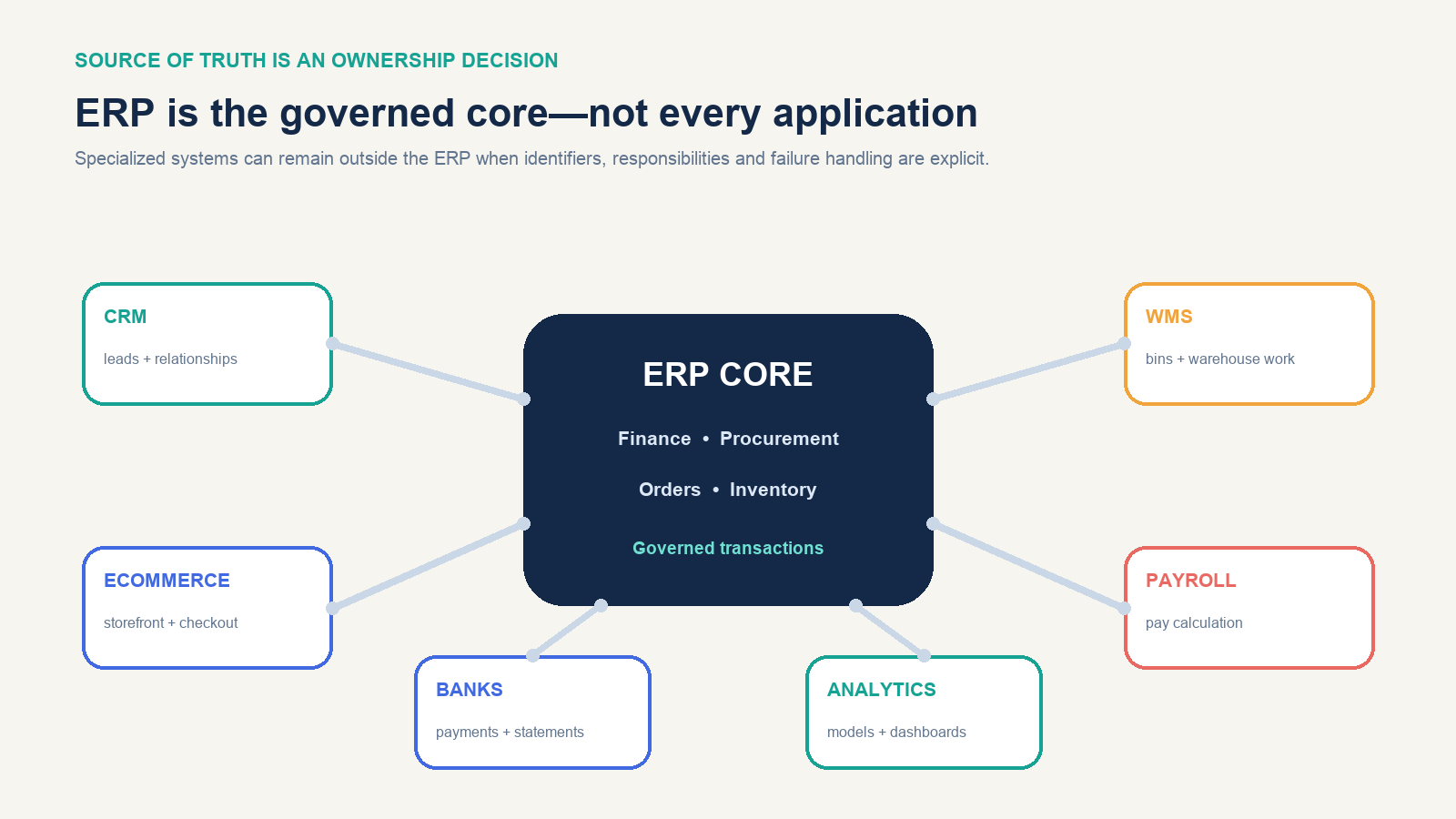
“Single source of truth” is useful shorthand, but it can be misunderstood as “put every piece of data in one application.” Modern organizations often keep specialized systems for customer engagement, ecommerce, warehouse execution, product design, payroll, banking and analytics. The ERP may own the financial transaction, item cost, payable, inventory valuation or legal-entity structure while another application owns the prospect conversation, parcel scan or storefront session.
The design problem is therefore ownership, not just connectivity. For each important object, define:
- the authoritative system that creates and changes it;
- the systems allowed to consume it;
- the identifier used across integrations;
- the timing and direction of synchronization;
- the response when a message fails, duplicates or arrives out of order.
APIs, prebuilt connectors and integration platforms can transport data, but they do not decide which system is correct. If a CRM calls one account “ACME Ltd” and finance calls it “Acme Holdings,” faster synchronization can spread the ambiguity faster. Master-data ownership and exception handling are part of ERP design.
ERP versus accounting, CRM, MRP, WMS, and SCM
| Software category | Primary question | Typical scope | Relationship to ERP |
|---|---|---|---|
| Accounting software | What happened financially? | Ledger, invoices, bills, payments and reports | Finance is usually an ERP foundation, but standalone accounting can be sufficient for a simpler business. |
| CRM | Who is the customer and what is the relationship? | Leads, opportunities, interactions, sales and service | Often integrated with ERP when a won deal becomes an order, delivery or invoice. |
| MRP | What materials are needed, and when? | Demand, bills of materials, inventory and production planning | MRP is a manufacturing-planning capability and historical predecessor; it may be a module within ERP. |
| WMS | How should work move through the warehouse? | Bins, waves, picking, packing, labor and scans | ERP may provide basic warehousing or integrate a specialized WMS while retaining inventory value and order records. |
| SCM | How should supply, production and logistics be planned and executed? | Planning, sourcing, manufacturing, logistics and collaboration | Some ERP suites include broad SCM capabilities; in other architectures, specialized planning and logistics products connect to ERP. |
These labels overlap because software markets are not governed by a universal feature boundary. Compare products by real process coverage and data ownership, not by whether the vendor places “ERP” on the product page.
What ERP changes—and what it does not
A well-designed ERP can reduce duplicate entry, automate repeatable approvals, expose transaction status, enforce posting rules, shorten reconciliations and create traceable records. It can make a common process easier to operate across locations or legal entities. It can also give management a more timely operational and financial view.
ERP does not automatically create clean data, sensible policies or cooperation between departments. It cannot decide whether sales or finance owns a customer attribute, whether an urgent purchase may bypass approval, or how to measure an on-time order. Those are management decisions encoded in configuration and operating procedures.
Nor does “real time” mean every metric is instantly correct. A dashboard can refresh immediately while a warehouse receipt, expense report or bank file is still missing. Timeliness depends on the complete process, including human actions and external integrations.
When a business may need ERP
ERP discovery is reasonable when several of these symptoms occur together:
- the same order, item, supplier or customer is re-entered in multiple systems;
- inventory, revenue or margin changes depending on whose spreadsheet is open;
- month-end requires repeated manual reconciliations between operations and finance;
- multiple entities, currencies, locations or channels have outgrown the current controls;
- employees cannot see an order’s status without messaging several departments;
- approvals happen in email and leave no dependable audit trail;
- growth requires adding administrative work faster than transaction volume;
- legacy applications are unsupported or cannot meet security, reporting or integration needs.
One symptom is not proof. A small firm with sound accounting, simple inventory and one sales channel may gain more from improving its existing tools or adding a focused integration. ERP is justified when cross-functional complexity and control requirements create material cost, delay or risk—not because the organization reached an arbitrary employee count.
Cloud, on-premises, hybrid, and two-tier ERP
Cloud ERP is operated as an online service, typically with the provider managing infrastructure and application updates. On-premises ERP is deployed under the organization’s control, which also leaves it responsible for infrastructure, maintenance and upgrades. Hybrid ERP combines cloud and on-premises components. Two-tier ERP uses different ERP layers—for example, a corporate system and a lighter subsidiary system—with defined consolidation and data flows.
Deployment is not a simple modern-versus-old decision. Evaluate regulatory obligations, data residency, operating continuity, customization, integration latency, update control, internal skills and total lifecycle responsibility. A subscription removes some infrastructure tasks; it does not remove process design, identity management, access reviews, data stewardship, testing or vendor-dependency risk.
A practical ERP implementation sequence
- Define outcomes and baseline them. Name the measurable problem—such as closing days, inventory adjustments, order cycle time or manual invoice touches—and record the current state.
- Map end-to-end processes. Follow actual scenarios and exceptions across departments. Assign one accountable process owner for each cross-functional flow.
- Set scope and design principles. Decide which entities, locations, modules, integrations and historical records are included. Establish when standard configuration wins and who may approve an exception.
- Govern master data and controls. Define data owners, naming rules, units, charts of accounts, approval thresholds, segregation of duties, retention and audit requirements.
- Configure and integrate. Prove the most important scenarios early. Avoid recreating every legacy workaround before confirming why it exists.
- Clean and migrate data. Reconcile counts and financial balances, preserve required history, and test repeatable migration runs rather than relying on one final import.
- Test the business, not only the screens. Include normal transactions, reversals, partial shipments, returns, failed integrations, period close, permissions and peak volumes.
- Train by role and rehearse cutover. Users need their responsibilities, exception routes and support contacts, not merely a tour of menus.
- Stabilize and measure. Monitor issues, adoption, controls and the original business metrics after launch. Treat go-live as the start of operational ownership.
The sequence may be phased, iterative or run by business unit. What should not disappear is accountability. ERP implementation is a business-change program supported by software, not an IT installation that departments can receive at the end.
What to evaluate before choosing an ERP
Replace a generic demo script with five to ten representative scenarios. Include an ordinary transaction, a high-value approval, a return or correction, a cross-entity case and a failed integration. Then ask:
- Process fit: Can users complete the full scenario without hidden spreadsheets or uncontrolled re-entry?
- Data model: Who owns customers, suppliers, items, accounts and dimensions, and how are duplicates prevented?
- Controls: Can roles, approvals, changes and reversals be traced without granting excessive access?
- Integration: Which APIs and connectors are standard, what are the limits, and how are failures monitored and replayed?
- Reporting: Can teams trace a summary back to transactions, and can finance reconcile opening balances and subledgers?
- Deployment: Who operates updates, environments, backups, recovery, identity and security response?
- Usability: Can each role complete frequent work with acceptable training and accessibility?
- Lifecycle: What do implementation, support, storage, integrations, testing, upgrades and exit or data export require?
Score the same scenarios across candidates and record assumptions. A polished demonstration that avoids exceptions is not evidence that the system fits the business.
What ERP means in one sentence
ERP is the governed transaction backbone that connects how an organization buys, makes, sells, delivers, pays and reports. The software matters, but the enduring value comes from shared definitions, controlled workflows and named owners. If those foundations are weak, ERP can centralize confusion; if they are explicit, it can turn separate departmental records into a coherent operating system for the business.