A practical expense workflow that turns receipts and account activity into classified, reconciled records without double-counting transfers or repayments.
A folder full of receipts is not an expense tracker. It proves that transactions happened, but it does not tell you which account paid, why the purchase occurred, whether it was personal or business, or whether the same cost was counted twice.
To track expenses, capture each outflow when it happens, record the amount and purpose, classify it with a stable category, attach supporting evidence, reconcile every account weekly, and close the period only when the unexplained difference is zero. A spreadsheet can do this; an app can automate parts of it. The durable part is the workflow.

Build one expense ledger before choosing a tool
Start with one source of truth. It can be a spreadsheet, budgeting app, or accounting system, but every transaction should end in the same ledger and use the same definitions. Bank feeds are capture channels, not separate books.
Create one row for each economic event. When one receipt contains two purposes, use two linked rows rather than forcing the whole purchase into one category. When the same purchase appears in a receipt inbox and a bank import, match them to one event instead of keeping both.
| Field | What to enter | Why it matters |
|---|---|---|
| Date | Transaction date; optionally add posting date | Places the event in the correct review period. |
| Merchant or payee | Normalized name, not an unexplained bank abbreviation | Makes vendor totals and duplicate checks usable. |
| Description and purpose | What was bought and why | Preserves context that a statement cannot supply. |
| Amount and currency | Original amount; converted amount if relevant | Retains the number that can be matched to evidence. |
| Payment account | Checking, card, wallet, cash, or petty cash | Provides a control total for reconciliation. |
| Category | A stable reporting category | Turns individual rows into a spending view. |
| Context | Personal or business; project, client, or household member | Separates ownership and reporting without multiplying categories. |
| Evidence | Receipt, invoice, statement reference, or mileage log | Supports the entry and lets another person verify it. |
| Status | Captured, needs review, reimbursable, matched, or closed | Prevents incomplete rows from looking final. |
| Transaction ID | Bank ID or a unique internal ID | Links splits, refunds, reimbursements, and duplicate imports. |
Keep the category list short enough to use consistently. For personal spending, start with housing, food, transportation, health, debt, subscriptions, household, giving, and flexible spending. A business may start with cost of sales, contractors, software, marketing, travel, facilities, professional services, and bank fees. Use project or client tags for a second dimension instead of inventing a new category for every customer.
For a U.S. business, a separate business checking account creates a cleaner boundary. IRS Publication 583 recommends keeping business and personal checking separate and using the business account for business purposes. Separation reduces classification work; it does not decide whether a cost is deductible.
Use a capture-to-close expense workflow
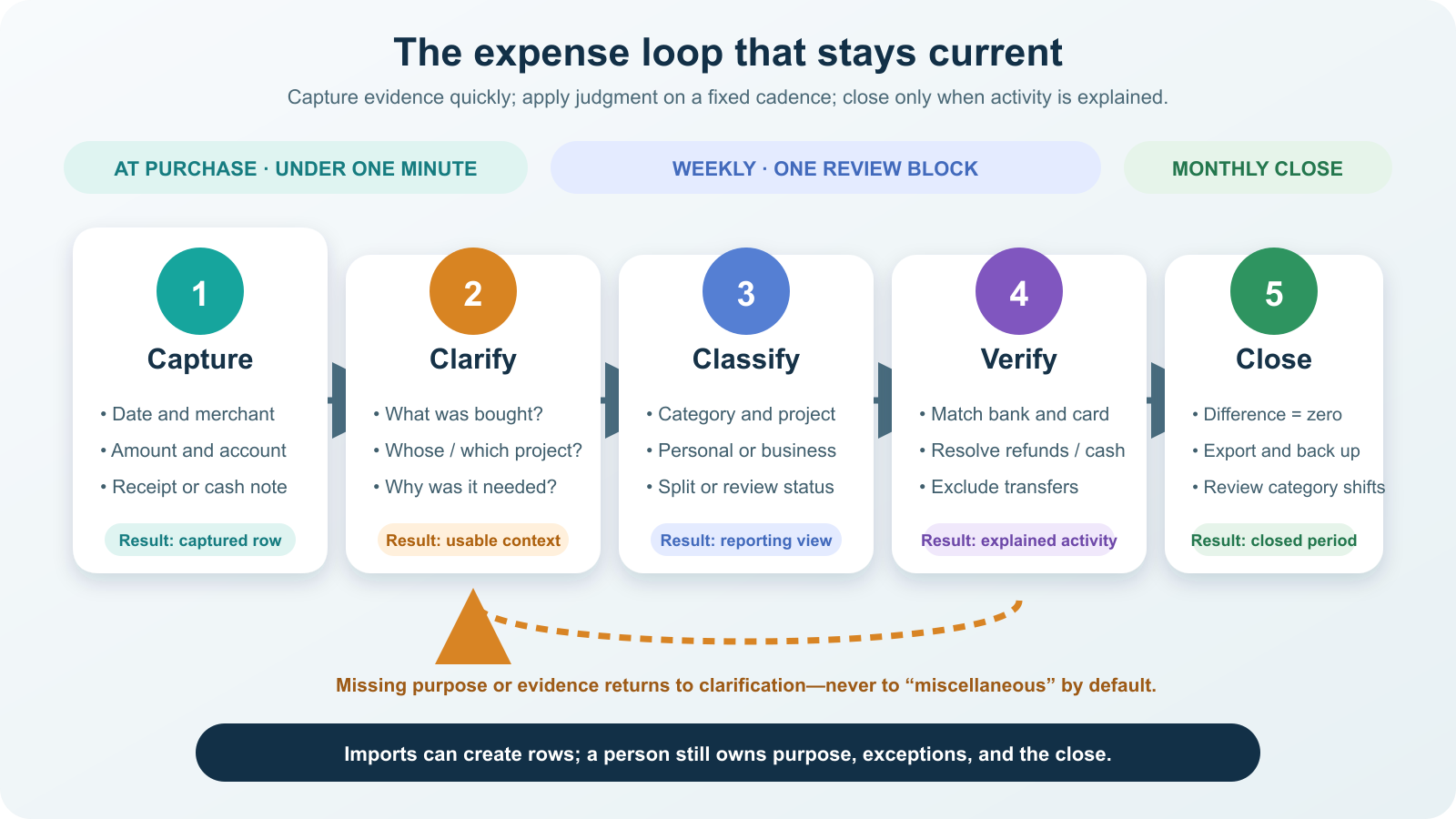
1. Capture the transaction at purchase
Let card and bank feeds import what they can. Photograph paper receipts before they fade, forward digital receipts to one folder, and write a cash note immediately. Capture only the facts available at the counter: date, merchant, amount, account, and evidence. Do not stop to perfect the category while a line forms behind you.
For a receipt image, use a filename or link that ties it to the ledger ID, not a folder of anonymous photos. Keep originals legible. Electronic records can be acceptable for U.S. business recordkeeping, but Publication 583 says electronic systems remain subject to controls and retention requirements.
2. Clarify purpose while memory is fresh
Within a day, replace vague bank text with a useful merchant name and add the purpose, project, person, or business relationship. A statement may prove that $46.60 reached a restaurant; it does not explain who attended or why the purchase belonged to a client project.
Do not invent missing context at month-end. Mark the row needs review and ask the owner. For U.S. travel, gift, and transportation records, IRS Publication 463 emphasizes timely written records and details such as amount, time, place or description, and business purpose. It notes that a weekly log can qualify as timely when it accounts for the week.
3. Classify in one weekly review
Choose a fixed 15- to 30-minute appointment. Review every uncategorized row, split mixed purchases, assign context tags, and leave genuinely uncertain tax treatment for a qualified adviser rather than labeling it “deductible” from memory. Category describes the economic purpose; tax treatment is a separate decision.
Use rules only for merchants that behave predictably. A rule can safely classify the same software subscription each month. A general marketplace, department store, payment processor, or restaurant needs more context. Every automated rule should remain editable and visible during review.
4. Verify each account against its source
For every bank account, card, wallet, and cash pool, compare the source activity with the ledger. Match the count and amount of outflows, then resolve missing rows, duplicates, refunds, transfers, fees, and pending transactions. Reconciliation is stronger than scanning for transactions that “look about right.”
Use this simple control:
source outflows = expense rows + transfers + receivables + other explained non-expense uses
The equation is not an accounting statement. It is a completeness test for the tracking period. If the two sides differ, do not hide the difference in “miscellaneous”; find the missing or duplicated event.
5. Close the month and preserve the evidence
Close only after every account has a zero unexplained difference, every business row has adequate purpose and evidence, and all review flags have an owner. Export the ledger and receipt index in a durable format, then back them up. ToolMerit’s computer backup guide explains why a backup is incomplete until you can restore it.
Record the closing date and avoid silently rewriting a closed period. If a late refund or correction arrives, post a linked adjustment with a note so the history remains understandable.
Classify boundary transactions without double counting
| Transaction | Tracking rule | Common mistake |
|---|---|---|
| Credit-card purchase | Record the expense on the purchase transaction. | Counting the later card payment as the same expense again. |
| Credit-card payment | Link the checking outflow to the card inflow as a transfer. | Classifying it as “credit card expense.” |
| Transfer to savings or between accounts | Record both sides as one transfer, excluded from expense totals. | Treating money moved as money spent. |
| Refund | Link it to the original transaction and reduce the original category. | Calling it new income and leaving spending overstated. |
| Reimbursable purchase | Mark the outflow as a receivable; link the repayment when it arrives. | Leaving both the purchase and reimbursement in ordinary expense or income. |
| Mixed personal/business receipt | Split the row by documented items or another defensible allocation. | Assigning the full receipt to whichever side is more convenient. |
| Cash purchase | Create a manual row and attach a receipt or contemporaneous note. | Using the ATM withdrawal as the final expense category. |
| Loan payment | For formal books, split principal, interest, and fees using the lender statement. | Assuming the full payment is one expense; a simple cash-flow view may still show the full outflow separately. |
| Foreign-currency purchase | Keep original currency, converted amount, rate or statement reference, and fee. | Losing the amount that matches either the receipt or the account. |
| Business mileage | Use a separate timely log for date, destination, purpose, and distance. | Trying to reconstruct routes from an annual calendar. |
Worked example: reconcile one week
Assume one account shows six hypothetical outflows totaling $273.00:
| Outflow | Amount | Classification | Context needed |
|---|---|---|---|
| Groceries | $72.40 | Personal food | None beyond normal receipt evidence |
| Transit | $18.00 | Personal transportation | None for the personal budget |
| Software | $24.00 | Business-review expense | Tool and business purpose |
| Client meal | $46.60 | Business-review expense | Attendees, relationship, and purpose |
| Reimbursable fare | $12.00 | Receivable | Claim owner and expected repayment |
| Savings transfer | $100.00 | Transfer | Destination account |
The four spending rows total $161.00: $72.40 + $18.00 + $24.00 + $46.60. The reimbursable fare is tracked separately until repaid, and the savings transfer is not spending.
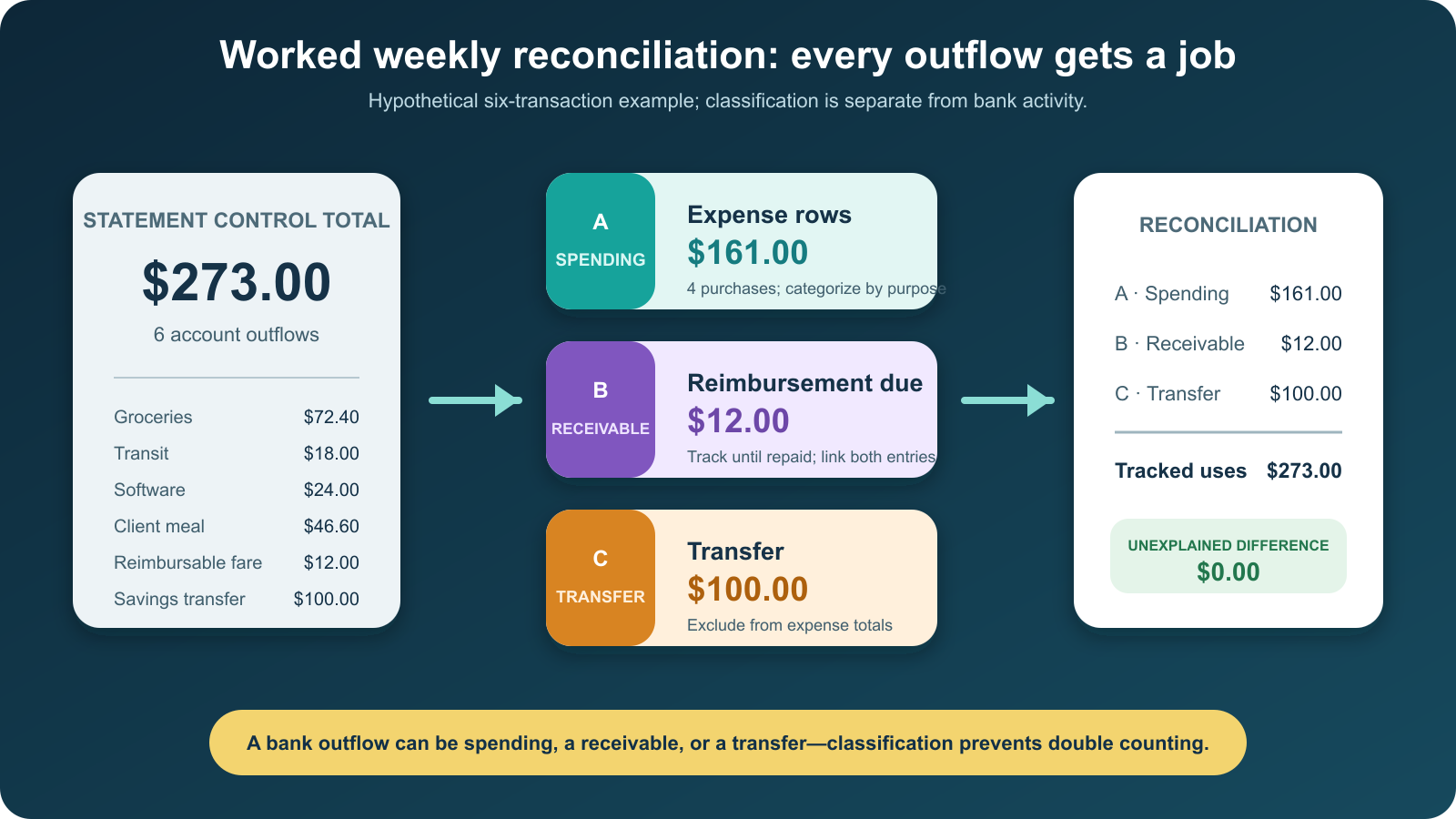
The control equation closes:
$273.00 source outflows = $161.00 spending + $12.00 receivable + $100.00 transfer
Within the $161.00 spending total, personal rows equal $90.40 and business-review rows equal $70.60. “Business review” deliberately does not promise deductibility; supporting facts and applicable rules still decide that.
Review the ledger at three different cadences
Do not ask one dashboard to answer every question. Each review has a different job:
- At purchase: prevent lost evidence.
- Weekly: resolve purpose, categories, missing items, and exceptions while memory is usable.
- Monthly: reconcile, close, compare category totals, and adjust upcoming decisions.
For personal finances, compare fixed commitments, flexible spending, debt payments, and savings moves against the plan. The Consumer Financial Protection Bureau’s Your Money, Your Goals toolkit includes a spending tracker intended to help people see patterns and make decisions.
For a business, compare costs by category, vendor, and project; identify subscriptions with no current owner; and review whether cost changes are explained by volume, price, timing, or misclassification. The U.S. Small Business Administration’s finance guidance emphasizes categorizing expenses and examining money in and money out. Use at least several comparable periods before treating one unusual week as a trend.
Choose a tool by the control you need
| Starting point | Good fit | Move up when |
|---|---|---|
| Spreadsheet | Low transaction volume, one owner, manual imports, custom views | Matching, receipt links, or version control consume the review time. |
| Personal budgeting app | Household categories, recurring transactions, account aggregation | You need formal business books, project ownership, or accountant access. |
| Accounting software | Business bank feeds, reconciliation, invoices, liabilities, collaborators | The business has inventory, payroll, complex tax treatment, or multi-entity reporting that needs professional setup. |
| Receipt-capture tool | Mobile evidence collection and searchable documents | Never by itself; it should feed the ledger rather than replace classification and reconciliation. |
Before adopting a tool, verify export format, split transactions, rule overrides, receipt attachment, reimbursements, cash entries, account reconciliation, user permissions, and backup. Import one week and prove the full workflow before moving historical records.
Keep tax records as a supported subset, not a guess
For U.S. federal tax purposes, Publication 583 says the law generally does not require one specific recordkeeping system; the chosen system must clearly show income and expenses. It also distinguishes proof of payment from proof that a cost qualifies for a deduction. Keep receipts, invoices, account evidence, and purpose information together rather than assuming a bank line is sufficient.
Retention depends on the record and the period in which it may be needed. Property, employment, and certain other records can follow different timelines. Keep the policy in the ledger documentation and check current IRS guidance or a qualified tax professional for the actual situation. Readers outside the United States should apply their local tax and record-retention rules.
If you are behind, rebuild one closed period
Do not begin by designing the perfect annual dashboard. Choose the oldest open month, collect every statement and cash note for that period, import the account activity, remove duplicate transfers, attach available evidence, and flag unknown purpose instead of inventing it. Reconcile to zero, export the closed period, then move to the next month.
The worked week above is what “current” looks like: all $273.00 of account activity has a documented job, the reporting view includes only the $161.00 that belongs in spending, and nothing is hidden in an unexplained balance. Repeat that result each week and the monthly close becomes verification rather than reconstruction.