Canva combines templates, a drag-and-drop editor, shared brand assets, collaboration, publishing, and AI. This guide shows when that connected workflow is a good fit—and when it is not.

Canva is an online visual design, publishing, and collaboration platform. It combines templates, a drag-and-drop editor, stock and uploaded media, brand controls, comments and approvals, exports, publishing, and AI-assisted creation. People use it for presentations, social posts, documents, whiteboards, videos, simple websites, print materials, and related visual work. Its strongest fit is fast, repeatable communication—not every precision design, production, data, or coded-web task.
That last distinction matters. Calling Canva “graphic design software” is true but too narrow; calling it a replacement for every professional creative tool is too broad. The useful question is whether its connected workflow produces the deliverable you need, at the fidelity, control, licensing, accessibility, and handoff standard the project requires.
What Canva actually combines
Canva began as an online design and publishing tool and now describes a broader Visual Suite. The current product groups documents, sheets, whiteboards, presentations, social content, video, websites, email, and print-oriented pages in a connected environment. Users can start from a template or a blank design, add uploaded or library media, edit layouts, collaborate, then export or publish.
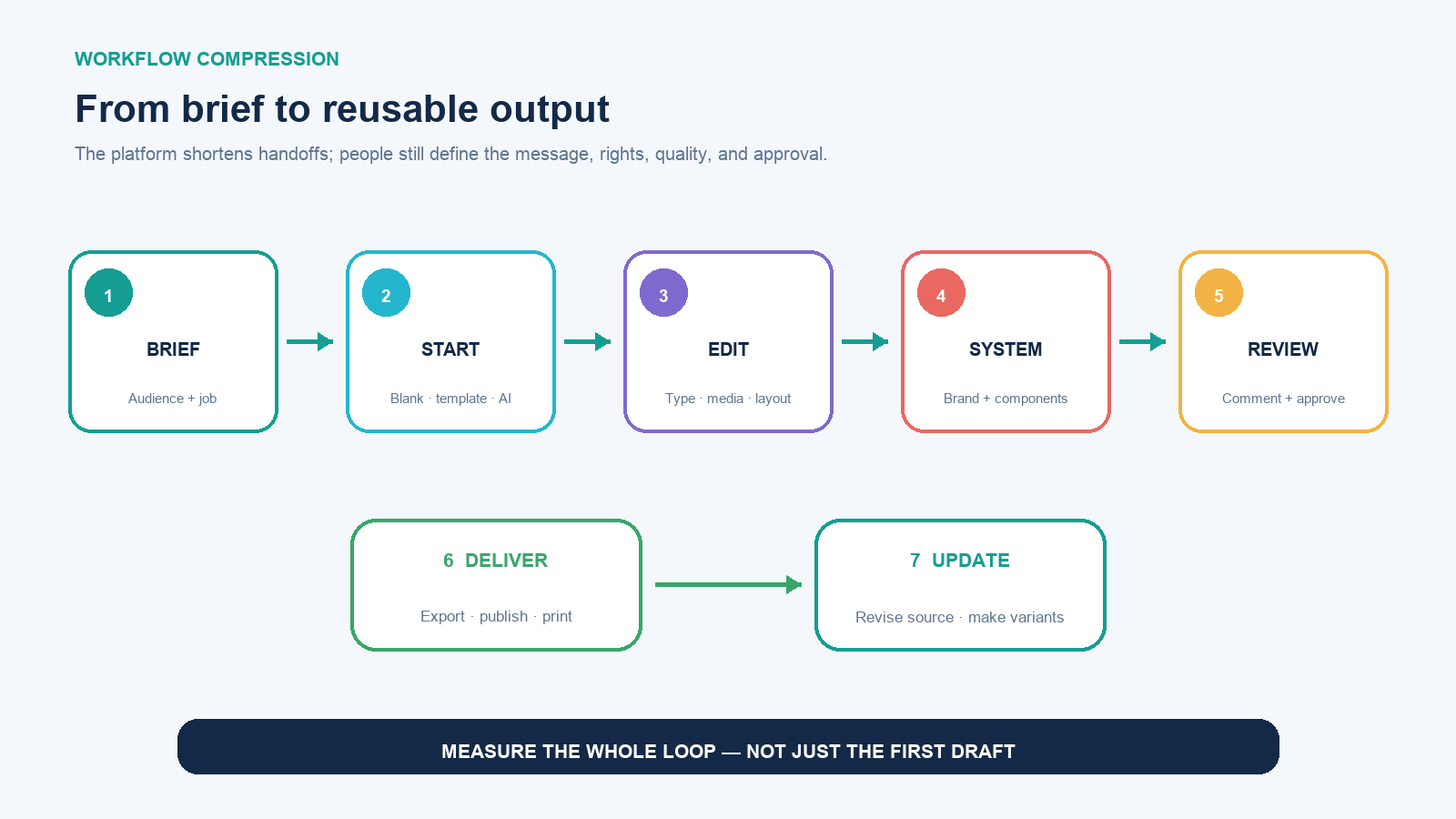
The product loop is:
- Brief: define audience, channel, dimensions, required copy, brand rules, owner, deadline, and acceptance criteria.
- Starting structure: choose a blank canvas, template, imported file, or AI-assisted draft.
- Composition: arrange text, media, color, type, motion, data, and interactive elements.
- System: apply reusable brand assets, styles, templates, components, or locked choices where the plan permits.
- Collaboration: share, comment, assign, revise, and approve in the same workspace.
- Delivery: download an appropriate file, present it, schedule or publish it, order print, or share a controlled link.
- Update: revise the source design and create later variants without rebuilding every asset from scratch.
Canva compresses those transitions. It does not remove the need for content strategy, factual review, visual judgment, rights clearance, accessibility checks, or a reliable final-output test.
What can you make with Canva?
Common outputs include slide decks, posters, flyers, social posts and stories, thumbnails, infographics, resumes, worksheets, certificates, reports, whiteboards, short videos, simple animations, one-page websites, invitations, menus, labels, and print collateral. The Visual Suite also supports connected document-like and data-oriented work, while imports can make some existing PDF, presentation, or design files editable.
“Can create” does not mean “is the best production system.” A simple campaign landing page is different from an authenticated application. A short branded explainer is different from a color-managed feature film. A chart placed in a report is different from a governed analytical workbook. A logo assembled from library elements is different from an original identity system whose ownership and vector geometry must withstand registration and many production contexts.
Before choosing a format, define the final destination. A screen graphic needs pixel dimensions and compression; commercial print may need bleed, safe area, color, and printer specifications; a presentation needs editable delivery and font behavior; a video needs aspect ratio, captions, audio rights, and codec acceptance; a website needs responsive behavior, analytics, domain, accessibility, SEO, and maintenance requirements.
Where Canva fits—and where it starts to strain
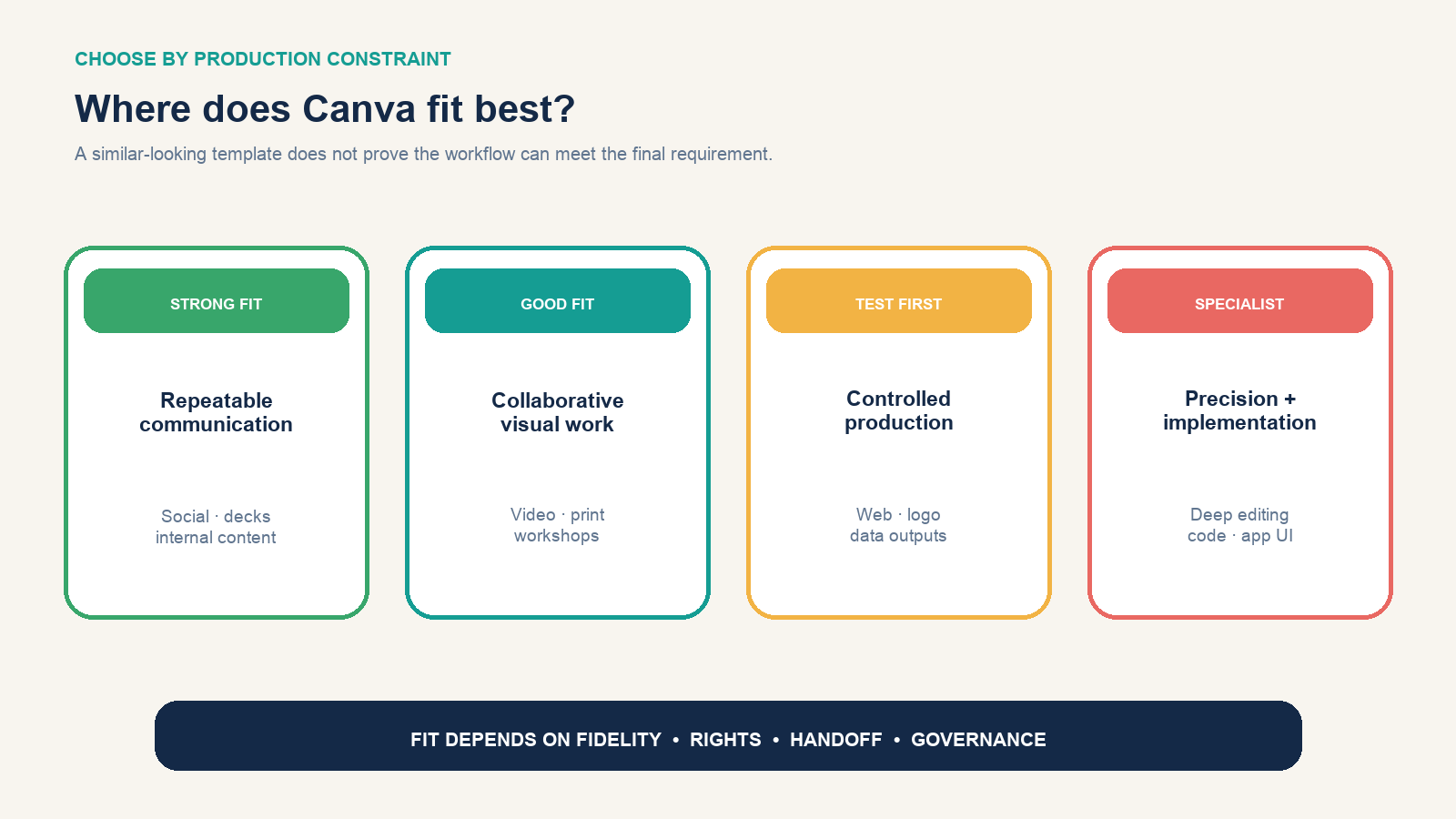
| Job | Likely fit | Constraint to test |
|---|---|---|
| Repeatable social and campaign assets | Strong | Brand consistency, approval, resizing, channel-safe exports |
| Presentations, internal documents, and workshops | Strong | Offline delivery, font substitution, data updates, audience accessibility |
| Short marketing video | Good for straightforward edits | Timeline precision, audio mixing, captions, version review, export requirements |
| Flyer, menu, card, or simple print piece | Good when printer needs are supported | Bleed, resolution, color mode, finishing, proof approval |
| Simple campaign or information website | Conditional | Responsive control, forms, structured content, integrations, SEO, code ownership |
| Original logo and identity master files | Conditional | Asset licensing, distinctiveness, exact vector construction, trademark use |
| Complex photo, illustration, layout, or video production | Specialist tools usually fit better | Non-destructive controls, precision, color, effects, packaging, interoperability |
| Software UI or production application | Poor as the implementation system | Reusable code, state, data, accessibility semantics, testing, deployment |
If an image needs intricate masking, color repair, or repeatable pixel-level control, a dedicated editor may be more appropriate; the GIMP background-removal workflow shows the difference between a one-click result and a controlled edge repair. If a mark must remain editable at any scale, understand the properties of a true vector image before treating an exported graphic as a durable master.
Run one serious pilot before choosing a plan
Do not evaluate Canva by making a disposable quote graphic. Choose a small job that resembles repeated production: one campaign with a square post, vertical story, presentation slide, one-page handout, and short motion variant.
Prepare the approved copy, real logo files, palette, fonts or permitted alternatives, image rights, output sizes, and named reviewer. Build a master rather than five unrelated templates. Then create the variants, assign a review, export each deliverable, and ask a colleague who did not build it to make one controlled change.
| Acceptance test | Evidence to retain |
|---|---|
| Brand consistency | Palette, typography, logo clear space, image treatment, component reuse |
| Production speed | Brief-to-first-review time and revision time—not template browsing time |
| Collaboration | Who could view, comment, edit, approve, duplicate, and publish |
| Export fidelity | Opened PNG/PDF/video/presentation in the destination system and inspected it |
| Accessibility | Reading order, contrast, text size, captions, alt-text or equivalent delivery needs |
| Handoff | A second person changed copy and produced the correct variants without rebuilding |
The plan decision should come after this test. Use the Free plan to establish workflow fit. Consider a paid individual plan when premium content, brand controls, resizing, background removal, translation, scheduling, storage, or AI allowances remove a measured bottleneck. Consider business or enterprise tiers when approvals, administrative controls, many brand systems, security, procurement, or organization-wide governance—not merely more templates—drive the requirement. Recheck the live pricing page because packaging and limits change.
Templates are a starting structure, not a brand
A template solves initial arrangement. If you only replace the headline and photo, your work can preserve the original hierarchy, visual rhythm, and familiar decorative choices. That is fast, but it can make unrelated businesses look interchangeable.
Keep the useful structure, then rebuild the visible system:
- reduce the design to one clear communication objective and hierarchy;
- apply the actual brand palette, type scale, voice, logo rules, and image treatment;
- remove decoration that does not support comprehension;
- replace placeholder copy with channel-appropriate final copy;
- create reusable components for titles, calls to action, footers, labels, and data notes;
- test the family together at realistic size rather than admiring each canvas in isolation.
A recognizable brand comes from repeated decisions, not repeated templates. Teams should name an owner for the master and prevent unauthorized variants from quietly becoming the new standard.
AI can accelerate drafts; it does not accept the risk
Canva’s AI features can propose copy, images, layouts, transformations, translations, or other starting material. Treat the result as an editable draft. Verify facts and quotations, look for invented text or visual artifacts, check cultural meaning and representation, confirm that a generated image fits the claim, and review whether the output may resemble protected material or violate a policy.
For brand or client work, record which parts were generated, what inputs contained confidential information, who reviewed the output, and what rights or disclosure obligations apply. AI allowances and feature access vary by plan and tool. An “AI included” label does not tell you whether the volume, model behavior, data path, or approval control fits your organization.
Check the asset license at the moment of export
Your design can combine four different rights questions: material you uploaded, Canva library content, content from a third-party app, and generated content. Canva’s Content License Agreement distinguishes Free, Pro, Branded, Education, and other categories, and states that the more restrictive category can govern a mixed design. Popular music has separate terms.
Do not assume that a paid subscription transfers ownership of every asset or permits resale as a standalone element. Canva’s own commerce guidance says a product for sale must be an original design and that library content cannot simply be sold as stock. Pro content can carry special conditions in templates or products. Client transfers, template links, electronic-publication limits, logos, merchandise, and stock-like uses deserve a check against the current agreement at export—not a memory of an old blog post.
For an important deliverable, preserve the source-information panel or asset ID, content category, license version and date, subscription status at export, project/client, final exported file, and any separate permission. For uploaded media, record where it came from and who authorized the use. A design being editable in Canva is not evidence that every embedded asset is cleared.
Test handoff, privacy, and exit before scaling
Canva’s Trust Center says designs use a restrictive privacy setting by default, while link settings can allow broader view or edit access. Treat “anyone with the link” as shareable beyond the named recipient because links can be forwarded or indexed in some contexts. Check membership, public links, duplicated designs, former staff, connected apps, published websites, embedded designs, and download permissions.
Third-party apps can have their own terms and privacy policies. Canva also provides privacy settings related to whether eligible user content or usage data may improve AI-powered features, with different organizational and education behavior. A procurement review should verify current storage location, data-processing terms, subprocessors, retention, admin logs, encryption claims, incident process, student or regulated-data requirements, and the exact plan controls available.
Run an exit test while the pilot is small. Export the files the downstream team truly needs; open them outside Canva; check fonts, animation, hyperlinks, video, transparency, image resolution, editable elements, and color. Determine whether the next editor needs an editable Canva source, a standard file, original uploaded assets, or a fully reconstructed production file. “Downloadable” and “portable without loss” are different promises.
Should you use Canva?
Use Canva when a team needs to produce coordinated visual communication quickly, non-specialists must contribute safely, templates and shared brand assets reduce repeated setup, and the accepted deliverable can be exported or published with the required fidelity. It is especially compelling when the same campaign must become several related formats and review friction costs more than specialist control would save.
Choose a specialist or coded workflow when the master asset needs exact vector or color behavior, the project has deep non-destructive editing, a complex timeline, governed analytics, structured content, custom application logic, stringent source packaging, or interoperability Canva cannot preserve. A hybrid is often best: create or finish specialist masters in the appropriate production tool, then place approved assets and controlled templates in Canva for scaled communication.
The practical recommendation is to pilot one real asset family on the Free plan, inspect every exported destination, log the license and privacy decisions, and measure revision and handoff—not just first-draft speed. Upgrade only when a specific gate blocks a validated workflow. That makes Canva a deliberate part of the production system instead of an attractive template library that quietly becomes the system by accident.