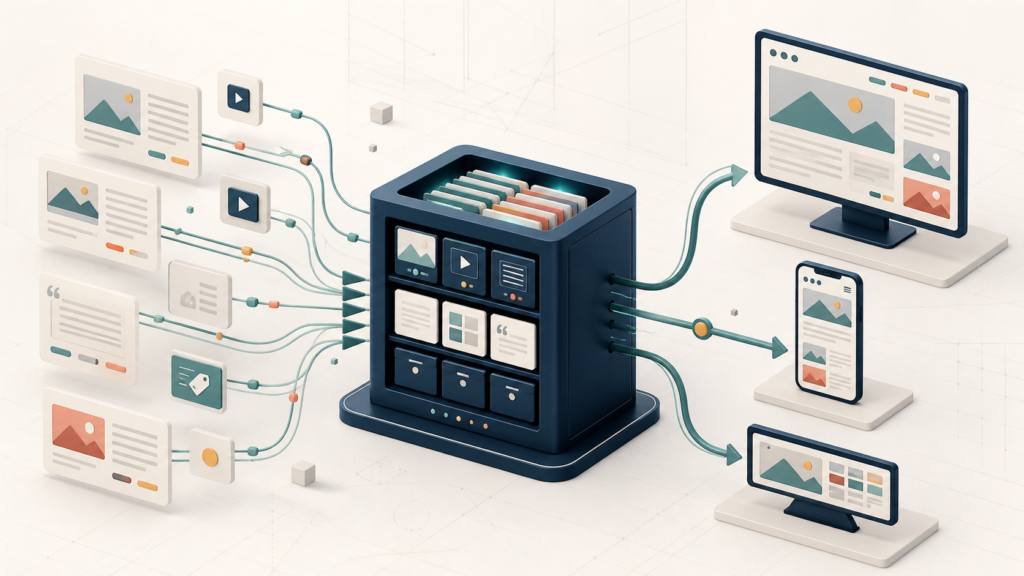
A CMS is more than a page editor. See how models, roles, assets, publishing, templates, and APIs turn one content source into digital experiences.
A content management system (CMS) is software that lets people create, organize, govern, publish, and update digital content without hand-editing every final page or screen. It normally provides an editor, structured storage, media handling, user permissions, publishing states, and a way to deliver approved content to a website or another channel.
The boundaries matter. A CMS is not automatically a drag-and-drop site builder, a hosting service, an analytics platform, or a guarantee that content is accurate, accessible, secure, or fast. Some products bundle those jobs; others connect to separate tools. The useful question is not merely “Which CMS has the most features?” but “What content operating model does this team need?”
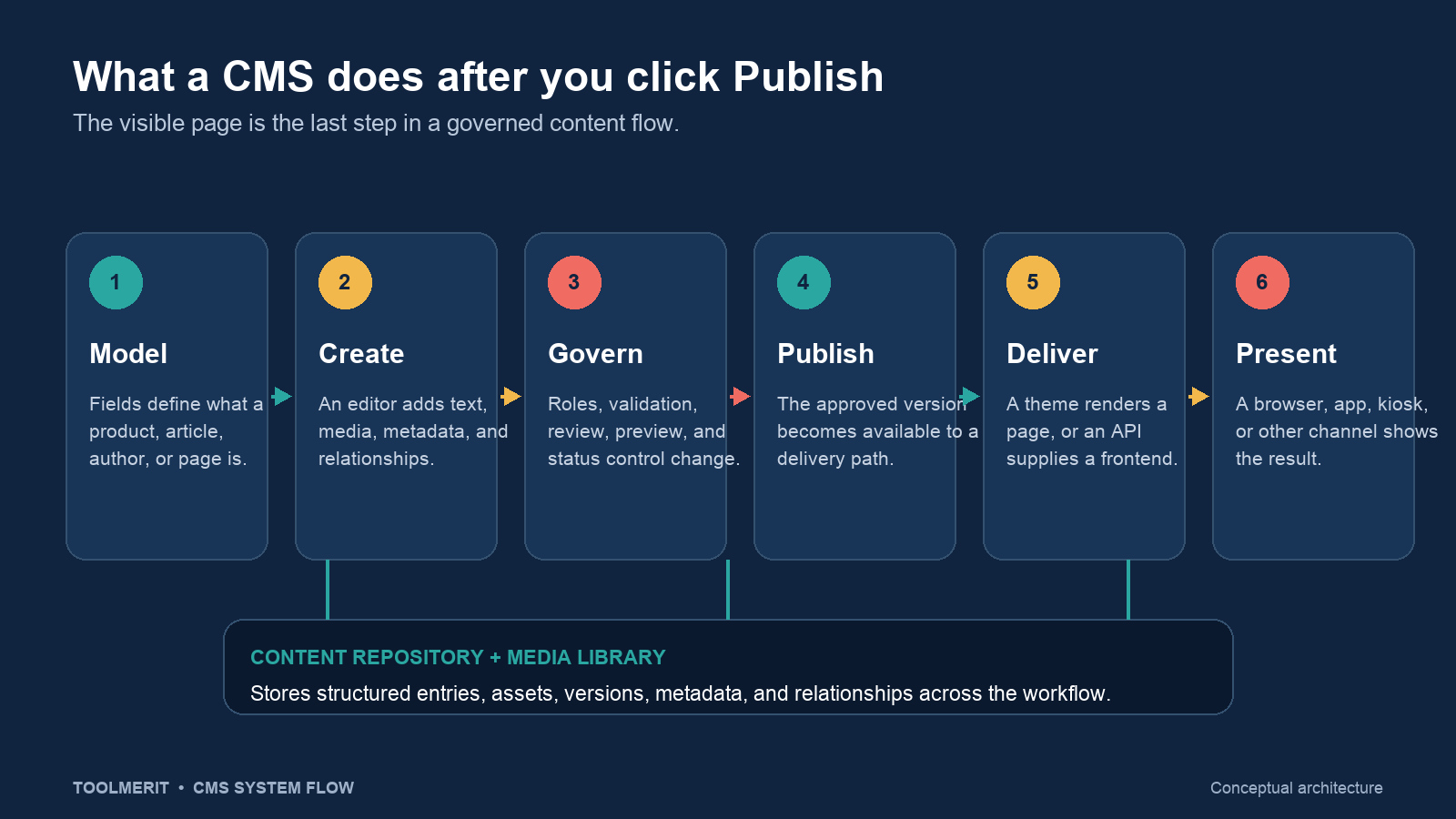
A CMS is six connected jobs
The Drupal User Guide gives a practical baseline: a CMS lets people add, publish, edit, or remove website content in a browser. It also explains a common implementation in which scripts combine database content with assets such as CSS, JavaScript, and images to build a page for a visitor. Modern products use different stacks, but the operating jobs remain recognizable.
- Model the content. Define reusable types—such as Article, Product, Person, Location, or Event—and the fields and relationships each type requires.
- Create and edit. Give authors a controlled form or editor for text, media, links, categories, dates, and other fields.
- Store and relate. Keep entries, assets, metadata, versions, and relationships in a repository rather than scattering them across hand-coded pages.
- Govern change. Use roles, permissions, validation, review, preview, scheduling, and status rules to decide who can change what and when it becomes public.
- Publish a version. Mark an approved state as available to the public delivery path while drafts and later revisions remain controlled.
- Deliver and present. Render a web page with a built-in theme, or send structured content through an API to a separate website, app, display, or other frontend.
Not every CMS implements all six jobs equally well. A blogging system may emphasize immediate writing and website presentation. An enterprise or headless system may emphasize structured models, permissions, localization, APIs, and multiple delivery environments. The label “CMS” describes the category; the operating design determines the fit.
Follow one product entry from draft to screen
Suppose a retailer needs to publish a new backpack. In a file-based site, someone might duplicate an HTML page and replace text in several places. In a CMS, the team first defines a Product type with fields such as name, summary, price, materials, image, availability, care instructions, and related category.
An editor creates one Product entry and uploads the image. Field validation can require a price, image alternative text, and category before review. A merchandising editor may revise the copy, while only a publisher can change the status from draft to published. WordPress, for example, separates abilities such as editing posts, publishing posts, uploading files, and managing users through roles and capabilities.
When the publisher approves the entry, an integrated CMS may combine it with a template and return a finished product page. A headless CMS may expose the published fields through a delivery API; a storefront frontend then decides how to render them. Contentful’s API documentation illustrates this separation with different interfaces for content management, published delivery, preview, images, and GraphQL queries.
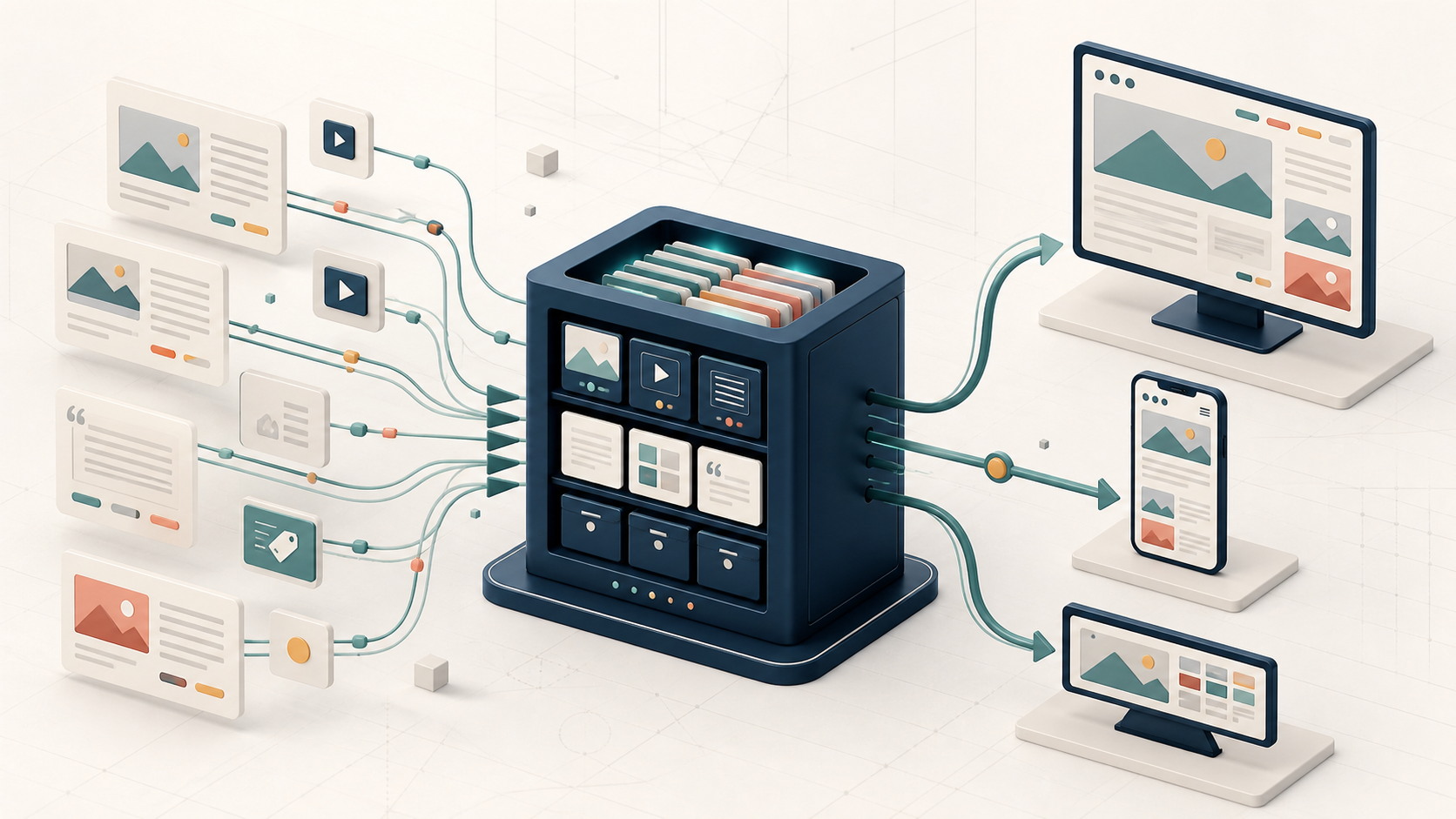
A correction to the materials field can then flow to every presentation that reads that field. That reuse is not automatic magic: each frontend must actually request and display the same structured content, and caches or static builds may need invalidation or rebuilding. The CMS provides the source and publishing event; the delivery architecture determines when the change becomes visible.
Content is not the page
A recurring CMS mistake is to store an entire page as one undifferentiated rich-text block. That may look flexible at first, but it makes reuse, validation, filtering, accessibility checks, and multi-channel delivery harder. A content model separates meaning from one visual layout.
| Element | What it represents | Backpack example |
|---|---|---|
| Content type | A reusable definition and its allowed fields | Product requires name, price, image, materials, availability, and category. |
| Entry | One item that follows a content type | The “Trail 24L Backpack” product record |
| Asset | A managed image, video, document, or other file | Product photography and a care-guide PDF |
| Metadata and taxonomy | Information used to classify, find, govern, or deliver content | Category, locale, campaign, publication date, and review status |
| Template or component | Presentation rules that turn fields into an interface | A product-page layout with gallery, price, description, and availability modules |
| URL and route | The public address or application path used to reach an output | /products/trail-24l-backpack/ |
Contentful’s data-model documentation uses the same underlying distinction: a space contains content types; individual entries follow those types; assets represent files; and fields can carry validation, relationships, and localization. A URL identifies where an output can be reached, but it is not the content record itself. A vanity URL is another presentation and routing choice, not a replacement for a content model.
Choose the delivery shape
“Traditional” and “headless” describe how content management relates to presentation. They are architectural shapes, not quality grades.
- Integrated or coupled CMS: the administration interface, repository, templates, and primary website delivery live in one main system. Editors often get a direct page preview, while developers work within the CMS theme or extension model.
- Headless CMS: the CMS manages structured content but does not own the final presentation layer. Separate frontends retrieve content through APIs. This supports custom interfaces and multiple channels, but the team must build and operate the frontends, preview integration, routing, deployment, and caching.
- Static files without a CMS: developers maintain content in HTML, Markdown, or other repository files and publish through a build or deployment process. This can be excellent for a small, stable, developer-owned site; it becomes less attractive when editors, volume, workflow, localization, or structured reuse grow.
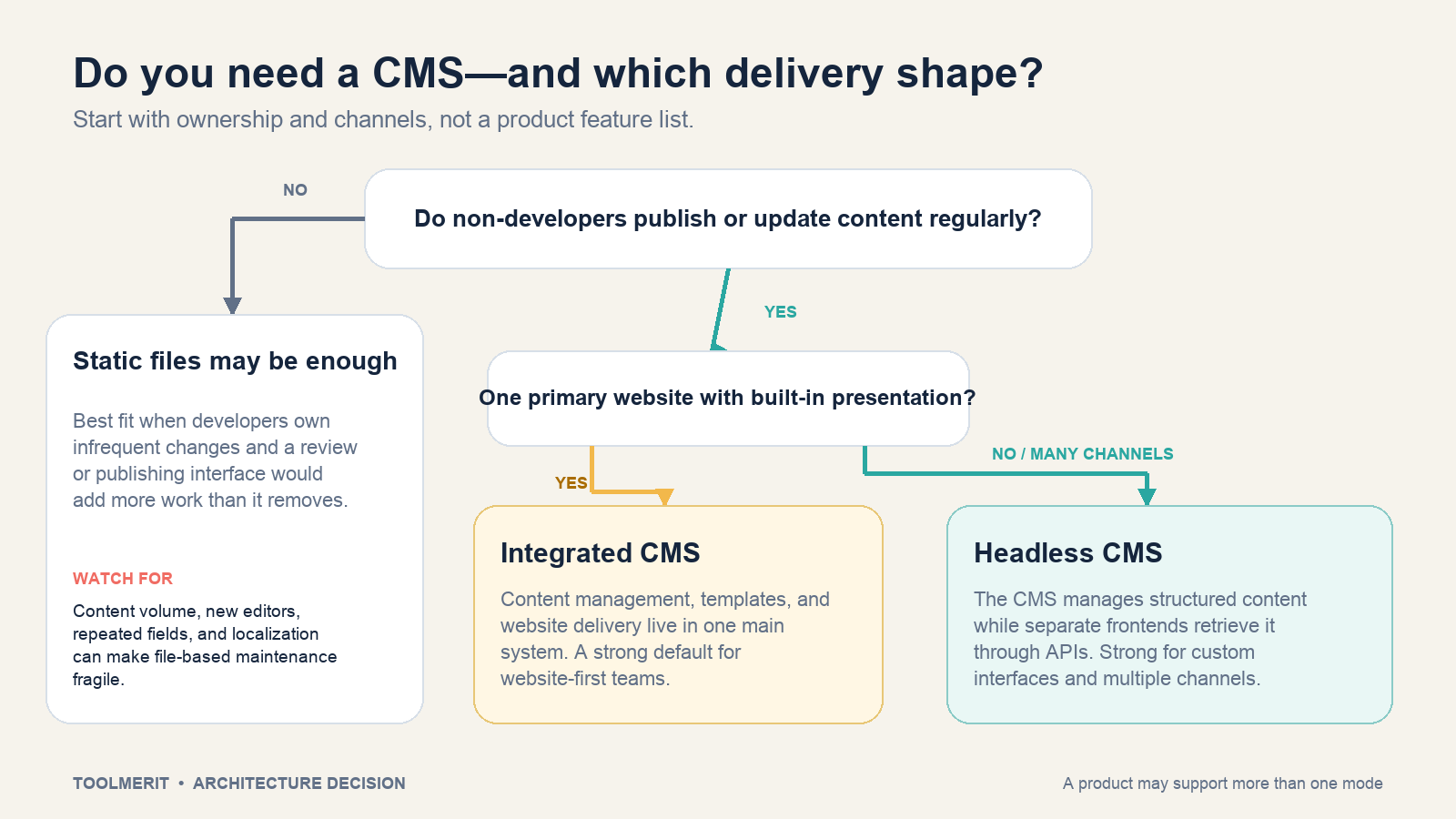
A product can support more than one mode. WordPress exposes posts, pages, media, users, taxonomies, and statuses through its REST API even though it can also render complete website pages. Conversely, a headless platform may offer visual previews and site-building integrations. Ask what the proposed implementation will use—not only what the product could theoretically do.
Know what a CMS does not solve by itself
| The CMS can provide | It may require an integration or extension | The organization still owns |
|---|---|---|
| Editors, fields, entries, media, roles, versions, statuses, and publishing controls | Search, forms, ecommerce, analytics, personalization, digital asset management, translation services, and specialized SEO workflows | Content strategy, editorial standards, factual accuracy, accessibility review, legal approval, and lifecycle ownership |
| APIs, templates, or both for delivery | Frontend applications, hosting, CDN behavior, deployment automation, and cache invalidation | Performance budgets, monitoring, incident response, and deciding who fixes failed delivery |
| User accounts and configurable permissions | Single sign-on, advanced audit retention, or external identity governance | Least-privilege design, access reviews, offboarding, updates, backups, and recovery drills |
Buying a CMS does not remove maintenance. Self-hosted software needs timely core, theme, and extension updates. A managed service reduces some infrastructure work but adds vendor, plan, API, data-residency, export, and outage dependencies. A complete backup must cover the content database or export, uploaded assets, configuration, and the code needed to render the site—not merely a screenshot of public pages. The same restore-first principle in our backup guide applies: a backup is only useful when you can recover from it.
When a CMS earns its overhead
A CMS is usually valuable when several of these conditions are true:
- Non-developers need to publish or update content regularly.
- The site has repeated content types with consistent fields and relationships.
- Different people write, review, translate, approve, and publish.
- The same content must appear across pages, locales, websites, apps, emails, or displays.
- Drafts, previews, scheduled releases, revisions, or audit history matter.
- The content set is large enough that hand-managed navigation, links, and files become fragile.
You may not need a CMS when a small site changes rarely, developers own every update, content has little structure, and the deployment workflow already provides suitable review and rollback. Removing a CMS can reduce attack surface and maintenance, but it transfers editing and publishing responsibilities to files, version control, and build systems. Make that ownership explicit.
Evaluate a CMS with one trial workflow
A polished demo can hide the difficult parts. Test a realistic lifecycle before selecting a product or architecture:
- Model one real content type. Use a representative product, article, location, or event with required fields, media, relationships, and localization—not a generic blank page.
- Create two roles. Give one person permission to draft and another permission to approve and publish. Confirm each role cannot perform the other’s restricted actions.
- Enter imperfect content. Omit a required field, use the wrong media shape, and add a broken relationship. See whether validation prevents or clearly explains the problem.
- Preview the draft in context. A headless preview should use a separate preview path and credential. Contentful, for example, documents a read-only Preview API that returns unpublished entries using a preview token rather than a production delivery token.
- Publish to the real delivery shape. Render through the intended theme or fetch through the intended API and frontend. Measure the handoffs your team will actually operate.
- Change a shared field. Update an asset, category, or description and verify which pages or channels change, which require rebuilding, and how caches are refreshed.
- Recover. Restore a prior version, unpublish the entry, export the content, and document what would happen if the CMS or frontend were unavailable.
The trial should reveal editor friction, developer work, preview gaps, permission mistakes, and delivery dependencies. Those costs are more predictive than the number of templates or AI buttons on a pricing page.
Choose the operating model before the product
Start with the people who create and approve content, the structure they must preserve, the channels that consume it, and the team that operates delivery. Choose an integrated CMS when a website-first workflow and built-in presentation reduce handoffs. Choose a headless CMS when structured reuse and independent frontends justify the additional engineering. Keep a file-based site when regular editorial workflow would be needless overhead.
Then compare products inside that chosen shape. A CMS is successful when it makes the correct content easier to create, safer to govern, and predictable to deliver—not when it simply moves page editing into a browser.