A CDN cache is a shared edge store, not a second origin. Learn the request lifecycle, freshness rules, cache keys, safety boundaries, and useful response headers.

A CDN cache is a shared store of reusable HTTP responses at network edge locations between visitors and the origin server. When a request’s cache key matches a fresh stored response, the edge returns that copy as a cache hit; otherwise it contacts the origin, may store the response under policy, and serves it. This can reduce latency, origin work, and bandwidth, but only if freshness, variation, personalization, and invalidation are handled correctly.
The cached object is usually an HTTP response: status, selected headers, and a body such as an image, stylesheet, script, font, HTML document, JSON result, or video segment. It is not necessarily a literal file copied forever to every city, and the CDN does not become the source of truth. The origin or upstream application still decides what representation exists.
A CDN cache is one layer in a stack
“The cache” can refer to several independent stores. A browser has a private cache for one user. A CDN runs shared caches that may reuse a response for many users. The origin can also have a reverse-proxy, application, object, or database cache. Clearing one does not guarantee that the other two are empty.
| Layer | Where it lives | Who can reuse it | Typical control |
|---|---|---|---|
| Browser cache | On a visitor’s device | That browser profile | Cache-Control, validators, browser behavior |
| CDN cache | Distributed edge or regional locations | Requests mapped to the same cache key and policy | Shared-cache headers, CDN rules, purge API |
| Origin/application cache | Near the web server or data layer | Requests handled by that application tier | Framework, reverse proxy, object cache, query policy |
The performance gain comes from avoiding work. A fresh edge hit may eliminate a long network trip, TLS and connection work at the origin, application routing, session restoration, database queries, template rendering, and a full response transfer. That reduces one component of website latency; it cannot repair slow client-side JavaScript, bad layout shifts, an oversized uncached page, or a third-party service the CDN does not control.
Follow one object through the edge
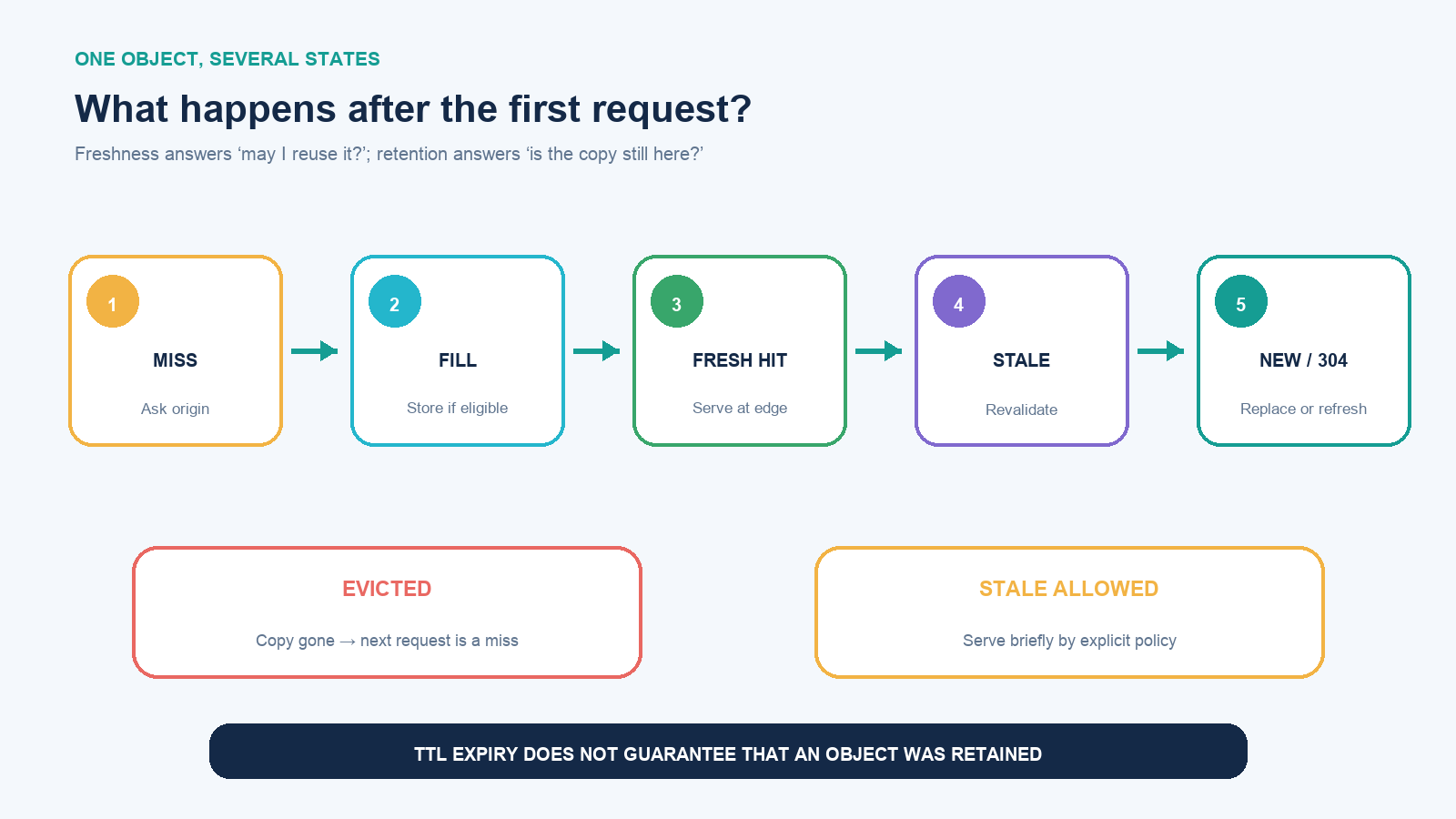
- Cold miss: no usable object matches the request’s cache key at that edge. The CDN forwards the request upstream.
- Fill: the origin returns a response. If the method, status, headers, and CDN policy allow storage, the edge stores it and returns it to the visitor.
- Fresh hit: a later equivalent request reaches an edge that still holds a fresh copy. The response can be served without consulting the origin.
- Stale check: after the freshness lifetime ends, the edge may revalidate with
If-None-MatchorIf-Modified-Since, or fetch the object again. - Revalidated or replaced: a
304 Not Modifiedlets the cache reuse the body and refresh its metadata; a changed representation returns a new response. - Stale allowance: an explicit policy may permit an old response briefly while revalidation happens or when the origin fails. That is a resilience decision, not permanent freshness.
- Eviction: the CDN may remove an unpopular object to make room even before its nominal TTL would have ended. A later request becomes a miss again.
Provider labels expose parts of this path. Cloudflare, for example, documents HIT, MISS, EXPIRED, REVALIDATED, STALE, UPDATING, BYPASS, and DYNAMIC. These names are useful evidence, but they are provider-specific observations—not universal HTTP status codes.
Freshness, retention, and invalidation are different clocks
Freshness is how long a stored response may be reused without checking the source. A TTL or max-age commonly expresses that time. Retention is how long the object physically remains in a particular cache; popularity and capacity can cause earlier eviction. Invalidation is an active instruction to remove or disregard a cached object before its normal freshness policy ends.
A one-hour TTL does not mean every edge already has the object, will keep it for exactly one hour, or will update exactly when the origin changes. Each location fills according to traffic. A rarely requested asset might disappear. A changed origin file can remain invisible until expiration unless its URL changes or a purge reaches every relevant key.
Validators reduce the cost of checking. An ETag identifies a version of a representation; a stale cache can send it in If-None-Match. If unchanged, the origin can return 304 without retransmitting the body. Last-Modified and If-Modified-Since provide a time-based alternative. Validation still contacts the origin, so it is not the same as a fresh edge hit.
The cache key decides whether two requests are equivalent
A cache key is the identity the CDN uses to find an object. It usually starts with host and URL path. Depending on policy, query parameters, selected request headers, cookies, protocol, device class, language, or compression support may also participate.
The correctness rule is simple: include a request value when changing that value can legitimately change the returned representation. If ?currency=EUR changes prices, ignoring it could show the wrong currency. If ?utm_campaign=spring only supports analytics, including it can create duplicate cache entries for identical pages.
More key dimensions improve separation but reduce reuse. Forwarding a unique session cookie or the full User-Agent can fragment one popular page into thousands of low-value variants. AWS specifically cautions that high-cardinality values can lower hit ratio and multiply copies. Normalize the input, use explicit language or device URLs where practical, or keep a value in the origin request without making it part of cache identity.
Vary communicates server-side content negotiation to HTTP caches. Vary: Accept-Language, for example, separates language representations. It is not a safety substitute for personalized responses: when content belongs to one user, mark it private or non-storable and review the CDN’s rules rather than attempting to vary on a session cookie.
Decide what belongs in a shared cache
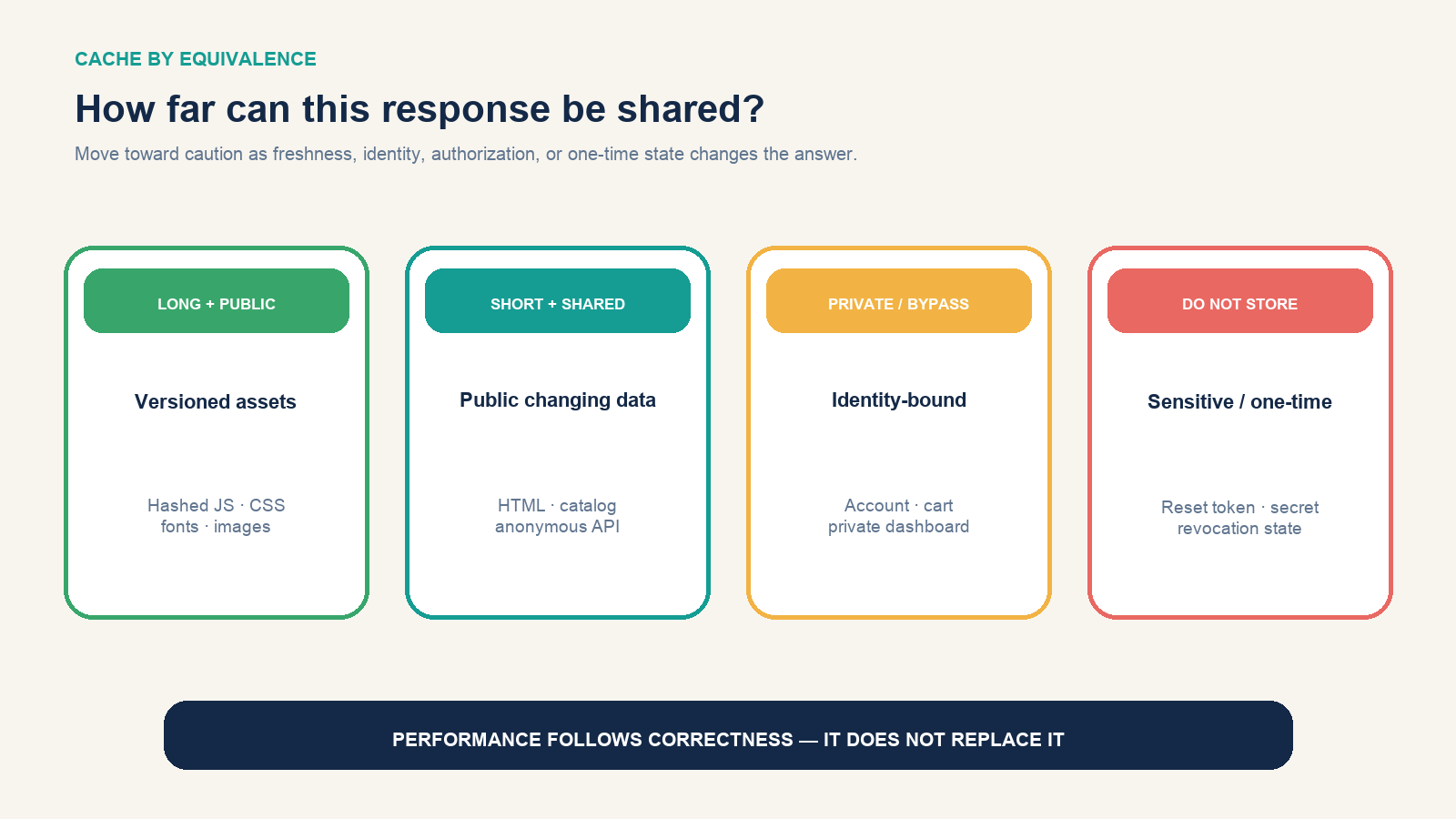
| Response type | Safe starting posture | Main release concern |
|---|---|---|
| Fingerprint-named CSS, JS, image, or font | Public, long TTL, immutable | Change the filename or content hash on every release |
| Public logo or media at a stable URL | Public with a bounded TTL and validators | Purge or shorten TTL when same-URL replacement must appear quickly |
| Public HTML or shared catalog data | Short shared TTL plus revalidation | Editorial freshness, inventory, regional and language variants |
| Anonymous API response | Only after defining query normalization and variation | Parameter explosion, authorization headers, changing data |
| Account, cart, checkout, private dashboard | Do not share by default; use private or bypass |
Cross-user disclosure and stale transactional state |
| Password reset, signed one-time URL, health decision | Usually no-store with application-specific controls |
Sensitivity, replay, revocation, and false confidence from stale data |
A headless CMS makes this boundary visible: published content may be widely cacheable while preview, draft, personalization, and editorial APIs are not. Route and hostname separation can make the rule easier to reason about than one global “cache everything” switch.
Read common Cache-Control recipes carefully
For a fingerprinted public asset whose URL changes with its content:
Cache-Control: public, max-age=31536000, immutableFor public HTML that browsers should revalidate but a shared cache may reuse for five minutes:
Cache-Control: public, max-age=0, s-maxage=300
ETag: "release-184"
For a personalized page that a browser may retain but a shared cache must not reuse across users:
Cache-Control: private, no-cache
ETag: "account-view-27"
For a response that must not be stored:
Cache-Control: no-storeno-cache does not mean “do not store”; it means the stored response must be validated before reuse. no-store prevents storage. private excludes shared caches but allows a private cache. s-maxage supplies a freshness lifetime for shared caches and can override max-age there. Provider rules and CDN-specific headers can alter precedence, so verify the behavior of the product actually deployed.
stale-while-revalidate may permit short stale service while an update happens, and stale-if-error may preserve availability during an origin failure. Use them only when the business accepts the age and content. A stale article may be tolerable; stale account permissions, inventory, prices, safety alerts, or legal status may not be.
Release with versioned URLs; purge stable URLs deliberately
The cleanest asset invalidation changes identity. A build might reference app.4f2a9c.js instead of overwriting app.js. The new HTML points to the new URL; old pages can still load the old asset; and both versions can carry long immutable lifetimes until unused copies are evicted.
Stable URLs—homepages, feeds, manifests, API routes—need a different release plan. Define which keys must be purged, whether query and hostname variants exist, how long global invalidation can take, and what rollback means. Purging the CDN does not clear a visitor’s browser cache or an application cache. A successful deployment test must observe the public URL from more than one path, not merely confirm that the origin has the new file.
Diagnose the cache from response evidence
Start with a normal request, then repeat it. Browser developer tools or a header request can reveal the response metadata:
curl -I https://www.example.com/assets/app.4f2a9c.jsRecord Cache-Control, Age, ETag, Last-Modified, Vary, Set-Cookie, and the CDN’s cache-status header. Ask four separate questions:
- Was the response eligible for shared storage?
- Which request values formed the cache key?
- Was a matching object present and fresh at this location?
- Did a CDN rule override or bypass the origin’s header?
A missing Age does not alone prove failure; dynamic or first-fill responses may not include it, and providers expose different signals. Likewise, one MISS is expected on a cold edge. Repeat the identical request, then change one suspected key dimension at a time. Do not test a personalized endpoint with another user’s credentials or disable privacy controls merely to raise the hit rate.
Measure correctness before celebrating hit ratio
Useful operating measures include hit ratio by content class, origin request rate, bytes served from edge, time to first byte, revalidation volume, purge frequency and duration, stale responses during incidents, and wrong-content or stale-release reports. Segmenting matters: a high-volume image can hide a zero-hit HTML policy, while one incorrectly cached account page can be serious even if the overall ratio looks excellent.
A CDN cache reaches its useful limit when two requests are not safely equivalent, when allowed staleness is shorter than the system can enforce, or when releases cannot reliably change or invalidate identity. In those cases, bypassing shared cache is a correct design result—not a performance failure. Cache the public, deterministic, versionable response; validate the changing response; and keep user-specific or sensitive state out of shared reuse unless the application has proved the boundary end to end.