Several unrelated mobile apps, people-research services, intelligence platforms, and research projects use DeepSearch. Match the exact developer and data path before you pay or rely on a profile.

“DeepSearch” looks like a product name, but it behaves more like a crowded signpost. A mobile people-search assistant, a professional profile service, a multipurpose consumer app, enterprise intelligence platforms, and academic code all use the same or a very similar label. Searching the name alone can therefore send you to the wrong download, policy, review, or cancellation instructions.
DeepSearch is not one universal app or company. The name is currently used by unrelated mobile people-search apps, public-web profile services, consumer search products, enterprise intelligence platforms, knowledge-discovery systems, and research projects. Before downloading or paying, match the exact store listing, developer, package or app ID, domain, privacy policy, terms, billing provider, and intended use. Then test whether claims link to current primary sources and never treat a public-web profile as a regulated background check.
DeepSearch currently points to several different things
The following map is not a ranking. It is an identity check based on official store, product, and project pages reviewed on August 17, 2026. Names, features, and commercial terms can change, so recheck the exact record you are using.
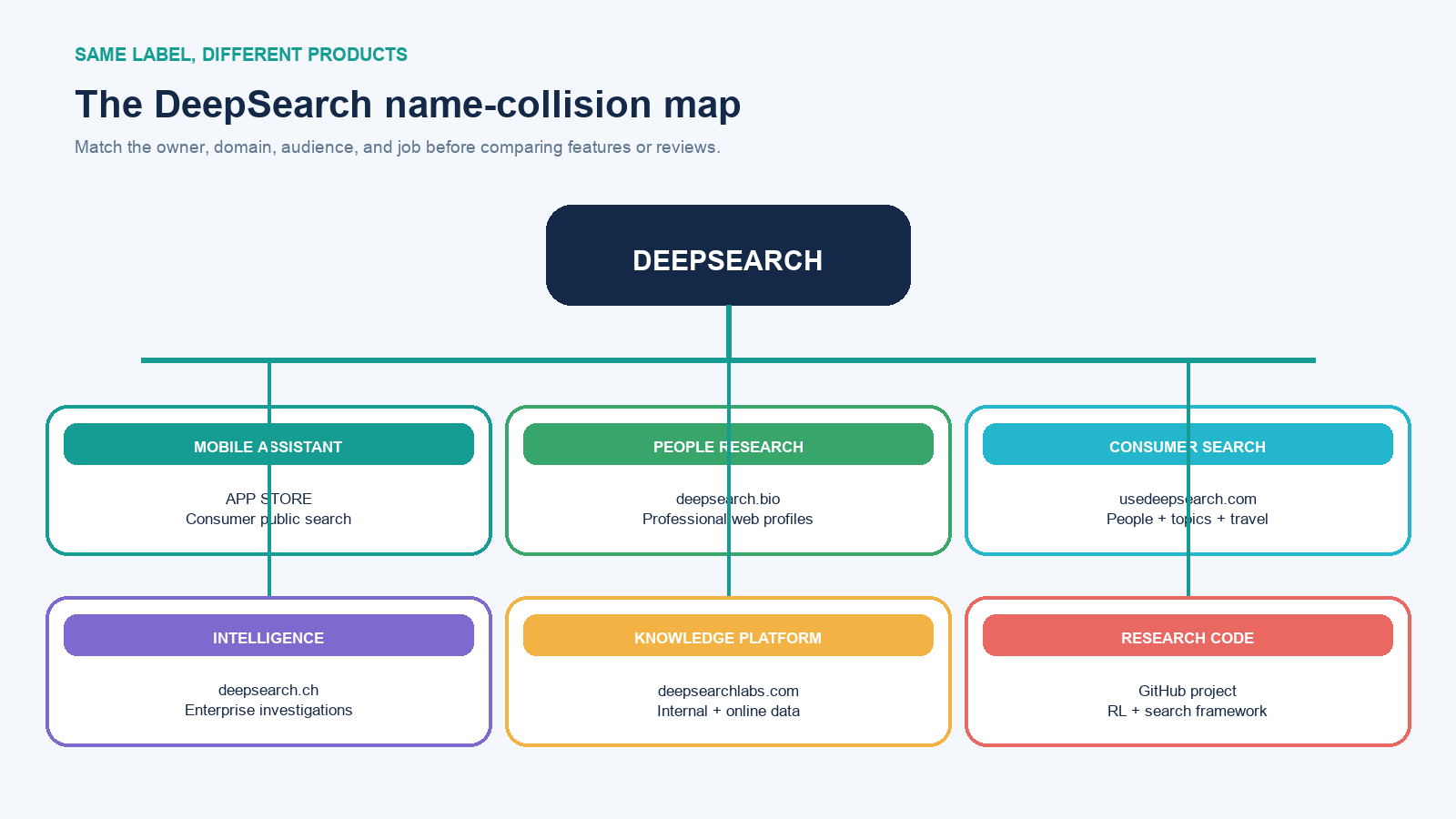
| Identity | Current official location | What it presents itself as | Do not confuse it with |
|---|---|---|---|
| Deepsearch AI Search Assistant | Google Play package hubx.whois.ai.search; developer shown as TapSuite |
A consumer mobile assistant for searching public information about people and topics | A regulated background-check service or an enterprise platform |
| DeepSearch.bio | deepsearch.bio | Public-web professional people research with candidate disambiguation and linked sources | The similarly named mobile apps |
| UseDeepSearch | usedeepsearch.com | A consumer app spanning people, phone, shopping, travel, entertainment, and AI-chat searches | DeepSearch.bio or the Google Play package above |
| DeepSearch Intelligence | deepsearch.ch | An enterprise investigative and due-diligence platform using structured and official sources | A general consumer search subscription |
| DeepSearch Labs | deepsearchlabs.com | Enterprise knowledge discovery across internal and online data | A public people-search site |
| DeepSearch research code | GitHub project | An ICLR 2026 research framework involving reinforcement learning and Monte Carlo Tree Search | An end-user subscription product |
This is why an isolated statement such as “DeepSearch has a people finder” or “DeepSearch is for enterprise research” is incomplete. Both can describe something that exists, yet refer to different entities. If you meant the general AI research technique rather than a named product, start with the separate deep-search workflow guide.
Identify the exact DeepSearch in front of you
Build a six-field identity card before comparing features or reviews. Take the values from the store page and first-party legal pages, not from a screenshot in an advertisement.
- Exact store title: preserve capitalization and subtitle. Similar icons and names are not proof of the same product.
- Developer or seller: record the name displayed by Apple, Google Play, the website footer, and the legal terms.
- Stable identifier: copy the Android package ID, App Store listing URL, website domain, or enterprise contract entity.
- Policy and support routes: open the privacy policy, terms, deletion or opt-out page, and support contact from the product itself.
- Billing channel and account: note whether Apple, Google Play, a web checkout, or an employer administers the subscription.
- Dates: capture the store update, policy revision, purchase, trial end, and your evidence-check date.
The popular Google Play listing currently connects the TapSuite developer identity, package ID hubx.whois.ai.search, and deepsearchai.app support pages. Its privacy page names TapSuite, while the terms page also contains an xStudios entity reference. That does not prove wrongdoing; it could reflect corporate structure or an older document. It does mean the buyer should ask support which entity provides the service and controls personal data before accepting material uncertainty.
What the popular mobile assistant says it does
The Google Play listing describes Deepsearch AI Search Assistant as a way to search public information about people and topics. At the time checked, the listing displayed more than 10 million downloads, hundreds of thousands of reviews, in-app purchases, and a July 4, 2026 update date. Those store signals help identify the app and indicate distribution; they do not independently prove that every result is accurate or complete.
The service’s terms describe searches of publicly available sources and recurring weekly or annual subscriptions. Treat that as the provider’s contractual description, not as an audit of coverage. Marketing phrases such as “deep,” “comprehensive,” or “AI-powered” do not reveal which sources were searched, how identities were matched, when a page was last fetched, or what was omitted.
Public does not mean accurate, complete, or consequence-free
Public-web research can join fragments that were previously difficult to find together. That changes practical exposure even when each fragment was already public. Common failure modes include two people sharing a name, an old employer surviving after a job change, a copied profile losing its original context, a relative being mistaken for the subject, and an automated summary stating an inference as fact.
A credible people-research product should expose candidate alternatives and the pages supporting each material claim. DeepSearch.bio, for example, documents candidate disambiguation, cited profile results, private lookup behavior, and an opt-out route. It also explicitly says it is not a consumer-reporting agency and must not be used for decisions governed by the Fair Credit Reporting Act. That boundary matters: a public-web profile is not identity proof, a criminal-record check, or authorization to make employment, housing, credit, insurance, or tenant-screening decisions.
Use the smallest amount of personal data needed for a legitimate purpose. Do not search private identifiers merely to test a product, publish an assembled profile, contact relatives, or treat absence from results as proof that a person or fact does not exist. For the narrower task of identifying an unknown caller or account, use the safety-first process in Who Is This? rather than assuming a people-search match is certain.
Test the product without using another person as an experiment
A safe pilot uses your own public footprint or an unambiguous public figure whose role and official pages are already known. Define the test before subscribing:
- Enter only the minimum disambiguating facts and record how many candidates appear.
- Choose the correct candidate without relying on sensitive data the product reveals.
- List five known current facts, two known outdated facts, and one tempting but unverified inference.
- Open every cited source. Prefer the person’s or organization’s official page for role, the issuing body for credentials, and the original publication for quotes.
- Mark each output as supported, contradicted, stale, ambiguous, or unsourced. A polished paragraph is not a sixth evidence class.
- Test whether a corrected or removed source changes the result after an appropriate refresh period.
- Locate correction, deletion, opt-out, saved-history, and export controls before entering anything more sensitive.
Keep a short evidence ledger with claim, source URL, source owner, publication or update date, subject match, and your verdict. If the product cites only another aggregator, search snippet, or generated summary, trace the claim farther upstream. If two primary sources conflict, keep the conflict visible rather than letting the tool choose certainty for you.
Judge the source trail—not the length of the answer
For every material claim, ask four questions: Can I open the cited page? Is it the right person or entity? Does the page actually support the wording? Is it current enough for this decision? A fifth check is useful for changing facts: does the answer update after the primary source changes?
Coverage also needs a defined denominator. “Found 30 sources” is not meaningful if you do not know which relevant source classes were expected. For a professional profile, those might include the current employer, licensing body, author identifier, conference program, patent office, court or company registry, and the subject’s own site. Not every person will have every class, but declaring the expected set makes omissions visible.
Separate retrieval from interpretation. The product may correctly retrieve a page yet infer the wrong relationship; it may match the right person but summarize an old role; or it may generate a plausible answer with no inspectable source. Score those separately. This prevents fluent writing from receiving credit for evidence it did not produce.
Treat the subscription screen as part of the product
Do not hard-code a price from an article or advertisement. The amount, trial, interval, currency, and offer can vary by store, country, account, and date. Immediately before confirming, capture:
- the trial end and first charge date;
- the recurring interval and exact checkout price;
- the Apple ID, Google account, or web account being billed;
- the receipt and subscription-management path;
- what happens to saved searches, exports, and data after cancellation;
- whether access ends immediately or at the close of the paid period.
For a Google Play purchase, manage the subscription through the Google account that bought it. Google’s current instructions explicitly warn that uninstalling an app does not cancel its subscription. For Apple billing, locate the subscription under the purchasing Apple Account and follow Apple’s cancellation steps. If you cannot find it, search receipts to identify the account or billing company instead of repeatedly buying through another channel.
Decide whether DeepSearch earns a paid trial
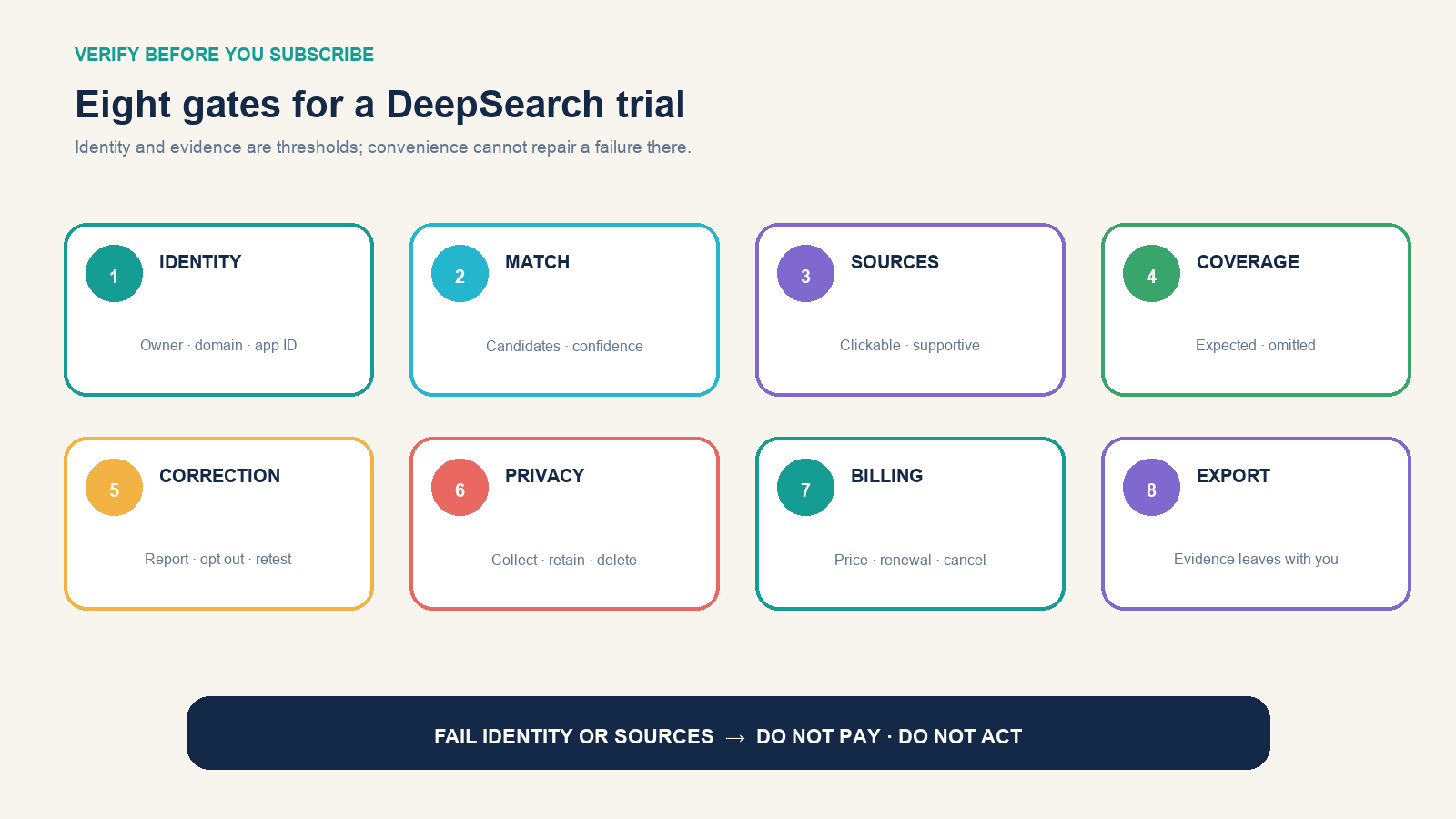
Score the exact product, plan, account, and date you tested—not the shared name. Give each gate 0 for fail or unknown, 1 for limited, and 2 for clear and usable:
| Gate | A pass looks like | Walk-away signal |
|---|---|---|
| Identity | Store, developer, domain, policies, and billing entity can be reconciled | You cannot tell which company or listing you are evaluating |
| Match | Alternative candidates and reasons for the match are visible | One confident profile appears for an ambiguous name |
| Sources | Material claims link to pages that support them | Answers cite only generated text or inaccessible snippets |
| Coverage | Expected source classes and meaningful omissions are clear | “Comprehensive” has no testable definition |
| Correction | Wrong or stale claims can be reported and retested | No correction, opt-out, or support route is findable |
| Privacy | Collection, retention, deletion, sharing, and lookup visibility are understandable | The data path is unclear for the information you must enter |
| Billing | Price, interval, renewal, account, and cancellation are visible before purchase | A trial hides the first charge or managing account |
| Export | Citations and findings can move into your accountable workflow | Results are trapped in screenshots or unsupported prose |
Identity and sources are mandatory: if either scores zero, do not pay and do not act on the output. For casual, low-consequence discovery, a modest score elsewhere may still justify a controlled trial. For journalism, recruiting, due diligence, or organizational research, require strong traceability, correction, privacy, and export—and follow the legal and policy requirements of the actual decision.
The practical recommendation
First identify which DeepSearch you encountered. If it is a consumer mobile app, verify the package or App Store record, test it on non-sensitive known facts, inspect every source, and document the billing path before starting a trial. If it is DeepSearch.bio, an enterprise platform, or research code, evaluate it against that specific purpose rather than reviews of a namesake.
The name is not the product, download count is not accuracy, and public data is not permission for consequential use. A DeepSearch product earns trust only when its owner, data path, source trail, limitations, and subscription behavior remain clear after the marketing page is closed.