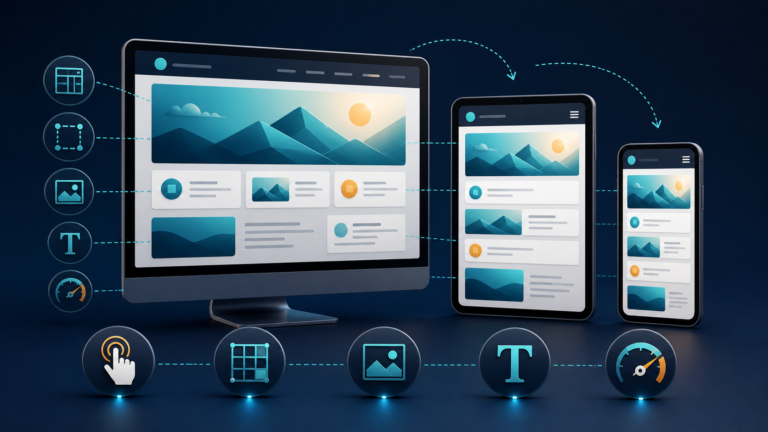
A headless CMS separates content management from presentation. Evaluate the content model, delivery responsibilities, and a production-like pilot before adopting it.

A headless CMS manages structured content in a backend and exposes it through APIs instead of controlling the website theme or page rendering. Editors work in the CMS; developers build the website, app, or other “head.” The separation supports content reuse and custom experiences, but the team must also own preview, rendering, caching, search, analytics, security, and deployment.
Headless is therefore an operating-model decision, not an automatic upgrade. A small team running one conventional marketing site may gain more from an integrated CMS that already connects editing, templates, plugins, and publishing. Headless becomes persuasive when the same governed content must serve multiple funded products, or when a custom frontend is a durable requirement rather than a redesign preference.
Trace the ownership boundary
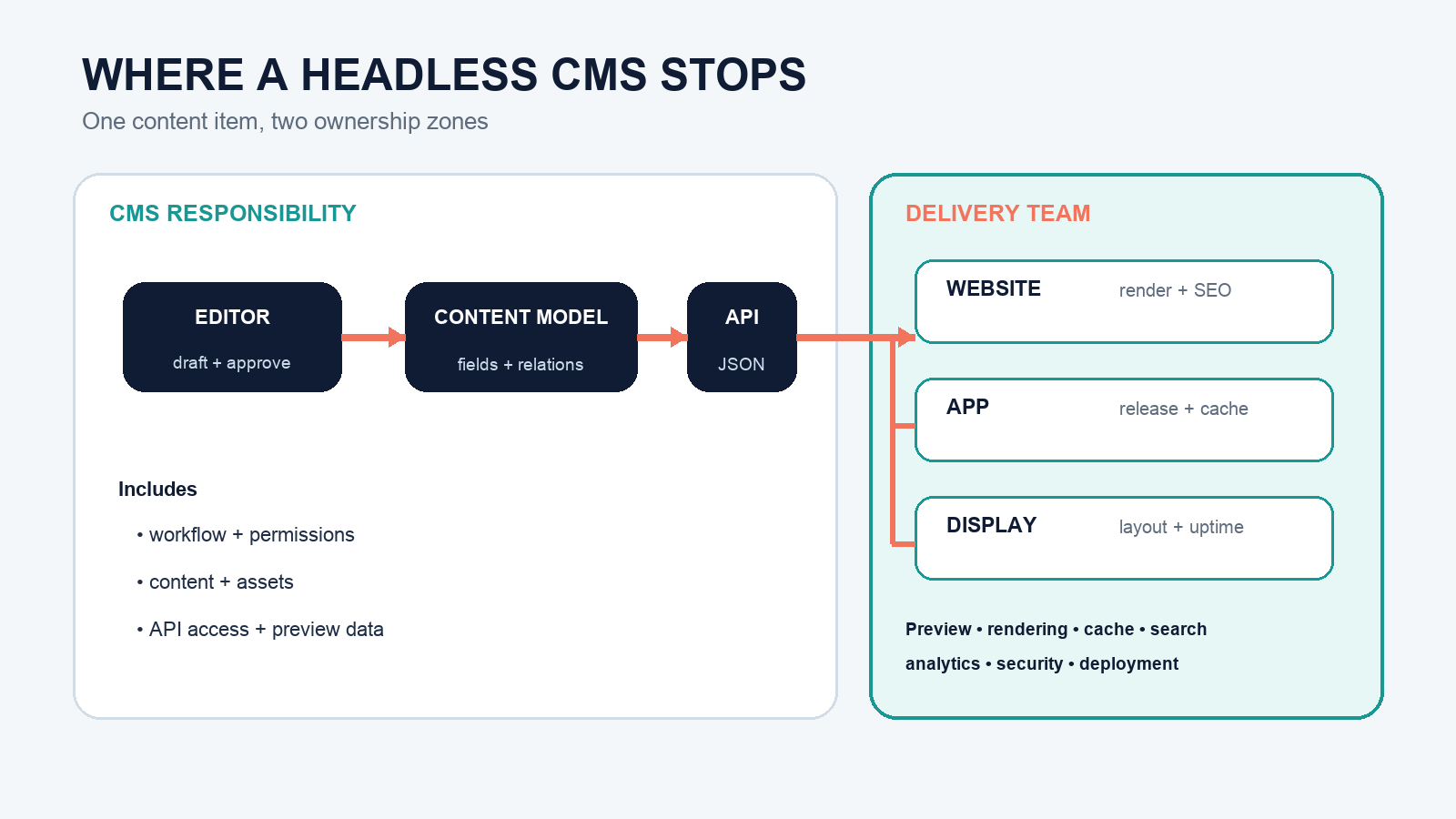
An editor creates a product, location, article, or campaign against a content model. The CMS stores fields and assets, applies permissions and workflow, and exposes authorized versions. A separate website, mobile app, kiosk, or voice experience fetches those records and renders them with its own code.
The separation is visible in official interfaces. Contentful’s API documentation distinguishes a read-only delivery API, a preview API for unpublished content, and a management API for creating or updating records. The WordPress REST API handbook likewise describes JSON access that can feed a completely separate application. A traditional CMS can be used headlessly; the architecture matters more than the vendor label.
The API is not the finished user experience. It is the contract between the content system and every consuming frontend. Schema changes, unpublished references, rate limits, locale fallbacks, asset URLs, and errors all cross that boundary and need agreed behavior.
Test whether the content is truly reusable
Headless works best with structured records, not giant page-shaped blobs. Imagine a store location used on a website, app, and in-store display. A reusable model might contain:
- name, address, coordinates, phone, and time zone
- regular hours plus dated exceptions
- services represented by stable references
- accessibility attributes and transit notes
- approved short and long descriptions
- images with alt text, crop intent, and usage rights
Each channel can select and format those fields without copying the underlying facts. By contrast, one rich-text “store page” containing the address, hours, images, and promotional layout may be easy to edit for a website but difficult to reuse safely in an app.
Run a paper test before selecting software: list two real channels and mark which fields both need, which rules differ, and who owns each field. If almost nothing is reused, “omnichannel” is not yet a strong reason to decouple.
Separate the gains from the work they create
| Potential gain | New responsibility | Evidence to request |
|---|---|---|
| One content source for several channels | Stable models, references, locale rules, and versioned API contracts | One record rendered correctly in two production-like clients |
| Frontend framework freedom | Rendering architecture, accessibility, browser support, and upgrades | Ownership map and supported-version policy |
| Independent deployments | Webhook reliability, build queues, invalidation, rollback, and monitoring | Publish-to-visible timing and failed-build drill |
| High-performance cached delivery | Cache keys, dependencies, purge scope, and stale-content behavior | Measured fresh/stale tests for related pages |
| Custom editorial workflow | Preview, page composition, validation, and training | An editor completes a draft-to-publish task without developer help |
The subscription price covers only part of this system. Budget frontend engineering, platform hosting, search, image processing, monitoring, incident response, accessibility testing, migrations, and editorial support. A lower CMS license can accompany a higher total cost of ownership.
Design preview as a secure product
Editors need to see drafts in the real layout before publication. That requires more than exposing the production site to a draft API. The preview path must authenticate the editor, fetch unpublished content with a server-kept credential, render the correct locale and relationships, display a clear preview state, and provide a safe exit.
Contentful’s Preview API overview uses a separate preview token and notes that production delivery tokens do not work with the preview service, reducing accidental disclosure of drafts. Frameworks then need their own preview mode; Next.js Draft Mode, for example, switches statically generated pages into a draft-aware request path.
Test preview with linked drafts, scheduled content, expired campaigns, missing images, translations, permission changes, and a logged-out browser. Do not put a privileged preview or management token in client-side JavaScript. The OWASP API Security Top 10 is a useful threat-model starting point, not a substitute for reviewing the specific authorization and data exposure design.
Close the publish-to-visible loop
A coupled CMS often renders a changed page immediately. A headless site may cache API responses, prebuild HTML, cache pages at an edge, and reuse one record on dozens of routes. Publishing is incomplete until all affected experiences show the intended version.
A reliable flow usually needs:
- The CMS records a publish or unpublish event.
- A signed webhook or integration identifies the changed record.
- The delivery service maps that record to affected pages, lists, feeds, and channels.
- Caches are invalidated or content is rebuilt with bounded scope.
- Monitoring verifies the new version and reports failures to an owner.
Contentful’s webhook reference describes change notifications sent to configured endpoints. The receiving code still has to authenticate the request, handle retries and duplicates, map dependencies, and avoid rebuilding everything for every edit.
Framework behavior also matters. The Next.js revalidatePath reference distinguishes path invalidation from tag-based data invalidation and warns that other pages using the same data can remain stale if only one path is refreshed. Your test plan should edit one shared author, category, product, or location and verify every dependent route.
Choose a rendering strategy for users and crawlers
Headless does not mean browser-only rendering. A frontend can pre-render pages, render on a server per request, hydrate server-generated HTML, or fetch data in the client. Choose per route based on freshness, personalization, traffic, build time, and operational capacity.
Public search pages need special care. Google explains that JavaScript applications pass through crawling, rendering, and indexing, and recommends server-side rendering, static rendering, or hydration rather than treating dynamic rendering as a long-term workaround. Verify the rendered HTML, canonical URL, status code, title, meta description, structured data, internal links, images, and robots directives without assuming the framework makes them correct.
Pass the five-question adoption gate
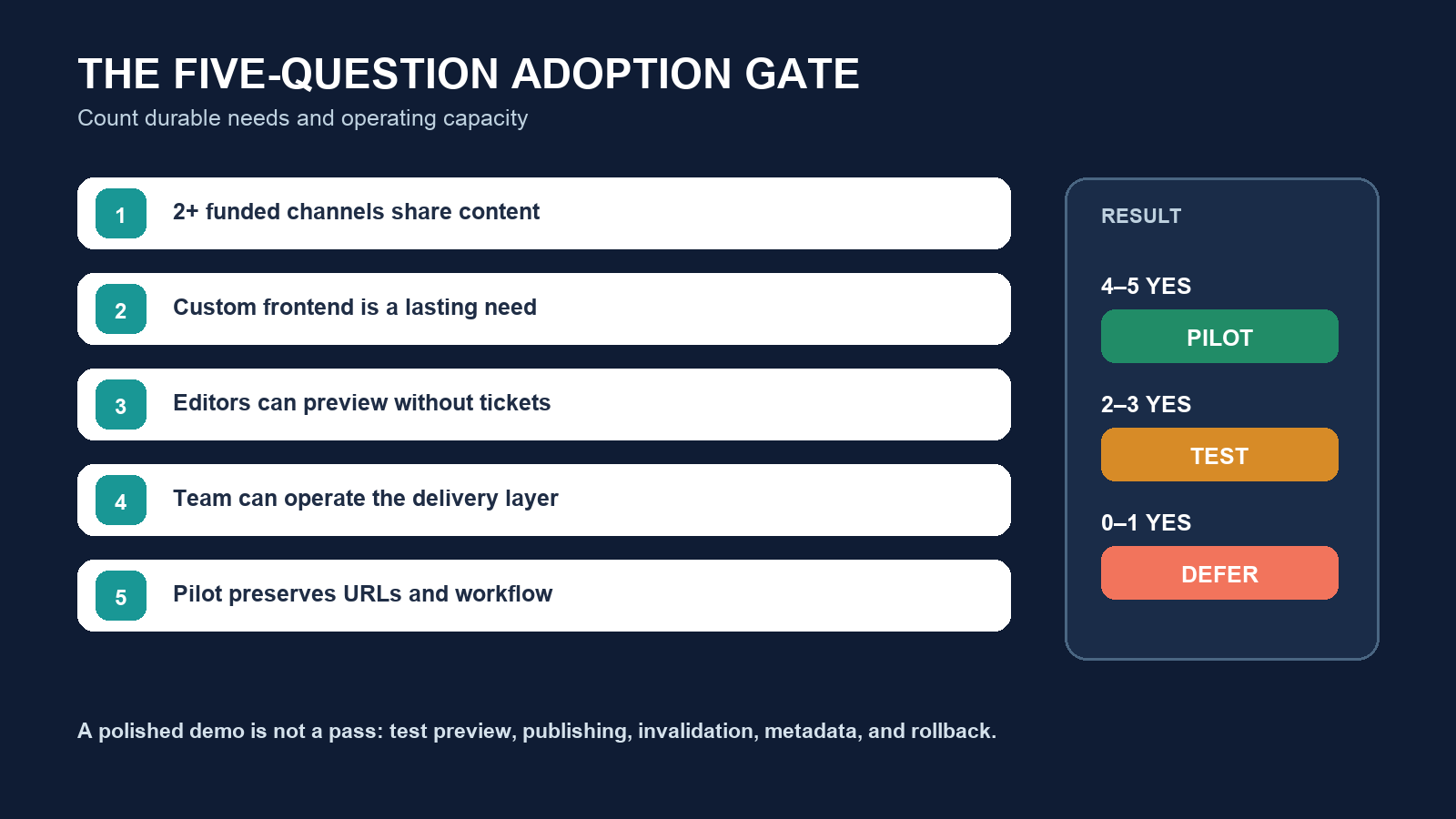
- Do at least two funded channels need the same structured content? Do not count hypothetical future devices.
- Does the frontend need behavior a conventional theme cannot reasonably support? A modern visual design alone is not enough.
- Can editors preview, compose, localize, and publish without routine developer tickets? Ask an editor to prove it in the pilot.
- Can the team own the delivery layer for several years? Include upgrades, on-call coverage, monitoring, accessibility, security, and staff turnover.
- Can a representative migration preserve URLs, metadata, relationships, workflow, and rollback? Test a vertical slice before approving a wholesale move.
Four or five clear yes answers justify a pilot. Two or three call for testing the hardest assumption first. Zero or one usually means the team should defer and improve the existing CMS. This is a discussion gate, not procurement arithmetic; a legal, localization, or product constraint can outweigh several small benefits.
Run a vertical-slice pilot with exit criteria
Choose one content type with real relationships, one editor, and two delivery surfaces. Model and migrate a small set; implement preview; publish, update, unpublish, and roll back; verify cache invalidation, SEO metadata, accessibility, localization, analytics, and failure alerts. Measure editorial completion time and recovery time as well as page speed.
Define success before the build. Example criteria might include: an editor publishes without developer help; both channels show the approved version within a stated interval; an unpublished record disappears everywhere; no preview data is available to an anonymous request; a failed deployment raises an alert and leaves the last good version live; old URLs preserve redirects and metadata.
If headless solves only one narrow area, consider a hybrid architecture. Keep integrated page publishing where it is efficient and expose selected structured content through APIs. The decision rule is: adopt headless when reusable structured content and custom delivery are durable needs, and the organization explicitly funds the delivery responsibilities it removes from the CMS.