A practical guide to the three meanings of sitemap, the XML protocol, URL inclusion rules, submission, and health monitoring.
A technically perfect sitemap can sit beside a site that search engines barely index. That is not a contradiction: the sitemap reports preferred destinations, but it does not repair thin content, inaccessible pages, duplicate URLs, or weak internal navigation.
A sitemap is a structured inventory of site content and relationships. For search engines it usually means a machine-readable XML file of preferred URLs; for people it can mean an HTML directory, and for planning it can mean a visual hierarchy. Those three artifacts share a name but serve different users.
One word describes three different artifacts
| Type | Primary user | What it contains | Main job |
|---|---|---|---|
| XML sitemap | Search-engine crawlers | Absolute URLs plus optional metadata and supported extensions | Help discovery and communicate preferred crawl candidates |
| HTML sitemap | Website visitors and crawlers following links | A normal web page of organized, crawlable links | Provide a human-facing route into important sections |
| Visual sitemap | Designers, writers, product owners, and developers | Boxes, levels, and connections representing planned pages | Plan information architecture before or during a build |
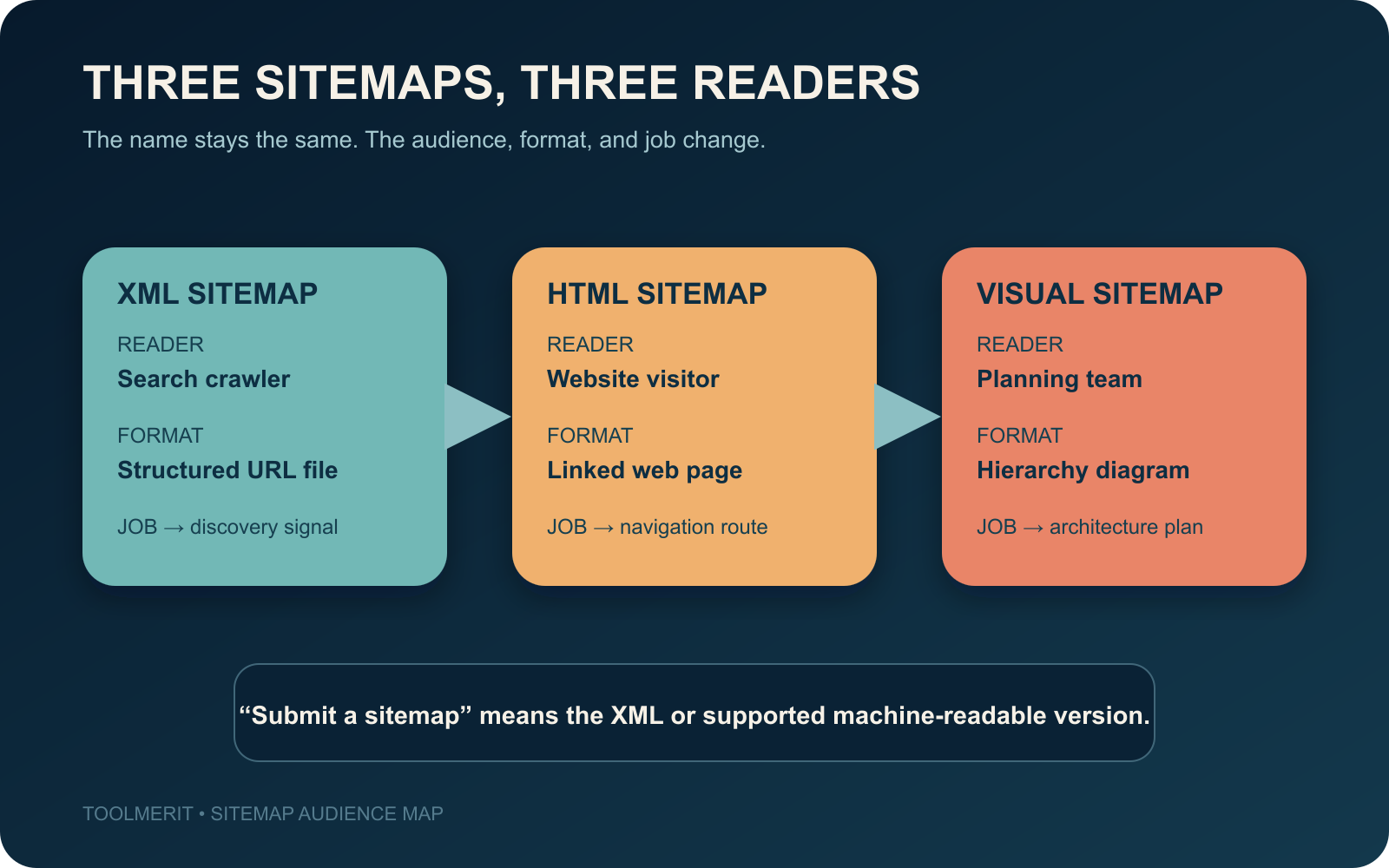
When SEO documentation says “submit your sitemap,” it means the machine-readable kind. Google’s sitemap overview defines it as a file containing information about pages, videos, images, and other files, plus relationships and useful metadata. An HTML or visual sitemap may still be valuable, but neither is a substitute for the XML submission.
What an XML sitemap actually communicates
The basic message is: “These are the canonical URLs on this site that we want search systems to know about.” An entry can also report when a page was meaningfully modified and, through supported extensions, describe alternate-language pages, images, videos, or news content.
An XML sitemap is most useful as a current inventory, not a historical ledger. Google’s build-and-submit guidance says to include URLs you want to see in search results, use complete absolute URLs, and choose the preferred canonical when the same content is available through multiple addresses. Its canonicalization guidance further explains that sitemap entries are canonical suggestions; Google still decides whether pages are duplicates.
A healthy entry therefore points directly to the preferred, publicly reachable page. Avoid filling the file with redirects, error pages, parameter duplicates, internal search results, login-only screens, or URLs deliberately marked noindex.
A minimal XML sitemap you can read
<?xml version="1.0" encoding="UTF-8"?>
<urlset xmlns="http://www.sitemaps.org/schemas/sitemap/0.9">
  <url>
    <loc>https://www.example.com/guides/choose-a-camera</loc>
    <lastmod>2026-08-16</lastmod>
  </url>
  <url>
    <loc>https://www.example.com/guides/edit-a-photo</loc>
    <lastmod>2026-08-12</lastmod>
  </url>
</urlset>
The namespace and each <loc> are essential to this XML form. The <lastmod> field is optional and should reflect the last meaningful change to the page, not the moment a generator reran. Google says it uses <lastmod> when the value is consistently accurate; it ignores <priority> and <changefreq>.
The Sitemaps protocol limits one sitemap file to 50,000 URLs or 50 MB uncompressed. Larger inventories must be split across files, normally gathered under a sitemap index. Compression can reduce transfer size, but the uncompressed limit still applies.
Pass each URL through an inclusion gate
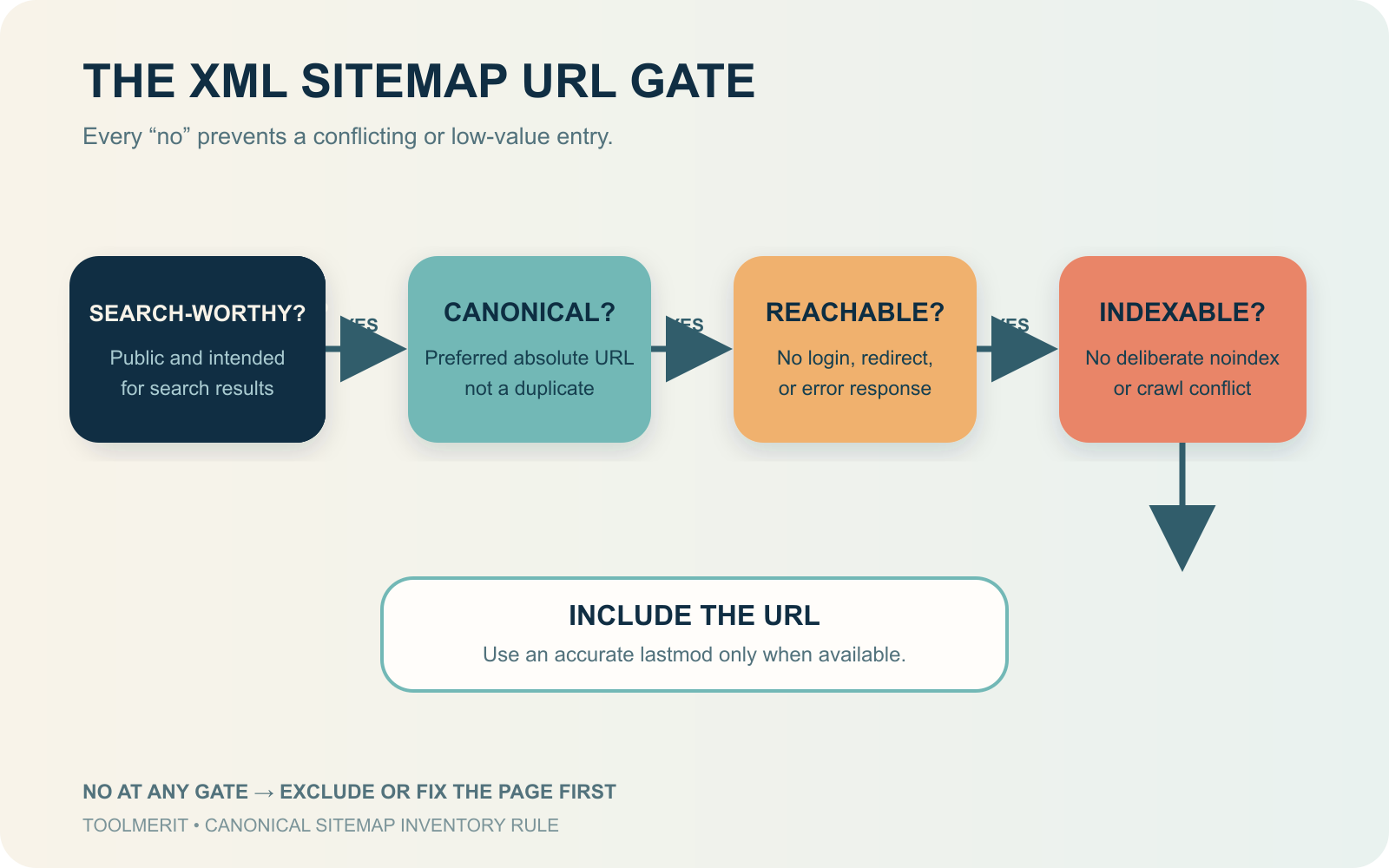
Before adding a URL, ask four questions in order:
- Should this page appear in search? If it is private, temporary, duplicated, or intentionally excluded, stop.
- Is this the preferred canonical URL? List the destination, not a redirect or alternate parameter version.
- Can an unauthenticated crawler fetch a useful page? The URL should not depend on a login and should not resolve to an error.
- Is indexing allowed? Do not send conflicting signals by listing a page you deliberately mark
noindexor prevent the crawler from accessing.
Use the sitemap generator as an export of these rules. A generator that copies every row from a URL database without applying them merely automates inconsistency.
What a sitemap cannot do
A sitemap can improve discovery, especially for a large, new, media-heavy, or weakly connected site. It cannot guarantee crawling or indexing. Google explicitly describes submission as a hint, not a command.
It also does not replace crawlable internal links. Google’s link guidance explains that links help its systems discover new pages and understand relevance. A URL that appears only in XML but is unreachable through the site’s navigation remains hard for visitors to find and weakly integrated into the site’s structure.
Finally, a sitemap does not block anything. Removing a URL from the file does not create a noindex rule, authentication requirement, redirect, or deletion response. Use the control that matches the intended outcome.
When a site benefits most from a sitemap
Google says a sitemap is particularly helpful when a site is large, new with few external links, or rich in video, image, or news content. A smaller site with comprehensive crawlable linking may not need one for discovery, although a CMS-generated sitemap can still provide a convenient inventory and monitoring surface.
Before building manually, check common locations such as /sitemap.xml, inspect /robots.txt for a Sitemap: line, and review the CMS or SEO plugin settings. WordPress, Wix, Blogger, and many other systems can generate a sitemap automatically. For more than a few dozen URLs, automated generation tied to publishing state is safer than hand-maintained XML.
Publish, submit, and monitor the file
- Publish: place the sitemap at a stable public URL, commonly at the site root.
- Declare or submit: add its URL to
robots.txt, submit it through Google Search Console, or use another supported submission path. - Verify retrieval: confirm that the sitemap URL loads without authentication, redirects unexpectedly, or returns an error.
- Inspect processing: check whether the search engine parsed it and review errors rather than treating “submitted” as “healthy.”
- Compare inventory with indexing: use the sitemap as a filter for investigating why intended URLs are excluded, duplicated, redirected, or inaccessible.
The official Search Console Sitemaps report shows submission history, fetch status, and parsing errors. It is a transport and syntax check; the Page Indexing report and URL Inspection provide the stronger evidence about individual URL eligibility and indexing.
Keep the sitemap smaller than the site
A sitemap is useful because it expresses a deliberate subset: the canonical, public pages you actually want discovered and considered for search. If its URL count grows whenever the application invents a filter, session, archive, or duplicate path, fix the generation rule instead of celebrating a larger file.
The operating limit is straightforward: use XML for crawler discovery, HTML when visitors need a directory, and a visual map when the team is planning structure. None of them replaces accessible pages, clear links, sound canonicalization, or useful content.