See what a podcast RSS feed contains, how apps turn it into a show, and which identifiers must remain stable when you publish or migrate.
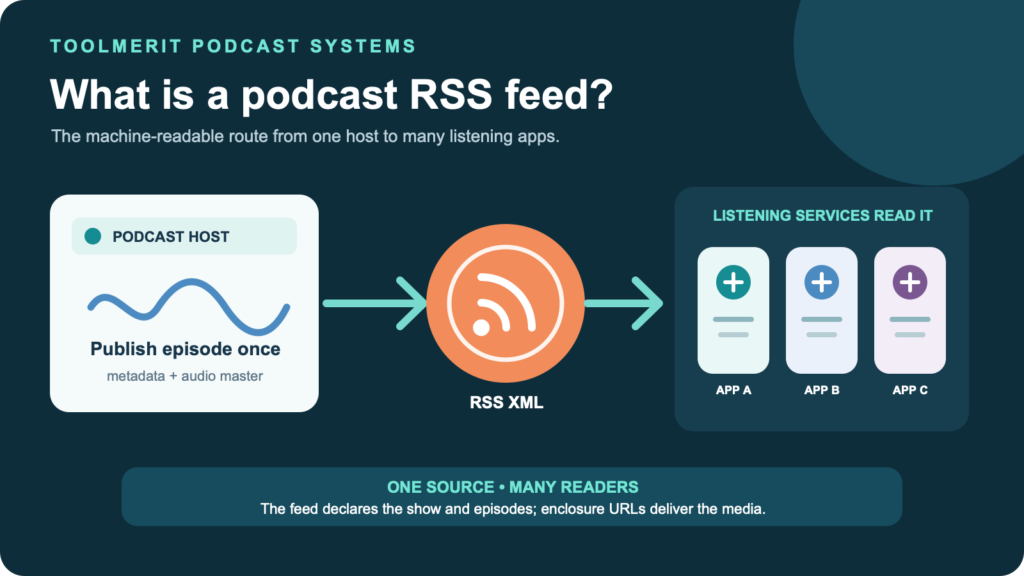
You publish an episode once in your hosting dashboard, yet it can appear in several podcast apps without uploading the audio to each one. The RSS feed is the relay that makes that possible.
A podcast RSS feed is a public or private URL for an XML document that lists a show’s metadata and episodes. The channel layer carries show-level information such as the title, description, and artwork. Each episode item carries its own title, publication date, stable identifier, and an enclosure that points to the media file. Podcast directories and apps read the feed to discover updates. The feed is not the audio file, show page, or listening app; it is the machine-readable distribution record connecting them.
A podcast RSS feed is the show’s machine-readable source
The feed is usually a web address such as https://feeds.example.com/my-show.xml. If the pieces of that address are unfamiliar, ToolMerit’s guide to reading a URL from scheme to path explains what the host and path identify. Opening a public feed in a browser may show raw XML, a styled preview, or a download prompt. All three can point to the same underlying data.
RSS 2.0 is a web-content syndication format expressed in XML. A podcast adapts it by using one <channel> for the show and one <item> for each episode. Podcast-specific namespaces add fields for artwork, categories, episode types, explicit-content flags, and other directory needs. Most creators never edit these tags by hand; the host writes the feed from fields in its dashboard.
That makes the hosting account consequential. It normally stores or serves the media, generates the feed, and exposes the feed URL. When comparing providers, use the audio and podcast tool directory as a starting point, but ask about feed access, media export, redirects, and GUID preservation before treating any host as portable.
Public and private feeds solve different distribution problems. Apple says a public feed can be submitted to a catalog, while a private feed may be personalized, password-protected, or authenticated for a limited audience. Spotify also warns that enabling a public RSS feed can expose the email address stored in it and that third-party aggregators may discover the feed. Do not assume “anyone with the URL” and “listed in every directory” are the same thing.
Read the feed as two layers: channel and items
This shortened example is not a complete directory submission, but it shows the structure that matters:
<?xml version="1.0" encoding="UTF-8"?>
<rss version="2.0" xmlns:itunes="http://www.itunes.com/dtds/podcast-1.0.dtd">
  <channel>
    <title>Field Notes</title>
    <description>Short reports from working researchers.</description>
    <link>https://example.com/field-notes</link>
    <language>en-us</language>
    <itunes:image href="https://cdn.example.com/show-cover.jpg" />

    <item>
      <title>Episode 12: Reading a River</title>
      <guid isPermaLink="false">field-notes-episode-12</guid>
      <pubDate>Tue, 18 Aug 2026 09:00:00 +0000</pubDate>
      <enclosure
        url="https://cdn.example.com/field-notes-12.mp3"
        length="28491377"
        type="audio/mpeg" />
    </item>
  </channel>
</rss>| Layer | What it describes | Identity to protect |
|---|---|---|
| Channel | The show: title, description, website, language, artwork, categories, owner details, and feed-wide settings. | The feed URL and the continuity of the show it represents. |
| Item | One episode: title, summary, date, duration or season data, a GUID, and a media enclosure. | The episode GUID; the enclosure URL must also be unique and usable. |
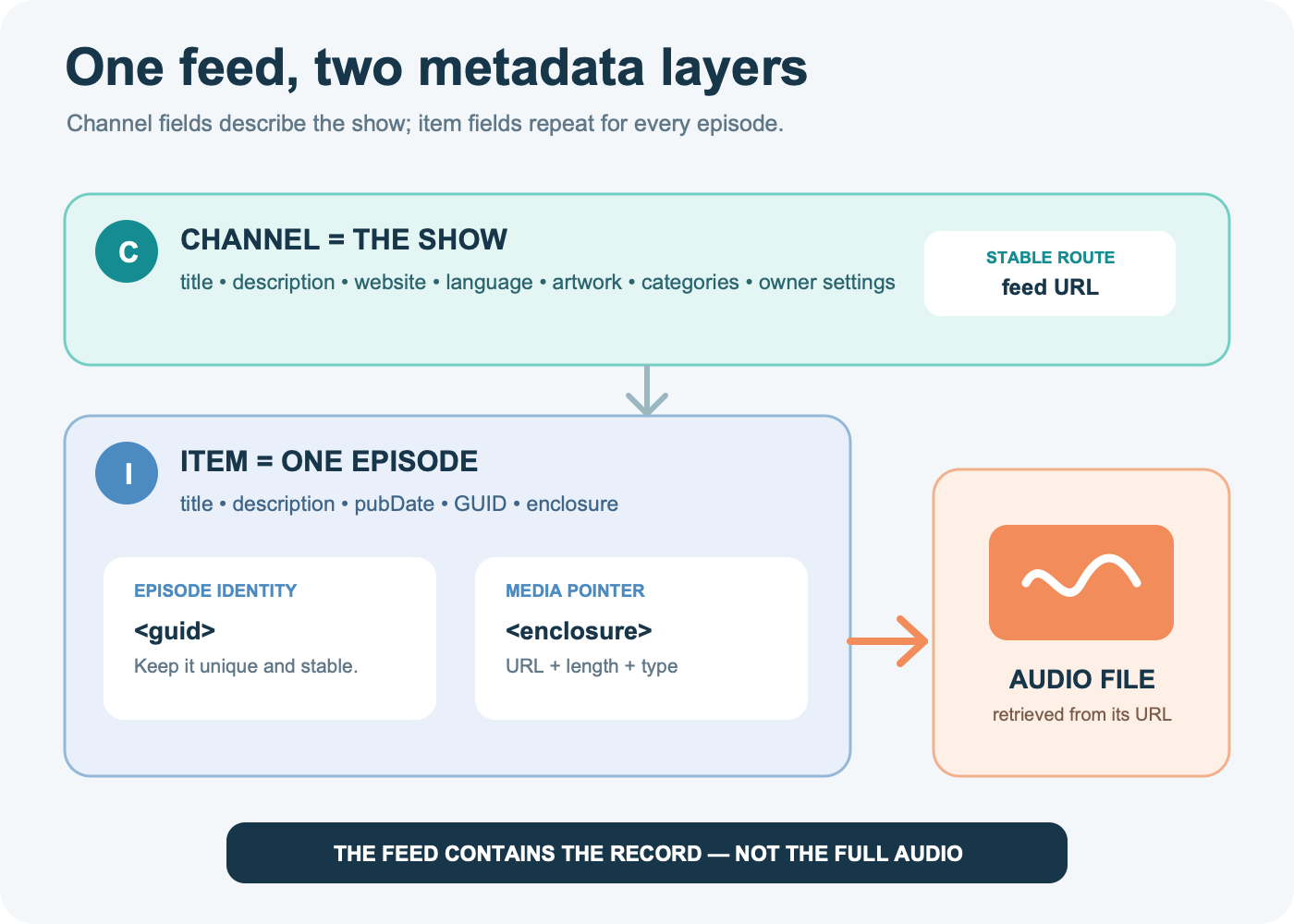
The RSS 2.0 specification defines the channel, items, GUID, publication date, and enclosure. An enclosure has a media URL, byte length, and media type. Apple adds a stricter podcast submission contract: a public RSS 2.0 feed, required tags, artwork, at least one episode, a unique enclosure for each episode, and a GUID that does not change.
The distinction between GUID and enclosure is important. The GUID says “this is the same episode record.” The enclosure says “retrieve its media here.” Treating an audio URL as the only identity makes routine media or host changes much riskier.
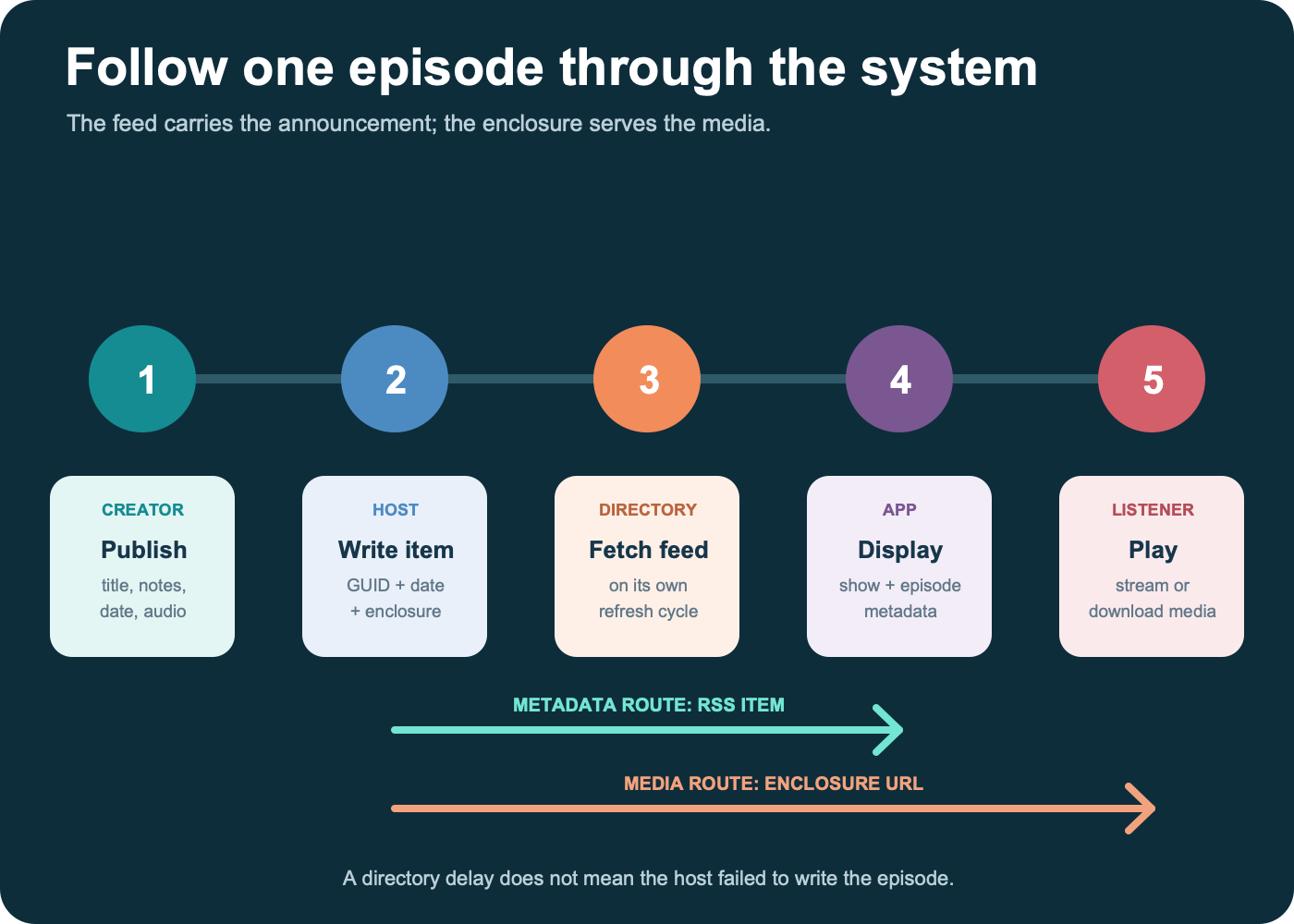
Follow one episode from host to listener
- You publish in the host. The dashboard accepts the title, notes, date, artwork choices, and audio master.
- The host updates the feed. It adds or changes an
<item>and provides an enclosure URL for the media. - A directory or app retrieves the feed. Services that already know the feed URL check it on their own schedule. Initial submission to a catalog is a separate action.
- The service reads the metadata. It associates the item with the existing show and episode identity.
- The listener requests playback. The app streams or downloads the media from the enclosure location; the XML itself does not contain the full audio.
The RSS URL therefore does not automatically submit a show everywhere. Spotify says creators using its hosting must enable the RSS feed for distribution outside Spotify and still submit to other listening platforms. The publishing and distribution tools hub can help with the surrounding release workflow, but each catalog keeps its own submission and review process.
Nor is the path instant. Spotify says new episodes and changes usually appear shortly after publishing but can take up to 24 hours to reach every platform. If the raw feed already contains the correct item, distinguish directory refresh delay from the transport and interaction delays covered in ToolMerit’s guide to diagnosing latency by layer. Re-uploading the episode immediately can create a second problem instead of fixing the first.
Separate the feed from the files and apps around it
| Component | Its actual job | What it is not |
|---|---|---|
| Hosting dashboard | The creator-facing control panel that stores settings and writes the feed. | The public syndication document. |
| RSS feed | The machine-readable show and episode record. | The audio library, listening interface, or directory listing. |
| Enclosure file | The MP3, AAC, or other supported media retrieved for playback. | The episode’s full metadata record or permanent identity. |
| Show website | A human-readable page for episodes, transcripts, links, and branding. | A substitute for a valid podcast feed. |
| Directory or listening app | A catalog, interface, cache, and playback experience built from feed data and platform features. | The canonical creator-controlled source. |
An RSS feed can look superficially like an XML sitemap, but their jobs differ. A sitemap tells search engines which site URLs you want them to know about. A podcast feed syndicates ordered content records and points to playable media. Submitting one where the other is expected will not work.
The feed is also not a backup. It may reference media that later disappears, and a host export may omit working files, notes, or project sessions. Keep the original recording, edited master, artwork, transcript, and metadata copy under a restore-tested backup plan that is independent of the podcast host.
Know what changes safely—and what can break distribution
| Change | Normal handling | Main risk |
|---|---|---|
| Show or episode title, description, or artwork | Update the existing record and allow directories time to refresh. | Cached copies may lag; replacing artwork at the same URL may not trigger a fresh download everywhere. |
| Episode media | Keep the episode GUID stable; follow the host’s replacement procedure. | A changed file may remain cached, while a changed identity may create a duplicate. |
| Episode GUID | Do not change it for an existing episode. | Apps can interpret the record as a new episode, fragment analytics, or display duplicates. |
| Feed URL or hosting provider | Preserve all episode GUIDs, redirect the old feed to the new feed, and update services that require a new URL. | Followers may remain attached to the abandoned feed and stop receiving episodes. |
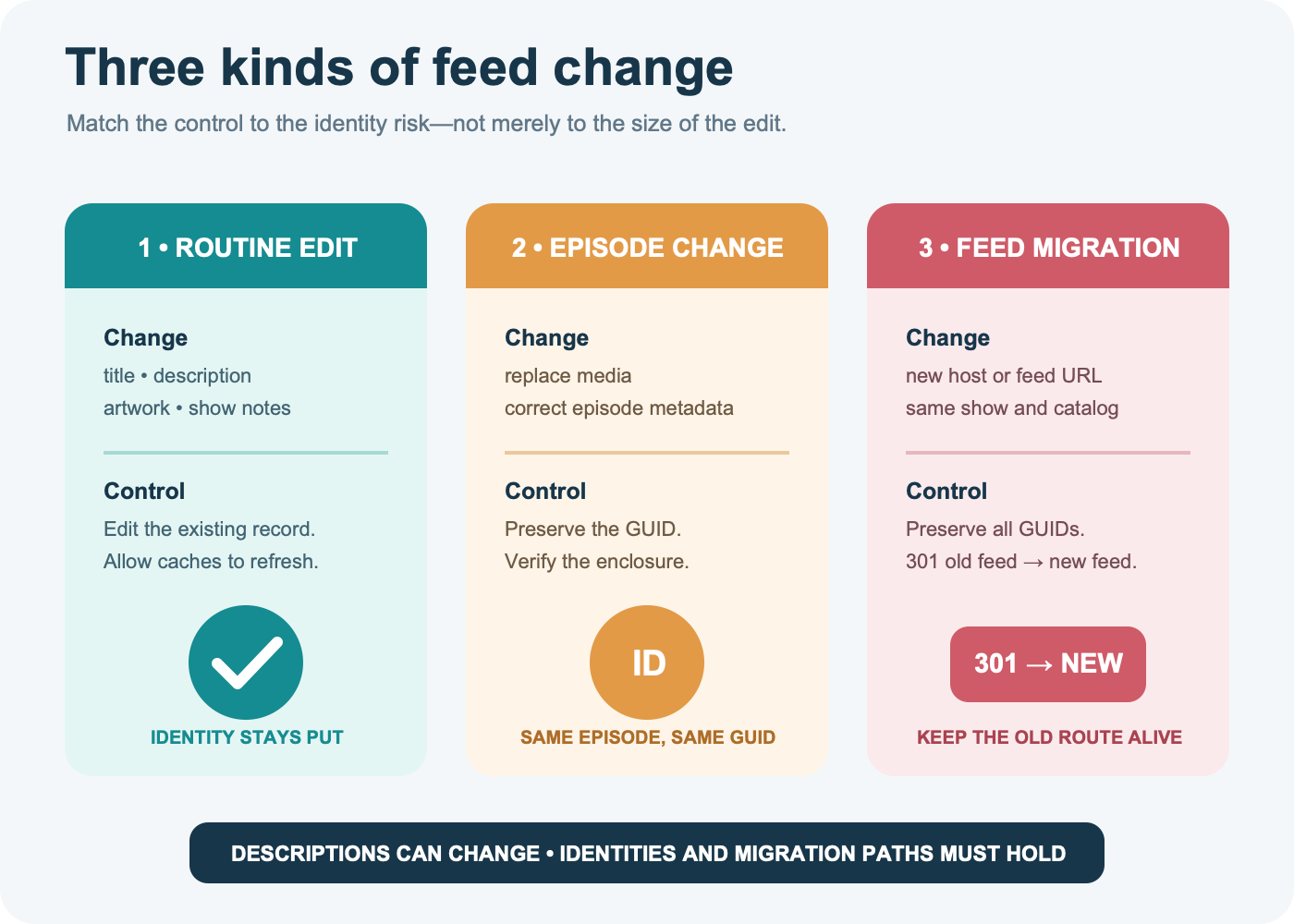
Apple’s migration guidance is concrete: return an HTTP 301 redirect from the old feed, use <itunes:new-feed-url> when self-hosting, keep the redirect and tag for at least four weeks, and preserve original episode GUIDs. Spotify separately tells externally hosted shows to update the RSS feed URL and provider in Spotify for Creators. A redirect alone is not proof that every catalog has accepted the move.
If the feed uses a domain you control, DNS and registrar mistakes can break the feed even when the XML is perfect. Use the domain-transfer runbook before moving that domain, and test the old feed URL, new feed URL, and a representative enclosure after every infrastructure change.
Run a five-minute feed health check
- Open the exact feed URL. It should be complete, use HTTPS for public submission, and resolve without an account login or password prompt unless the feed is intentionally private.
- Confirm you received XML. A branded error page, HTML login page, timeout, or redirect loop is not a healthy feed response.
- Find the channel title and latest item. Check the episode title, date, description, and GUID against the host dashboard.
- Inspect the enclosure. Confirm that its URL, length, and type exist and that the media is publicly retrievable for a public show. Apple requires publicly addressable media servers that support HEAD and byte-range requests.
- Validate, then compare a directory. Apple Podcasts Connect performs technical validation during submission. Passing that check does not guarantee content approval, so also verify the resulting listing and one playback route.
When an episode is missing in one app, start at the source: is it in the raw feed? If not, fix the host record. If it is present and valid, check that the app knows the correct feed URL and allow for its refresh interval. If several services fail, inspect the feed response and enclosure before editing episode identity.
For the surrounding work—show design, recording, editing, rights, launch, and promotion—use the broader Creator Guides. Those tasks produce the assets; the RSS feed distributes their final records.
Treat the feed URL as infrastructure you need to control
A portable podcast is not merely one that has an RSS icon. You should be able to locate the current feed, export the media and metadata, preserve episode GUIDs, and redirect the old feed if you change hosts. If a provider cannot explain those four controls, the convenience of its dashboard comes with a real switching risk.
The useful mental model is simple: the host writes, the feed declares, directories read, and apps play. Edit descriptions when the show changes. Preserve identity when an episode remains the same. Redirect deliberately when the source moves. The RSS feed makes distribution repeatable only while that chain stays intact.