A prompt is a cue that requests a response. In generative AI, it works best as a compact work specification with a task, context, input, constraints, output format, and examples chosen for the job.
A prompt is a cue or input that asks a person or system to respond. In generative AI, it is the instruction and supporting information sent to a model to produce an output. In a terminal, the prompt is the symbol or text showing that the shell is ready for a command; in a browser dialog, it asks a user to enter text.
The same word therefore describes several different interactions. If someone says “improve the prompt,” first identify who or what must respond. For AI work, treat the prompt as a compact work specification—not as a secret phrase that guarantees a perfect answer.

Understand the common meanings of prompt
All meanings share one idea: something signals that a response is expected. The sender, receiver, and type of response change with the setting.
| Setting | What the prompt is | Expected response |
|---|---|---|
| Generative AI | An instruction, question, data, image, or combination sent to a model | Text, code, analysis, an image, or another generated output |
| Command line | Text or a symbol indicating that a shell is ready | A command typed by the user |
| Website or app dialog | A label, question, or modal requesting input | A value, choice, confirmation, or cancellation |
| Writing or conversation | A question or cue intended to start thought | An idea, answer, memory, or discussion |
For example, Bash uses variables including PS1 and PS2 to control its primary and continuation prompts, as documented in the GNU Bash Manual. Windows also has a prompt command for changing the command prompt. In a browser, JavaScript’s window.prompt() opens an input dialog and returns entered text or null when the user cancels, according to MDN.
Treat an AI prompt as a compact work specification
An AI prompt can be one sentence or a structured packet of instructions and data. Microsoft describes a custom prompt as an instruction that tells an AI model to perform a task or behave in a specified way. Google’s prompt design guidance emphasizes clear instructions, relevant context, examples, and an explicit output format.
That does not mean longer is automatically better. A long prompt can bury the real request, repeat conflicting rules, or include irrelevant material. A short prompt can be sufficient for a low-stakes brainstorming question. The useful prompt is the smallest complete specification for the job and its cost of error.
Write for the model’s observable task rather than for an imagined personality. “Be brilliant” is hard to test. “Give three options, state one tradeoff for each, and recommend one for a team of five” defines an output that can be checked.
Build an AI prompt from six optional blocks
Use the following blocks as a diagnostic canvas. Task is normally essential; the other five are optional. Add a block only when it reduces a real ambiguity or recurring failure.
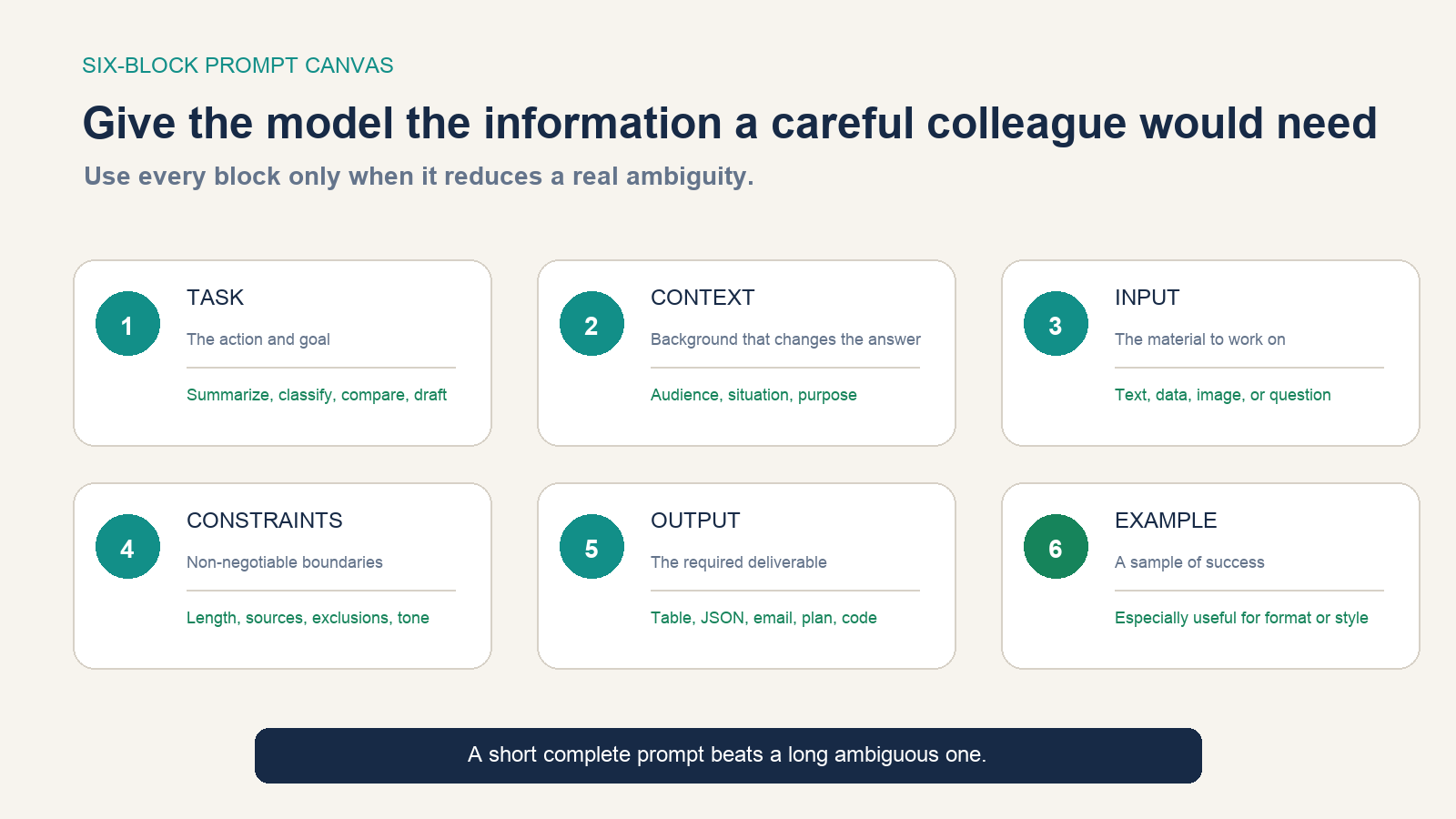
- Task: State the action—summarize, compare, classify, calculate, draft, extract, or critique.
- Context: Explain the audience, situation, purpose, decision, or definition of success.
- Input: Delimit the text, data, requirements, or reference material the model should use.
- Constraints: Set factual boundaries, exclusions, length, tone, language, or must-not-do rules.
- Output: Specify fields, headings, order, units, schema, or another usable format.
- Example: Show one or more representative input-output pairs when the desired pattern is difficult to describe.
Separate instructions from source material with headings, tags, or fenced blocks. The current Gemini developer guide likewise recommends direct instructions and deliberate output formatting. Structure is particularly useful when the input is long or contains text that looks like an instruction.
Turn a vague request into a testable prompt
Suppose the first draft is: “Write a launch email.” It names an action but leaves the product, reader, evidence, length, output, and prohibited claims unresolved. A more testable version is:
Task: Draft a launch email for existing trial users.

Context: We are releasing calendar sync for a small-team project app.
The reader already has an account but may not have completed setup.

Facts you may use:
- Syncs Google Calendar events into the project timeline
- Admin activation is required
- Available on the Team plan

Constraints:
- 120–150 words for the body
- Calm, practical tone
- Do not claim that conflicts are automatically resolved
- Do not invent pricing or customer results

Output:
1. Three subject lines under 45 characters
2. One preview line
3. Email body
4. One button-label CTA
This version does not guarantee a strong email, but it makes failure visible. A reviewer can check length, product facts, unsupported claims, audience fit, and whether every requested field exists. If the tone is still wrong, add a short approved example or a few concrete style attributes instead of stacking vague adjectives.
Examples are powerful but not neutral. A model may copy their quirks as well as their useful pattern. Use representative examples, label them clearly, and avoid showing a format you would reject in production. Anthropic’s prompting practices also recommend clear instructions, context, examples, and structured sections.
Improve the prompt against a success test
Prompt improvement is an evaluation process. Before editing words, define what a successful answer must contain, avoid, or enable a user to do. Then test on representative and edge-case inputs. Anthropic’s prompt engineering overview places success criteria and empirical testing before technique selection.
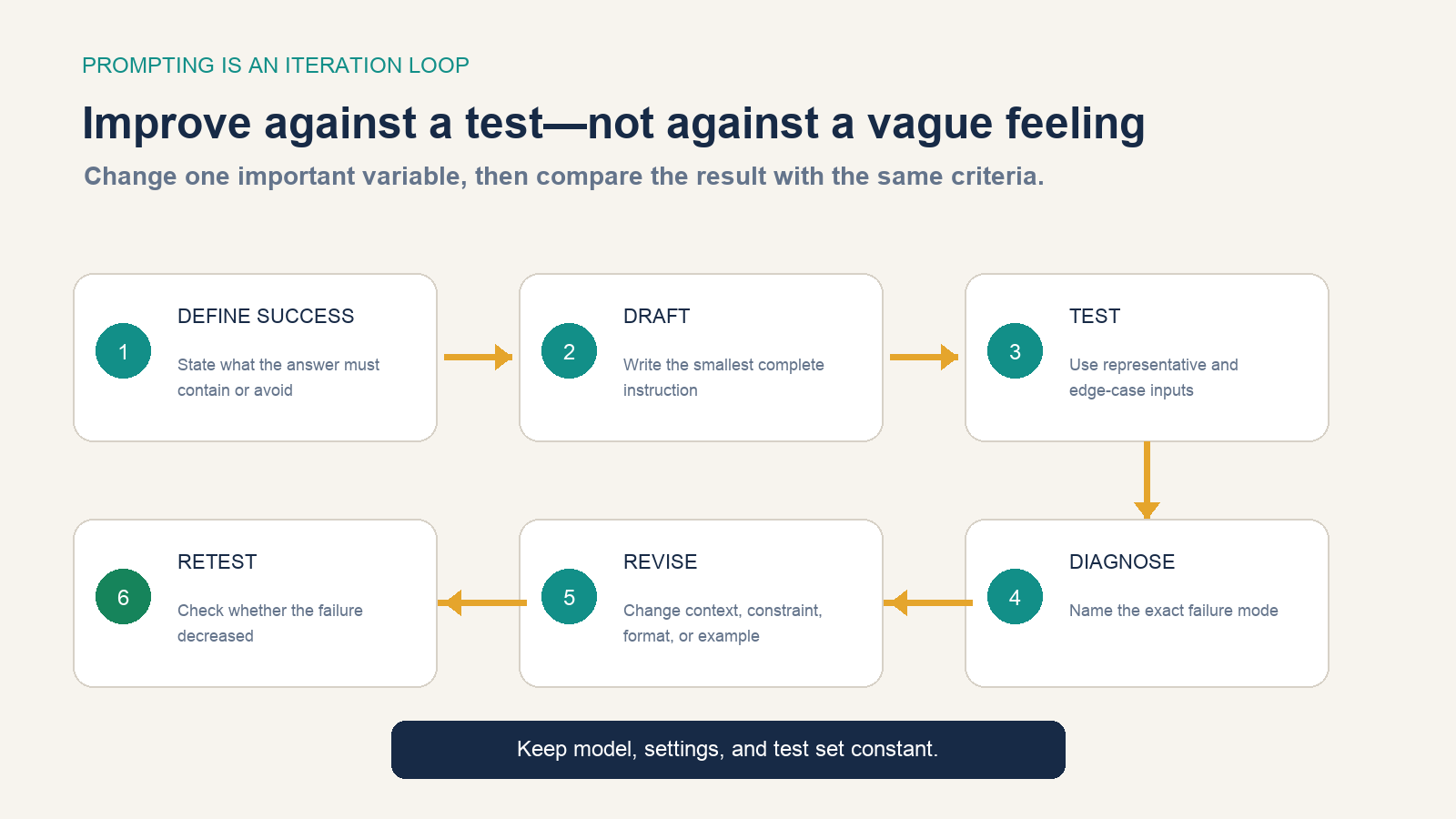
- Define a small set of pass conditions and unacceptable failures.
- Write the shortest prompt that appears complete.
- Run it on normal, difficult, and boundary cases.
- Name the exact defect: missing fact, wrong format, ambiguity, weak example, or conflicting rule.
- Change one important variable, such as the context, constraint, format, or example.
- Retest with the same model, settings, cases, and scoring rule.
Changing the prompt, model, temperature, source data, and test examples simultaneously prevents a useful comparison. Keep a small version history for prompts used in a team or automation, including what changed and which failure it was intended to reduce.
Know when a better prompt is not the answer
Prompting cannot supply information the model or connected tools do not have. It also cannot make a probabilistic language model behave like a guaranteed calculator, grant access to a private system, remove a provider’s policy boundary, or turn an unsuitable model into the right tool.
| Observed problem | Try a prompt change when… | Change the system when… |
|---|---|---|
| Missing or stale facts | The facts are present but poorly labeled | Current data must be retrieved or supplied |
| Wrong output format | The required schema was absent or ambiguous | The consumer needs deterministic validation and repair |
| Calculation errors | The task or units were unclear | Exact arithmetic should use a calculator or code tool |
| Slow or expensive response | The prompt contains avoidable work or output | A smaller model, shorter context, cache, or workflow redesign is needed |
| Repeated domain mistakes | Rules or examples can define the distinction | The model lacks the capability, source access, or reliable evaluation |
Use the prompt as one component of a system. High-consequence workflows also need trusted data, permissions, deterministic checks, failure handling, and human review appropriate to the risk.
Keep sensitive data and prompt injection in scope
Do not paste passwords, access keys, confidential contracts, personal data, customer records, or unpublished business information into an AI product unless you are authorized to do so and understand that product’s data controls. Redact or replace sensitive values when the exact value is unnecessary.
Prompt injection is a different problem. Instructions hidden in a webpage, document, email, or tool result may try to override the application’s intended task. OWASP’s prompt-injection guidance distinguishes direct attacks from indirect attacks embedded in external content and warns that restrictions in the prompt alone are not a complete defense.
Applications that let a model read untrusted content or take actions should separate instructions from data, minimize tool permissions, validate sensitive operations, and require confirmation for consequential changes. A user-facing prompt can guide behavior; it should not be the only security control.
Reuse a template without making every prompt identical
A template is a checklist, not a form that must always be filled. Copy this skeleton and delete irrelevant sections:
Task:
Context and intended user:
Input or trusted facts:
Constraints and exclusions:
Required output:
Example or acceptance test:
For brainstorming, “Task” and “Context” may be enough. For extraction, precise “Input” and “Required output” matter more than persona. For a public factual article, trusted sources, claim boundaries, and citation requirements matter more than decorative tone instructions. For classification, several boundary examples may provide more value than another paragraph of explanation.
Stop when the prompt is clear enough
The purpose of a prompt is not to display prompt-writing skill. It is to produce a response that meets a defined need with acceptable effort and risk. Start with the task, add the context or constraints that prevent likely failure, make the output checkable, and test on more than one easy example.
If repeated revisions no longer improve the measured result, stop polishing synonyms. Inspect the data, model, tool access, workflow, and evaluation instead. The best next move may be outside the prompt.