A practical workflow for identifying an unknown language from clean text, images or audio without confusing writing system, region, dialect or detector confidence.
A short message arrives with unfamiliar characters. A detector names a language immediately, yet a second tool gives a different answer. This is not necessarily a software failure. The message may be a name, a borrowed phrase, a mixture of languages, or text written in a script shared by several languages.
To identify a language, collect a clean sample of at least a full sentence when possible, remove names, URLs and numbers, then run language detection and inspect the writing system and context. Treat the top result as a candidate, not proof: short or mixed text can be ambiguous, and one script can serve many languages. For a screenshot, extract the text first; for speech, use a clear segment and confirm with a fluent speaker when accuracy matters.
Start with the kind of evidence you have
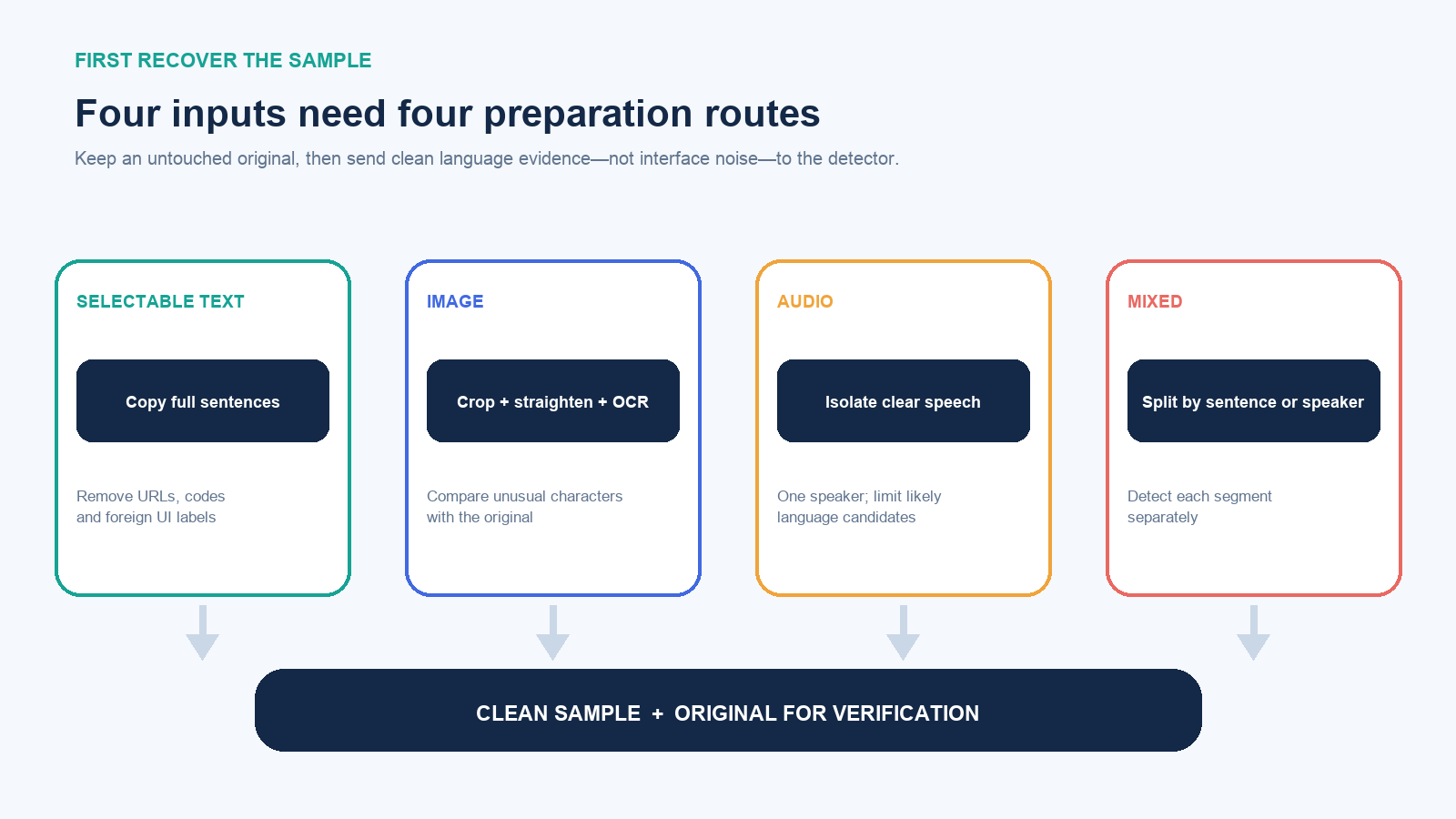
- Selectable text: copy complete sentences while preserving accents and punctuation. Remove interface labels from another language.
- Screenshot or photo: crop to the relevant text, straighten it, improve contrast if necessary, and use optical character recognition (OCR). Compare the extracted characters with the image before detection.
- Audio or video: isolate clear speech with minimal music and overlapping voices. Language detection may be built into a transcription service, or a likely language can be tested by transcribing a short segment.
- Mixed content: split it by sentence, speaker, subtitle track or visible section. A single “main language” label can hide code-switching.
Preserve the original alongside the cleaned sample. OCR may replace one character with another; transcription may force unfamiliar sounds into the wrong language model. Without the original, a confident detector result can become impossible to audit.
Do not confuse language, script, and region
Unicode encodes characters by writing systems, not by language. Latin script is used for English, Spanish, Vietnamese, Turkish and many other languages. Cyrillic serves languages including Russian, Ukrainian, Bulgarian, Serbian and Kazakh. Arabic script is also used beyond Arabic. Recognizing the script narrows the field but often cannot finish the job.
A language can also use more than one script. W3C’s guidance on language tags uses script subtags when the distinction matters; for example, a language may be represented in Latin or another script. Region is a separate dimension: en-GB identifies English as used in the United Kingdom, while the language remains English. Accent, dialect, country, script and language should not be collapsed into one guess.
This is why “Chinese characters” is not always a complete language identification. Han characters participate in more than one writing tradition, while Japanese commonly combines Han characters with hiragana and katakana. “Simplified” and “Traditional” primarily describe written character forms; they do not by themselves establish a speaker’s exact language variety or location.
Use a five-pass identification workflow
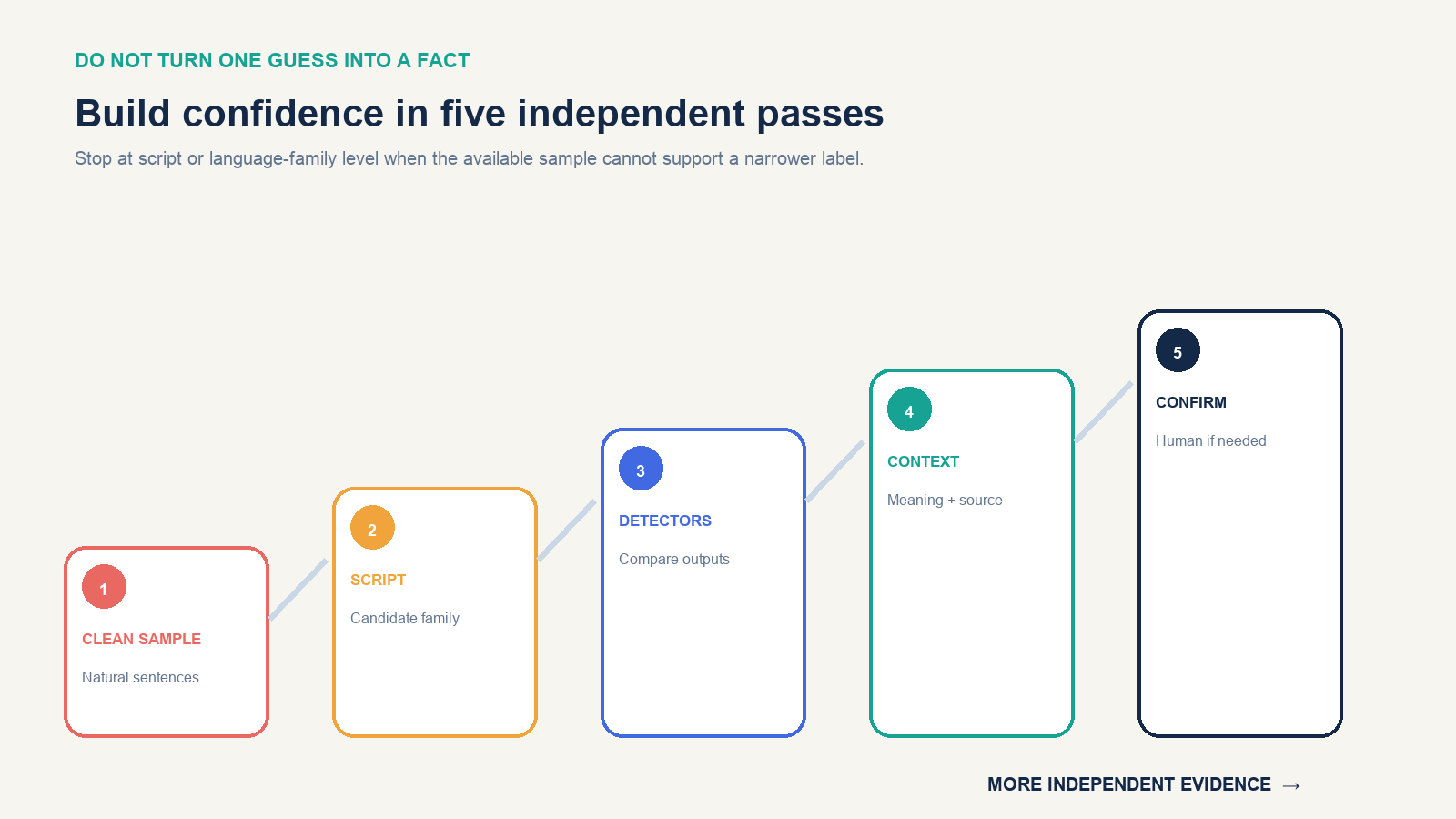
1. Build a representative sample
Prefer several natural sentences from the same author or speaker. Keep ordinary function words because they often distinguish related languages. Remove email addresses, product codes, usernames, URLs, emoji and long number sequences; these add characters without useful grammar. Do not “correct” unfamiliar spelling before identification.
If the only sample is one or two words, record that the result is provisional. Words such as names, international brands and technical terms can occur unchanged across languages.
2. Identify the script, not the language
Ask whether the sample uses Latin, Cyrillic, Greek, Arabic, Hebrew, Devanagari, Thai, Hangul, Han, hiragana, katakana or another script. This supplies a candidate family and can reveal OCR damage. A sample that should contain one coherent script but alternates visually similar Latin and Cyrillic characters may have been corrupted or deliberately spoofed.
3. Collect candidates from a detector
Paste the cleaned sample into a reputable language-detection or translation service. Google Cloud’s language detection returns a language code and confidence value; Microsoft’s language detection can return the predominant language, an ISO code, a confidence score and, for supported languages, a script code. Product support and behavior change, so check the current supported-language documentation before building a production workflow.
Do not read 0.98 as a 98% guarantee that the label is correct. A score describes the model’s own output under its design; it does not account for miscopied text, mixed input, a non-language code, or a closely related language outside the tool’s distinctions. When possible, compare a second system or test separate portions of the sample.
4. Test context and translation
Translate the sample under the top two candidates. The better candidate should produce coherent grammar and meaning that fit the source context. Also inspect the likely country, website domain, sender, document topic and surrounding labels—without letting one clue dictate the answer.
Context is evidence, not proof. A package sold in Finland can contain Swedish, Finnish, English and manufacturer information from another country. A person’s location or name does not determine the language they chose to write.
5. Confirm at the level the task requires
For curiosity or routing a support ticket, “probably Bosnian/Croatian/Serbian” may be enough. For publication, legal notice, medical instruction, safety label, immigration record or identity decision, send the original and your candidate to a qualified speaker or translator. Ask them to state whether the evidence supports a language, a closely related group, or only a script.
Use the writing system to narrow the field
| Visible pattern | Useful first conclusion | Do not conclude yet |
|---|---|---|
| Hangul syllable blocks | Korean writing is strongly indicated | Country, dialect, register or whether every token is Korean |
| Hiragana or katakana mixed with Han characters | Japanese is strongly indicated | Meaning, formality or authorship |
| Greek alphabet | Greek script is identified | Modern versus historical text without context |
| Cyrillic | A Cyrillic-using language family is indicated | Russian, Ukrainian, Bulgarian, Serbian, Kazakh or another language from script alone |
| Arabic script | An Arabic-derived writing system is indicated | Arabic, Persian, Urdu, Pashto or another language from direction alone |
| Devanagari | A Devanagari-using language is indicated | Hindi, Marathi, Nepali, Sanskrit or another language from script alone |
| Latin alphabet with diacritics | Specific letters may narrow candidates | A language from one accent mark, name or borrowed word |
Distinctive characters are leads. Turkish ı, Romanian ș, Portuguese ã, Spanish ñ and German ß can be useful, but names, quotations and keyboard substitutions cross boundaries. Examine repeated words and grammar across a longer sample.
Identify text inside an image
- Save an unedited original, then make a working crop around the text.
- Correct rotation and perspective so lines are horizontal.
- Use the highest-resolution source available; avoid repeatedly compressing a screenshot.
- Run OCR and compare every unusual character with the original.
- Detect the language from the corrected text, not from the entire image file.
Google Translate’s image mode supports Detect language, but Google warns that small, unclear or stylized text can reduce translation accuracy. Handwriting, curved packaging, glare and decorative fonts can create plausible-looking wrong characters. If OCR output is nonsense, manually transcribe a few clear words or ask a reader of the suspected script to verify the transcription before translating.
Identify a spoken language
Choose a segment with one speaker, natural speech and minimal background sound. Avoid greetings, place names, song lyrics and repeated brand terms as the only evidence. If a speech service requires candidate language codes, give it a short plausible list rather than every supported language. Google’s Speech-to-Text documentation notes that fewer alternative language codes improve the likelihood of selecting correctly within that feature.
Compare the transcript back to the audio. A fluent-looking transcript can be hallucinated from the wrong language setting. Names, numbers, borrowed vocabulary and closely related varieties remain difficult. For consequential use, a human listener should confirm both the language and the content; accent inference must not be used as a proxy for nationality or identity.
Why language detection gives the wrong answer
- The sample is too short: add complete sentences or leave the result at script/family level.
- Most tokens are names or codes: remove them and keep grammatical words.
- The text is transliterated: Latin letters may represent Arabic, Hindi, Russian or another language; look for native-script context and consistent transliteration patterns.
- Several languages are mixed: detect each sentence or speaker segment separately.
- OCR changed characters: compare the output with the image and rerun on a sharper crop.
- The encoding is broken: strings such as mojibake may need character-encoding repair before language detection.
- Languages are closely related: preserve multiple candidates until vocabulary, grammar or a fluent reviewer distinguishes them.
- A country hint biased the model: use location hints only when independently known, and compare the result without the hint.
Three cases where a broader answer is more accurate
A shared word is not a language sample
A sign containing only a word such as radio, hotel or a brand name may fit many languages. Adding the country where the image was taken supplies context, but it still does not prove which language the writer intended. Look for a sentence, operating instructions, opening hours or another grammatical phrase on the same object. If none exists, report “Latin script; language undetermined from this word.”
Han characters without other clues may stay ambiguous
A short product label made only of Han characters may be compatible with Chinese or may be part of Japanese text. Search the surrounding material for hiragana or katakana, a longer sentence, a manufacturer address, or an official version of the label. Do not use the visual complexity of the characters to declare “Traditional Chinese” or “Japanese”; the sample may contain forms shared across writing systems.
Romanized speech can hide the native writing system
A chat message typed phonetically in Latin letters may represent a language normally written in Arabic, Cyrillic, Devanagari or another script. Informal romanization often lacks one standard spelling, so detectors may prefer a Latin-script language with similar letter patterns. Preserve punctuation, collect more turns from the same speaker, and ask whether a native-script version is available. The correct result may be “probable transliteration of X” rather than a fully verified label.
Protect the content before uploading it
An online detector receives the sample you submit. Remove names, account numbers, private messages, health details, credentials, legal documents and confidential business data unless the organization has approved that service and data flow. A single representative sentence may be enough after sensitive fields are replaced with neutral placeholders.
For protected material, use an approved enterprise service with reviewed retention terms, an offline model, or a qualified translator under the required confidentiality arrangement. Never publish an unknown message merely to crowdsource its language.
When the evidence remains weak, the honest output is not a forced country flag. Report the strongest supported level: “Latin script, probably Portuguese,” “Cyrillic, language uncertain,” or “mixed Spanish and English.” Then obtain a longer sample or human confirmation. Preserving uncertainty is part of correct language identification, not a failure to finish.