
Identify the online source before formatting it, then build a traceable citation from author, date, page title, website, and URL using the style your assignment requires.

“I found it on a website” does not identify the source type. The browser tab might contain a signed article, government report, journal paper, PDF book chapter, video, dataset, social post, or a page that changes every day. Those items can require different templates even when every one has a URL.
To cite a webpage, first record its author or responsible organization, publication or update date, page title, website name, and direct URL. Then format those fields in the citation style your instructor or publisher requires and add the matching in-text citation, footnote, or endnote. Do not use a generic website template when the online item is actually a journal article, report, news story, video, dataset, or social post.
Identify the item before you cite it
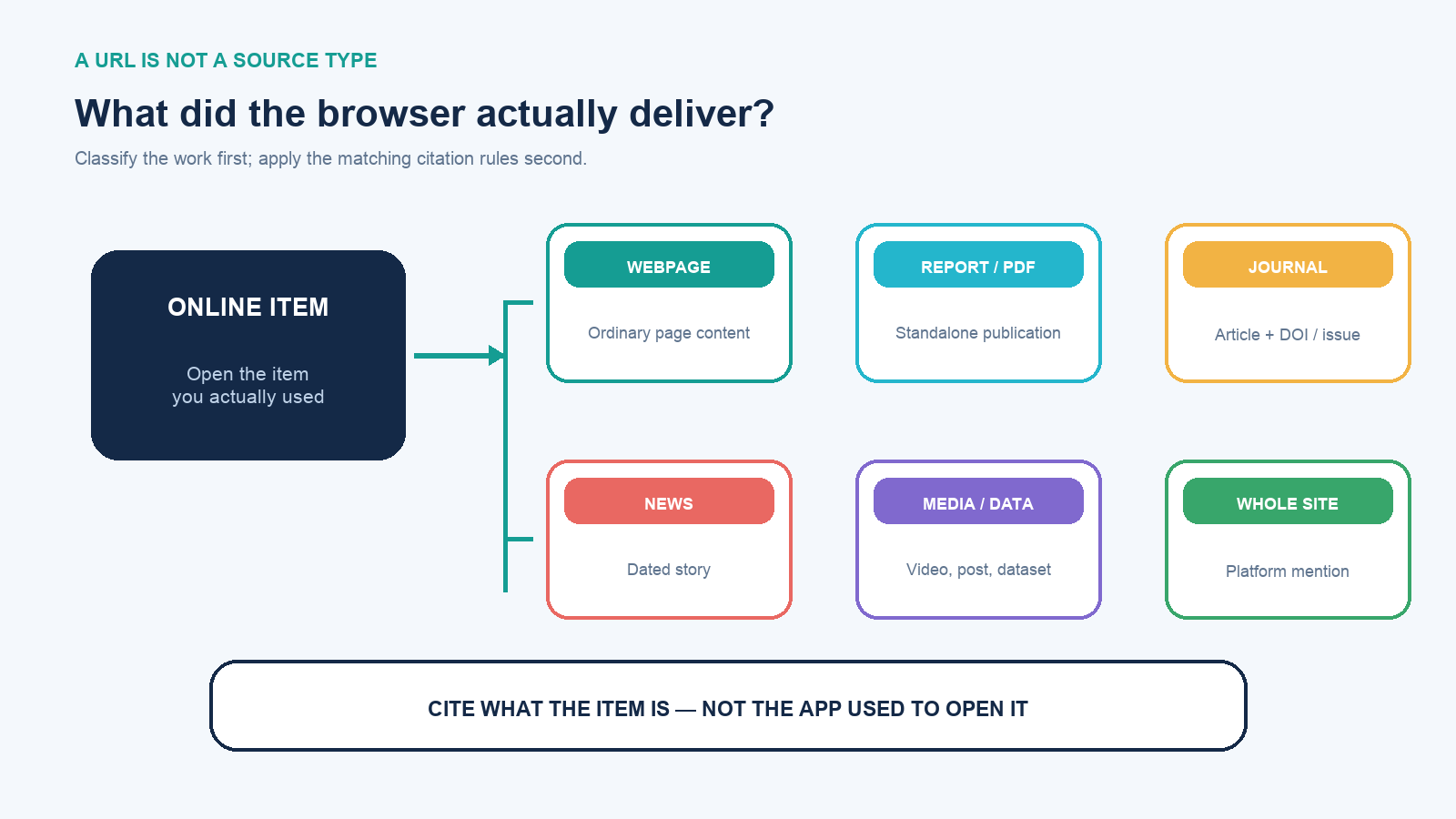
Start with the item you actually used, not the homepage of the organization that hosts it. Ask these questions:
- Does it name a journal, volume, issue, pages, and DOI? Cite a journal article, even if you read it in a browser.
- Is it a titled report or standalone PDF with an issuing body? Cite the report, not a generic webpage.
- Is it a dated story published by a news organization? Use the news-article rules required by the style.
- Is the evidence in a video, podcast, image, dataset, map, or social post? Use the format for that medium.
- Is it ordinary page content without a more specific publication identity? Use a webpage-on-a-website format.
- Are you merely mentioning the website as a platform rather than using a particular page as evidence? Some systems allow a text mention and URL instead of an end-list entry.
A citation generator cannot reliably repair a wrong classification. If a DOI article is labeled “website,” the output may omit the journal, volume, issue, or pages that let a reader identify the scholarly work.
Collect five fields while the page is open
- Author: look for an individual byline first, then a responsible group, agency, or organization. Do not assume the domain owner wrote every page.
- Date: capture a publication date or a clearly attributable content-update date. A sitewide copyright year in the footer is not automatically the page’s publication date, and “reviewed” does not always mean the text changed.
- Page title: copy the title of the particular article or page, not merely the browser tab if it includes extra site text.
- Website or container: record the publication or site that contains the page. MLA explicitly treats a website as a container; other systems place the site name in a source position.
- Direct URL: use the stable page address, DOI, permalink, or archived URL required by the source and style. Remove obvious tracking parameters when they are not needed to reach the item.
Also save the exact passage used, its heading, and a paragraph number or other locator if available. A screenshot or archived copy can preserve what you saw, but follow course, publisher, and copyright rules for storing and sharing copies. Record your access date immediately for an undated or changing page; reconstructing it later invites error.
One webpage, four citation systems
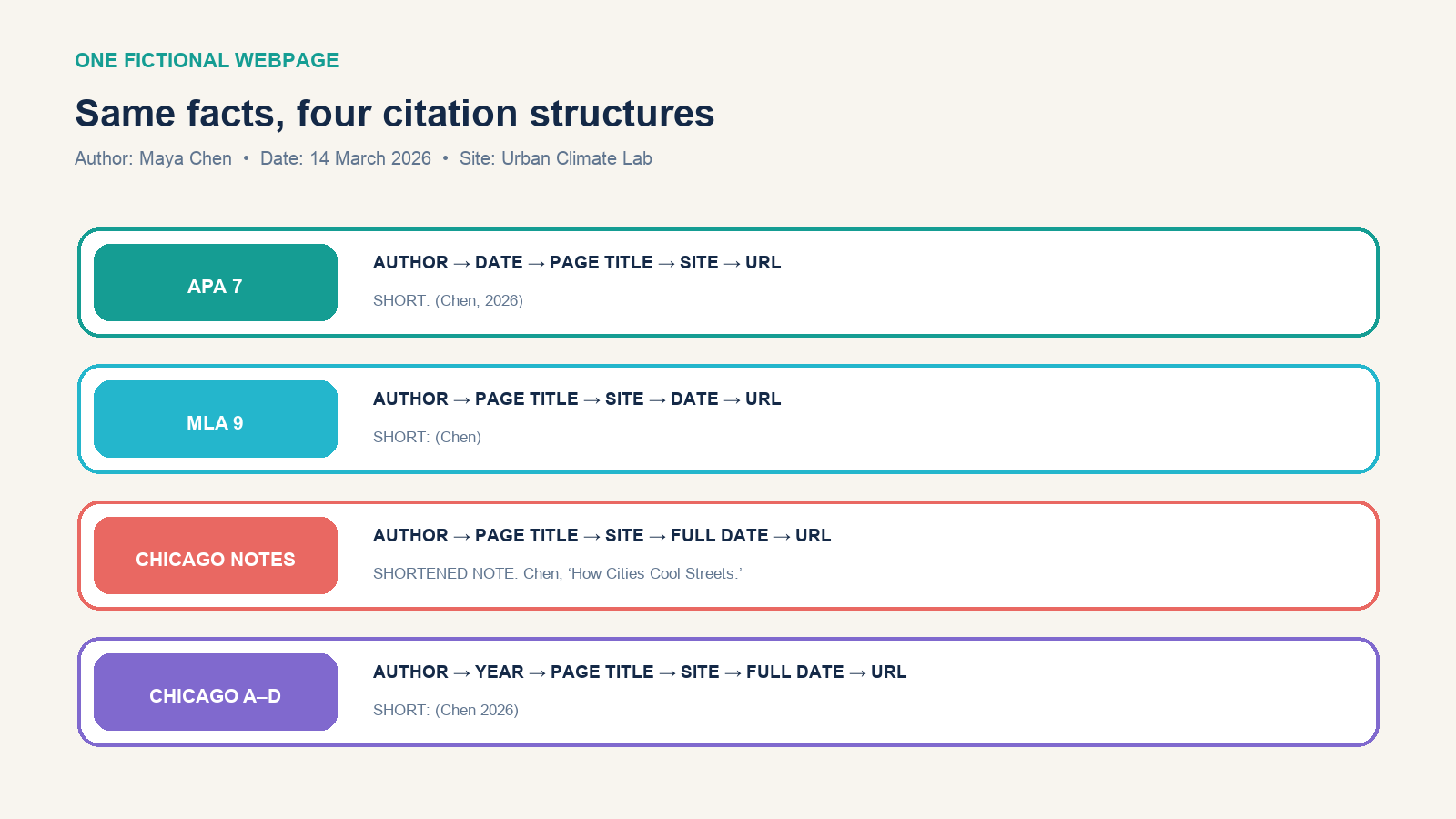
The following source is deliberately fictional, so the examples demonstrate format without pretending to document a real claim:
- Author: Maya Chen
- Date: March 14, 2026
- Page title: “How Cities Cool Streets with Tree Canopy”
- Website: Urban Climate Lab
- URL:
https://example.org/tree-canopy
APA 7
Reference list: Chen, M. (2026, March 14). How cities cool streets with tree canopy. Urban Climate Lab. https://example.org/tree-canopy
Parenthetical citation: (Chen, 2026)
Narrative citation: Chen (2026)
APA uses the author-date system and sentence case for a webpage title. The title is italicized in this webpage format. If the author and site name are the same, APA omits the repeated site name from the source element.
MLA 9
Works Cited: Chen, Maya. “How Cities Cool Streets with Tree Canopy.” Urban Climate Lab, 14 Mar. 2026, https://example.org/tree-canopy.
In-text citation: (Chen)
MLA builds the entry from core elements and treats the website as the container. Page titles appear in quotation marks; the container title is italicized. The in-text citation normally points to the first element of the Works Cited entry and adds a locator only when the source supplies a useful one.
Chicago notes and bibliography
First note: 1. Maya Chen, “How Cities Cool Streets with Tree Canopy,” Urban Climate Lab, March 14, 2026, https://example.org/tree-canopy.
Shortened note: 2. Chen, “How Cities Cool Streets.”
Bibliography: Chen, Maya. “How Cities Cool Streets with Tree Canopy.” Urban Climate Lab. March 14, 2026. https://example.org/tree-canopy.
This Chicago system connects a superscript number in the text to a note. A bibliography is common, though the project’s instructions determine whether one is required and which sources it includes.
Chicago author-date
Reference list: Chen, Maya. 2026. “How Cities Cool Streets with Tree Canopy.” Urban Climate Lab. March 14, 2026. https://example.org/tree-canopy.
Parenthetical citation: (Chen 2026)
Chicago offers two different systems; “use Chicago” is therefore incomplete. Confirm whether the assignment requires notes-bibliography or author-date before formatting the paper.
What to do when information is missing
Never invent an author or date to make a template look complete. Change the entry according to the required style:
| Situation | Reliable action | Do not |
|---|---|---|
| No individual byline | Use the responsible organization when the page clearly attributes authorship to it; otherwise follow the style’s title-first rule | Use a web designer, domain registrar, or person quoted on the page as author |
| No publication or update date | Use the style’s no-date treatment, such as n.d. where required, and add an access date when the style or changing nature of the page calls for it |
Treat the current copyright year as the page date without evidence |
| Author equals website name | Follow the style’s rule for avoiding redundant elements | Assume all styles remove the repeated name in the same way |
| Page changes frequently | Record access time, preserve notes, and cite an archived version when appropriate and permitted | Quote a live dashboard as though it were a fixed edition |
| No page number | Use a section heading, paragraph number, timestamp, or other locator when the style requires or permits it | Invent a PDF page number for an unpaginated HTML page |
| Homepage or whole site | Decide whether a text mention is enough or a formal whole-site entry is actually required | Use the homepage when the evidence came from a specific page |
Chicago’s current guidance notes that a changing home page often needs an access date if no archived version is cited. APA distinguishes a general mention of a whole website from a reference to specific content. MLA guidance likewise says Works Cited entries typically point to the individual page or resource containing the quoted or summarized material.
Preserve the version you actually consulted
Web citations can remain correctly formatted even after the underlying page changes. That is a provenance problem, not a punctuation problem. In your research notes, record the access date, page title, direct URL, author, visible publication or update date, and the exact passage used. For changing dashboards, policies, product documentation, and homepages, also record the time zone or timestamp when it can affect the claim.
Save a lawful working copy or screenshot for your own verification when course, employer, confidentiality, and copyright rules permit. A screenshot helps prove what you read, but it is not necessarily the best public route for a reader. When a stable archived version is available—or when you create one through an accepted web archive—cite it according to the required style. Chicago’s current webpage guidance explicitly shows an archived URL as an alternative to a live undated page with an access date.
Do not replace the original page URL with an archive automatically. Some pages prohibit capture, sit behind authentication, expose personal information, or change because corrections are important. If the live page now contains a correction, preserve the earlier version for the record but address the correction in your writing. A citation should enable honest reconstruction of the evidence, not freeze an error so it can be repeated.
For data that updates continuously, name the observation: “value shown on 17 August 2026” is more defensible than writing the number as timeless. Cite the dataset or dashboard using its specific rules, and retain the extract, query, filters, units, and access time needed to reproduce the value.
Make the short citation and full entry agree
A citation has two connected jobs. The short signal in the sentence or note credits the source at the point of use; the full entry supplies enough information to identify and retrieve it. Audit both directions:
- Every APA or Chicago author-date parenthetical citation should map to the correct reference-list entry.
- Every MLA in-text citation should point to the first relevant element in Works Cited and use the same spelling.
- Every Chicago note number should lead to the correct note; shortened notes must still distinguish sources by the same author.
- Every end-list entry that the assignment requires should actually be cited or otherwise legitimately included under that system’s rules.
- Quoted language needs quotation marks or block format plus the best available locator; paraphrasing still needs attribution.
If two undated pages have the same group author, the style provides a way to distinguish them, but the exact mechanism varies. Do not improvise suffixes, shortened titles, or order until you consult the current manual or the institution’s approved guide.
Format the end list as one system
A set of individually plausible entries can still fail as a reference list. Apply one assigned system to the whole document unless the publication explicitly requires exceptions. Check alphabetical or prescribed ordering, author-name inversion, repeated authors, capitalization, italics, quotation marks, DOI and URL treatment, spacing, and hanging indents. Word processors often apply a hanging indent more reliably through paragraph settings than through manual tabs or spaces.
Pay special attention after importing from multiple databases. One record may arrive in title case, another in sentence case, and a third with the website name duplicated as publisher. Normalize them using the official rules rather than making every entry visually identical. Styles intentionally treat books, articles, webpages, media, and datasets differently.
Run a two-way inventory at the end: scan the paper for every parenthetical citation and note, then scan the end list back toward the paper. Resolve spelling differences, missing years, duplicate records, orphan entries, dead URLs, and sources cited under a shortened organization name that never maps to the full name. This consistency check catches more consequential failures than adjusting punctuation by eye.
Use a citation generator as a draft, not an authority
Browser metadata can be incomplete or wrong. A generator may treat the website name as the author, import the last-updated time of the site template, capitalize a title incorrectly, retain a tracking URL, or classify a report as an ordinary webpage. After generating an entry, compare it field by field with the open source:
- Confirm the source type and required style edition.
- Verify every author’s name and order.
- Confirm that the date belongs to the content, not the footer.
- Compare the page title and container with the source.
- Open the saved URL in a clean tab.
- Check capitalization, italics, quotation marks, punctuation, and hanging indent.
- Confirm that the in-text form or note points to the finished entry.
Do this audit before submission, not after the bibliography has fifty entries. A useful research-paper workflow captures bibliographic data and exact evidence while reading, so citations do not have to be reconstructed from browser history at the end.
The final citation check
The correct answer to “how do I cite a website?” is a short decision sequence: identify the specific online item, collect its real metadata, confirm the required style and—where relevant—the correct system, create the short and full citations as a pair, then verify both against the current official guide.
Formatting cannot make a weak source authoritative, and evaluating a source does not replace citing it. Keep those jobs separate. Citation tells the reader exactly what you used and where it can be found; source evaluation decides whether that item deserves to support the claim.