Google Scholar, Semantic Scholar, and Elicit solve different research jobs; a reliable workflow uses each for discovery while grounding every claim in a verified source.
If you searched “scholar scholar scholar,” start with the research task, not the repeated word. Use Google Scholar for broad scholarly discovery and exact title or author searches. Use Semantic Scholar when citation context, AI-assisted relevance, paper relationships, and alerts matter. Use Elicit when you want question-led discovery, study filters, and a structured evidence table.
None of these tools replaces the original paper. Save the query, verify the paper’s identity, read the methods and results, and cite the publisher or repository version you actually examined.

Three research tools, three different jobs
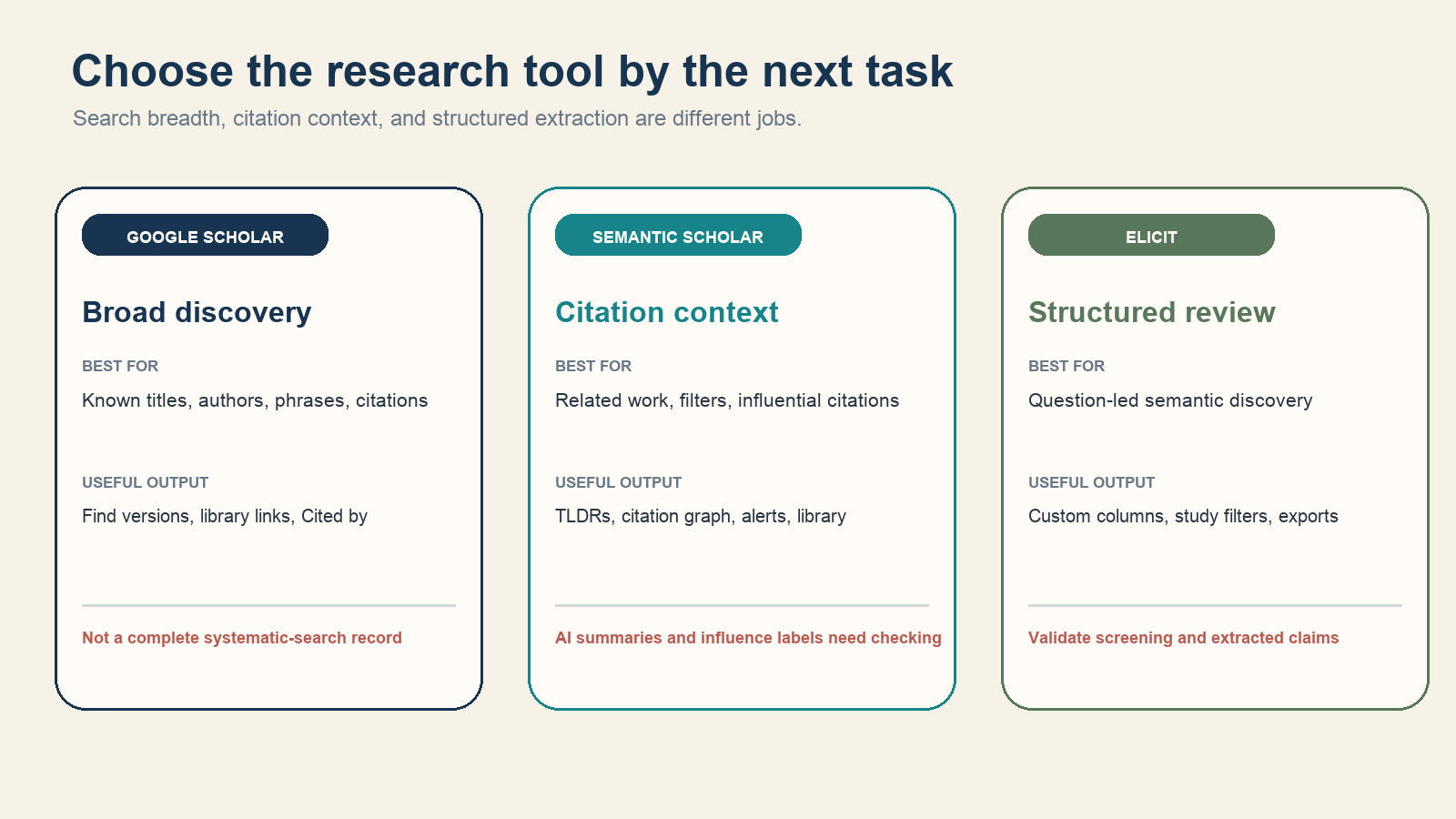
| Tool | Strong starting use | Important boundary |
|---|---|---|
| Google Scholar | Broad cross-disciplinary search, known items, citing papers, related articles, library and free-version links | Coverage and result counts are not a transparent, reproducible substitute for field-specific databases |
| Semantic Scholar | Filtered discovery, citation graph, influential-citation signals, TLDRs, research feeds, and alerts | AI summaries and influence classifications can be incomplete or wrong |
| Elicit | Question-led semantic search, study-type filters, custom extraction columns, and exportable review tables | Generated summaries, screening recommendations, and extracted fields require evaluation against papers |
Use Google Scholar for broad discovery
Google Scholar searches across disciplines and source types, including articles, theses, books, abstracts, technical reports, court opinions, and material from publishers, societies, repositories, and universities. Its official overview says ranking considers the document text, publication venue, authorship, and citation signals.
Useful moves include:
- Put an exact paper title in quotation marks.
- Use
author:"name"to focus on an author. - Select Cited by to find later papers that reference a known work.
- Select Related articles to widen a topic around a good seed.
- Use All versions, [PDF]/[HTML] links, or a library resolver to locate accessible text.
- Filter “Since year” for recent work, or sort by date only when newest-first is the real need.
Google’s Scholar Search Help explains that relevance is the normal sort order and that coverage of any specific source is not guaranteed without interruption. Record the date, query, filters, and titles you selected; do not report an unstable headline result count as though it were a controlled database total.
Use Semantic Scholar for relationships and AI-assisted triage
Semantic Scholar is a free research discovery service from the Allen Institute for AI. Its current product documentation describes field, date, author, publication-type, venue, and other filters; citation browsing; libraries; research feeds; author and paper alerts; short TLDRs; and AI-assisted paper features.
Start from one relevant seed paper, then inspect its references and citations. Sort or filter rather than treating citation count as quality. “Highly Influential” is a model-generated classification based partly on citation context and depends on access to citing full text; Semantic Scholar’s own FAQ says some important papers may not receive that label when full-text access is limited.
TLDRs and “Ask This Paper” can help decide what to read next. They are not quotable substitutes for the paper. The main Semantic Scholar FAQ explicitly warns that language-model text will not be error-free and that errors may be difficult to detect. Use the supporting statements to navigate, then verify the claim in the abstract, methods, results, tables, and limitations.
Use Elicit for structured comparison
Elicit is useful after the question has enough structure to compare studies. Its current Literature Review documentation describes semantic similarity search, keyword filters, query-specific abstract summaries, study-type filters, custom columns, sorting, and exports.
Define the columns before extraction: population, intervention or exposure, comparator, outcome, study design, sample size, result, limitation, and exact supporting location. Remove any column that the question does not require. A wide table full of generated detail can look rigorous while hiding inconsistent definitions across studies.
Elicit encourages users to evaluate screening precision and recall and extraction accuracy for their own use case. Export the working set to CSV, RIS, or BibTeX when the plan allows, then keep a reference manager and evidence table outside the tool. Generated cells remain leads until checked against the source.
Build one search that works across tools
Translate the question into concept groups rather than writing one long natural-language sentence everywhere. For a question about remote work and software-team retention, a query map might be:
| Concept | Terms to test |
|---|---|
| Work arrangement | “remote work,” telework, distributed work, hybrid work |
| Population | software engineer, developer, technical employee |
| Outcome | retention, turnover, attrition, intent to leave |
Google Scholar can test exact phrases and broad combinations. Semantic Scholar can begin with keywords or a seed paper and then filter or follow citations; its FAQ notes that Boolean operators and wildcards are not supported, although quoted text is. Elicit can begin with the research question and then add keyword or study-type filters. Keep each tool’s actual query separately rather than pretending one syntax ran unchanged everywhere.
Keep an evidence trail
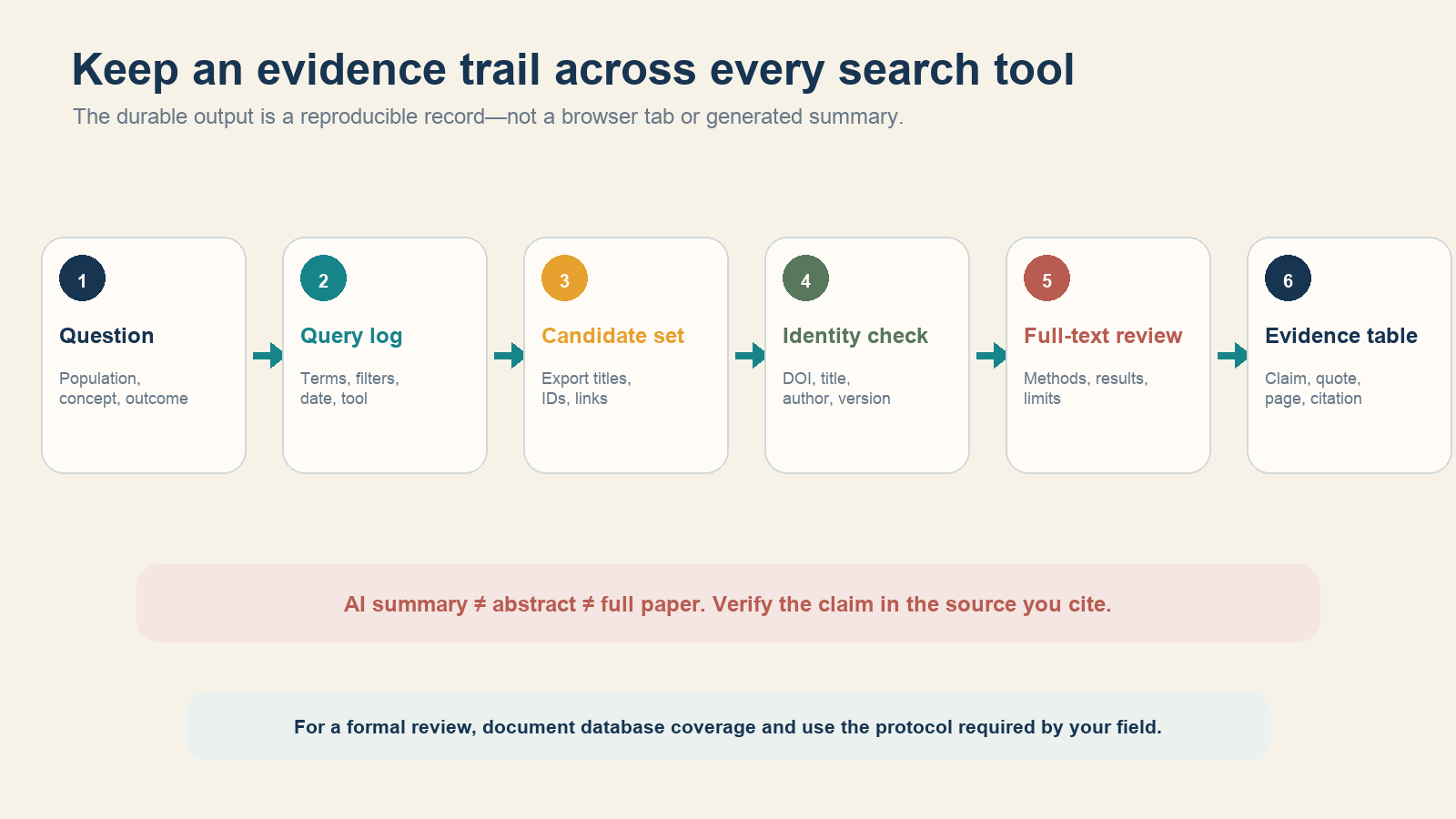
- Write the answerable question and inclusion boundaries.
- Log tool, date, complete query, filters, and sort order.
- Export or record candidate title, authors, year, DOI or other ID, and landing URL.
- Deduplicate versions and confirm that preprint, accepted manuscript, and version of record are not treated as three independent studies.
- Read the available full text and record methods, result, limitation, and exact page, table, or section supporting each claim.
- Store a stable citation and link to the version actually read.
Do not use a citation count as a verdict
A citation count is shaped by field size, paper age, document type, controversy, negative citation, database coverage, and duplicate versions. It does not prove that a result is correct or relevant. Read how the paper was cited, distinguish background from methodological or result use, and compare the study to the exact population and outcome in your question.
Likewise, “open access” answers an access question, not a validity question; “peer reviewed” describes a process, not a guarantee; and an AI summary is a navigation aid, not the publication.
When these tools are not enough
For a formal systematic, legal, clinical, regulatory, patent, or safety review, use the databases and protocol required by the field. Document coverage, controlled vocabulary, complete queries, dates, deduplication, screening decisions, and excluded studies. A convenience search engine can find excellent papers while still missing material needed for a defensible claim of comprehensiveness.
The decision rule is simple: Google Scholar for breadth, Semantic Scholar for relationships, Elicit for structured comparison, and the original paper for evidence. Move between tools when the next research task changes, and keep your own audit trail throughout.