
A four-route identification system for unknown text, interface icons, photographed objects, and sounds—with evidence and confidence rules.
To find what something is called, first classify it as selectable text, an interface icon, a photographed object, or a sound. Preserve the original, record where it appeared and what it did, then use the matching lookup route. Report the likely name together with the evidence and confidence level instead of presenting a visual guess as fact.
“What is this called?” has no universal lookup box. A punctuation mark can have a formal Unicode identity and several everyday names. A three-line app icon may have only a product-specific accessibility label. A connector may need a model number and dimensions. A melody can be fingerprinted, while an appliance alarm may require the manual. The useful skill is choosing the correct identification system before searching.
Make a 30-second evidence pack
Do not begin with a name guess. Save the thing in the form closest to its source:
- Text: copy the character into a plain-text note and keep one or two characters on each side.
- Interface: capture the whole window and a close crop; record the app, page, device, and what changed when the pointer hovered or the control was selected.
- Object: photograph the full object, connector or control, label, scale, and at least one second angle.
- Sound: save a clean recording if it is safe and lawful; note the source, location, rhythm, repetition, and when it occurs.
Remove passwords, addresses, faces, medical records, access badges, serial numbers, and other unnecessary private details before uploading an image or recording to a search service. If a device is hot, sparking, leaking, or attached to live electricity, do not handle it to obtain a better photo.
Choose one of four lookup routes
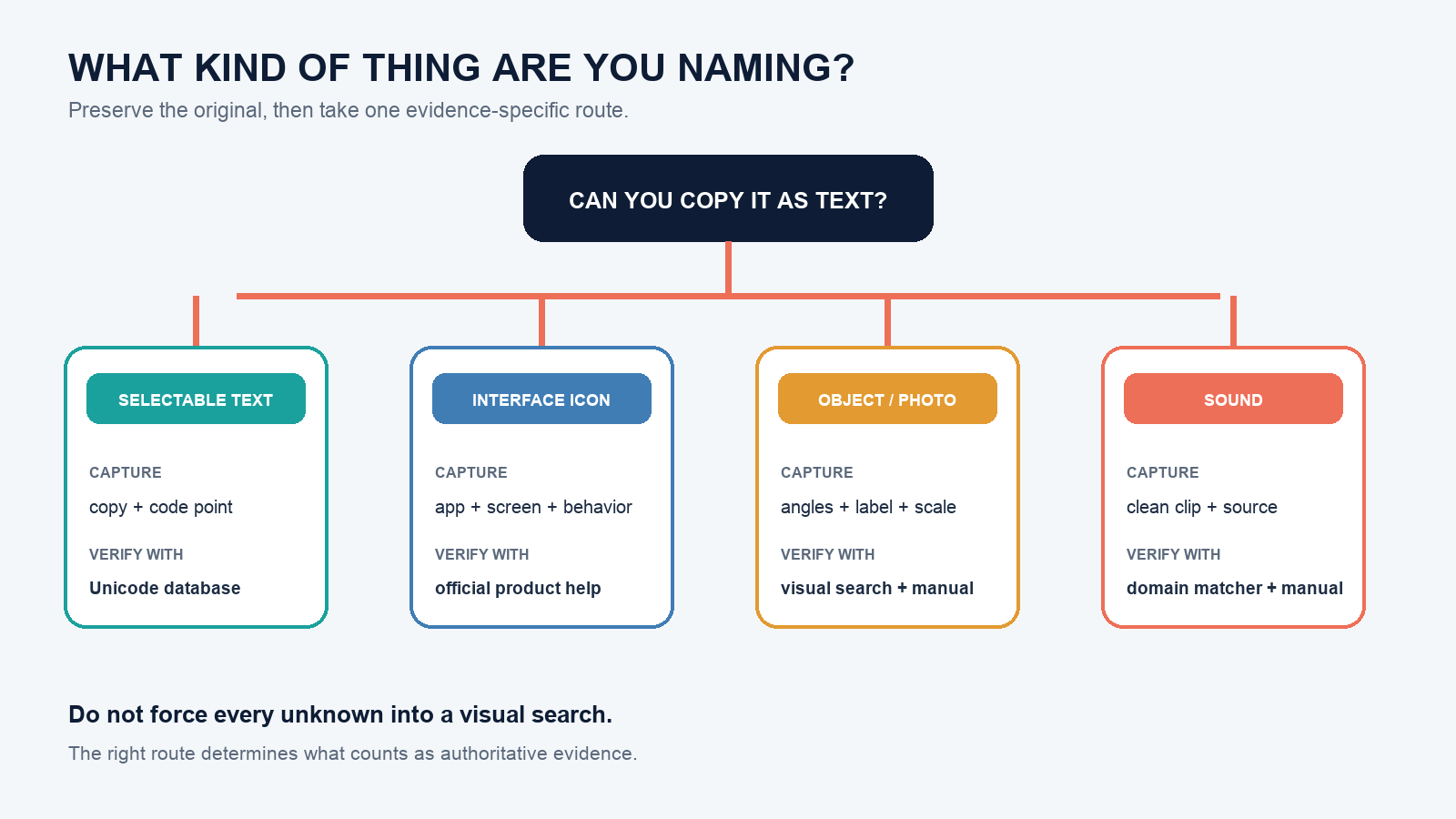
Route A: selectable character or symbol
Copy the exact character and inspect its code point. A code point is commonly written as “U+” followed by hexadecimal digits. Search that value in the Unicode Character Database or the Unicode Character Name Index. Unicode assigns character properties and formal names; the everyday name can still depend on context.
For example, ’ is U+2019, formally RIGHT SINGLE QUOTATION MARK, and often acts as a curly apostrophe in English prose. The straight ‘ is U+0027, formally APOSTROPHE. Calling both “apostrophe” may be enough in conversation, but a search-and-replace rule or software bug report should include the literal character and code point.
This distinction exists because a character is data while a glyph is its visual rendering. The W3C’s character-encoding concepts explain that font glyphs can vary and that text users perceive as one character may even be stored as a sequence. Pixels alone cannot prove the underlying code point.
Route B: interface icon or control
Search the official help for the app and screen, not just the shape. Three horizontal lines are commonly called a “hamburger menu,” but the product may label the control “Navigation,” “Main menu,” or something else. A gear may open settings in one app and editing options in another.
Check, in order: the hover tooltip, visible label, keyboard-focus or screen-reader name, the product’s icon legend, and its official help page. Include the app version and platform in a support request. The function is often more stable and useful than an informal shape nickname.
Route C: object in a photo
Crop the object without removing decisive context, then try visual search. Google’s image-search instructions describe using an uploaded image or page image with Lens; Microsoft’s Visual Search guide describes uploading, pasting, or photographing an image. Apple documents Visual Look Up for supported classes such as plants, pets, art, and landmarks.
Treat these results as candidates. Confirm against markings, dimensions, connector count, material, location, and a manufacturer manual or catalog. A visually similar adapter with different voltage or pinout is not an acceptable match.
Route D: music, animal call, or other sound
Use a domain-specific matcher. Apple explains that Shazam can identify music playing nearby or in another app. Cornell Lab’s Merlin Sound ID suggests bird species and explicitly asks users to compare a recording with reference calls.
Do not use a song matcher to diagnose a smoke alarm, machine fault, breathing sound, or electrical noise. Record the device model and timing, then use the official manual or an appropriate professional. Identification software can suggest a source; it cannot certify safety.
Name the right layer
Many disagreements are not really about accuracy. People are naming different layers:
| Layer | What it answers | Example answer |
|---|---|---|
| Formal identifier | Exactly which standardized item? | U+2019 RIGHT SINGLE QUOTATION MARK |
| Common name | What do people usually call it? | Curly apostrophe or right single quote |
| Function | What does it do here? | Marks an omitted letter in a contraction |
| Product label | What does this maker call the control? | Main menu |
| Model or part number | Which purchasable object is it? | Identifier printed on the housing or manual |
Choose the layer that lets the reader complete the task. A designer may need the common icon name; a developer needs the asset or component identifier; a buyer needs the part number; an accessibility bug report needs the control’s announced label and function.
Work through ambiguous cases
A mark that looks like a short dash
Do not decide from length alone. Copy it, inspect the code point, and compare hyphen-minus, en dash, em dash, minus sign, and any product-specific glyph. Record the surrounding sentence or equation. The correct name is the code-point identity; the correct usage description depends on context.
A port on the back of a device
Do not search “small black computer port” and buy the first visual match. Photograph the full panel and label, record the device model, measure the opening without inserting objects, and open the manufacturer’s port diagram. Similar shape does not establish electrical compatibility.
An unfamiliar toolbar icon
Note the application and screen, hover without clicking, move keyboard focus to the control, and look for an accessible name. If the icon triggers a destructive or financial action, use official documentation before selecting it. A screenshot shared without product context may support only a shape description.
A repeating beep
Count the beeps and pauses, record the device state and any indicator light, and consult the exact model’s manual. Do not assume the same pattern means the same condition across brands. For life-safety alarms, leave danger assessment to the alarm’s instructions and emergency guidance rather than an audio-identification result.
Grade the answer by evidence
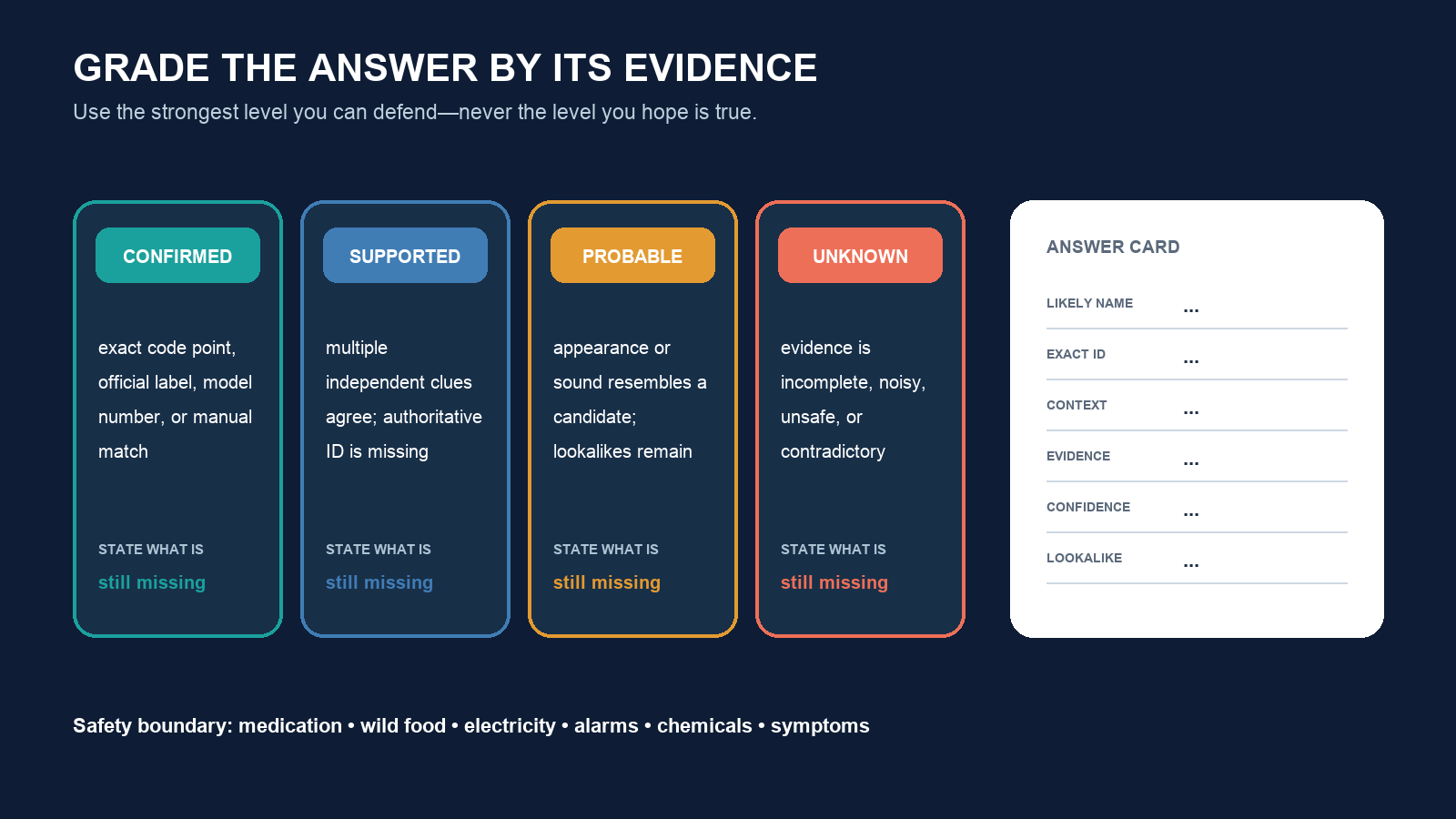
- Confirmed: exact code point, official product label, printed model number, or authoritative manual matches the source.
- Supported: several independent clues agree and no important feature conflicts, but the authoritative identifier is missing.
- Probable: the appearance or sound resembles a candidate, with unresolved lookalikes.
- Unknown: the evidence is too incomplete, cropped, noisy, or risky to interpret.
A strong response is concise but auditable:
Likely name: right single quotation mark / curly apostrophe
Exact identifier: U+2019 RIGHT SINGLE QUOTATION MARK
Context: apostrophe in copied English text
Evidence: character copied from the source and checked in Unicode
Confidence: confirmed
Closest lookalike: U+0027 APOSTROPHE
For a photographed object, replace the code point with make, model, measurements, visible markings, and the confirming manual. For an icon, include the app, page, tooltip or accessible name, and the official help link.
Know when not to identify it yourself
Escalate when a wrong name could cause harm: medication, wild food, electrical parts, structural cracks, weapons, medical symptoms, chemical labels, or emergency alarms. Visual similarity is weak evidence in those categories. Preserve the evidence, avoid unsafe handling, and contact the relevant qualified professional, manufacturer, poison service, or emergency service.
The practical rule is: classify first, preserve the original, then use the domain’s authoritative identifier. If the source data is unavailable, say “probable” and list the missing evidence. That produces a useful answer even when the honest name is not yet known.