

A batch-oriented fluid-ounce conversion workflow with spreadsheet formulas, explicit system fields, rounding control, reconciliation checks and a weight-ounce stop rule.

The common batch-conversion error is not multiplying incorrectly. It is losing what “oz” meant, mixing U.S. and Imperial rows, or replacing the conversion factor with a rounded display number. A sheet can calculate hundreds of wrong rows perfectly consistently.
One U.S. fluid ounce equals exactly 29.5735295625 mL; one Imperial fluid ounce equals exactly 28.4130625 mL. For a batch sheet, store the system and exact factor in separate columns, calculate the unrounded milliliters, and round only the reporting output. Do not convert a weight ounce to mL unless the substance’s density is known.
Why use a conversion sheet
For one value, the formulas are simple:
- U.S. mL = U.S. fl oz × 29.5735295625
- Imperial mL = Imperial fl oz × 28.4130625
A batch adds decisions that a pocket calculator does not preserve: which system each row uses, whether a blank is truly zero, which precision rule produced the displayed result, and whether “oz” meant fluid volume or mass. The sheet should keep those decisions visible so another person can audit the result without reconstructing your memory.
This page treats the malformed query “how many ml in.oz” as a batch-workflow need rather than creating a third near-identical one-ounce answer. If you only need the basic comparison, the short answer above is sufficient. Continue when the conversion must be repeated, reconciled or handed to someone else.
Build the six-column sheet
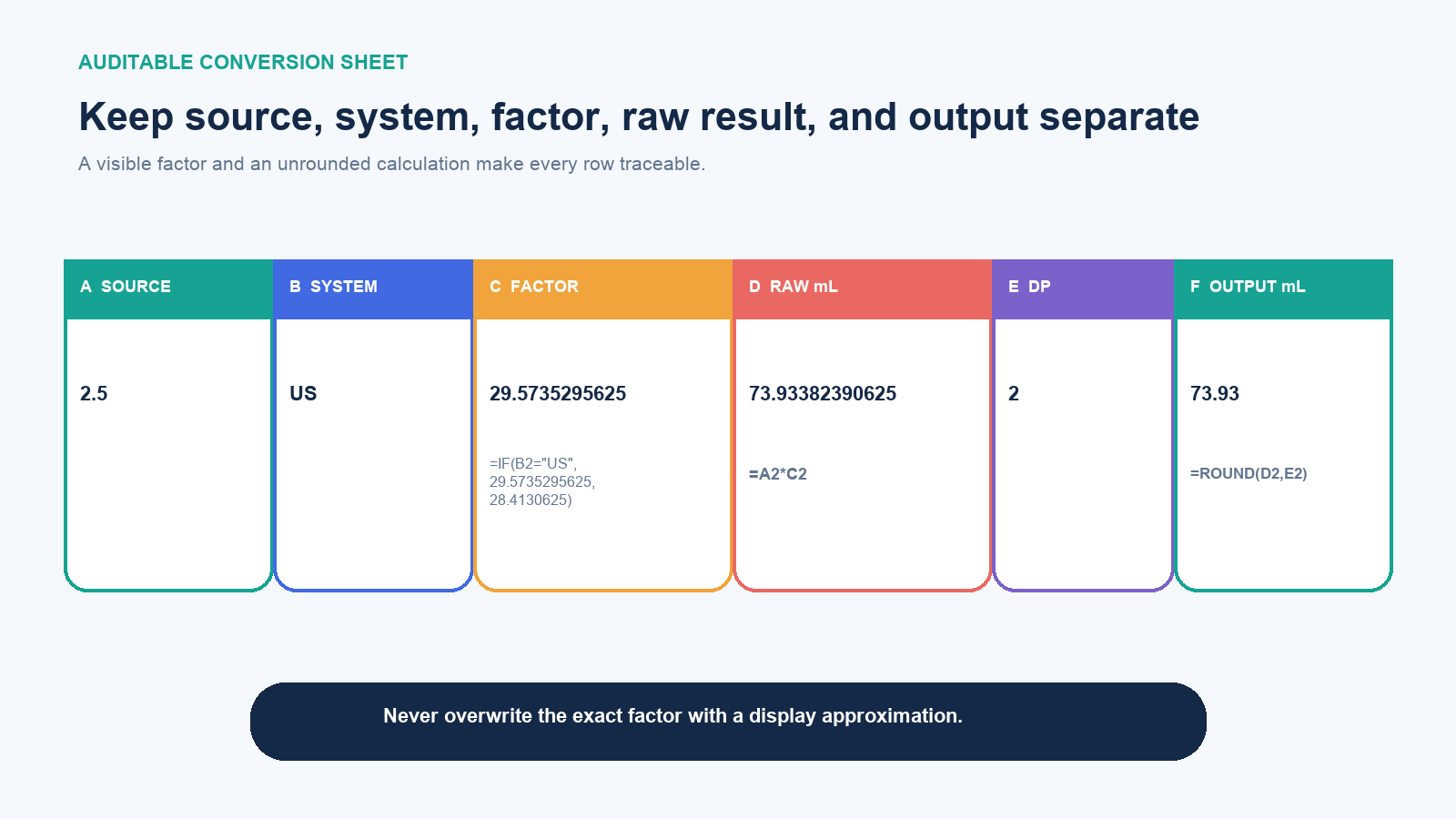
| Column | Field | Example | Purpose |
|---|---|---|---|
| A | Source fl oz | 2.5 | Preserves the original numeric input |
| B | System | US | Explicitly selects U.S. or Imperial |
| C | Exact factor | 29.5735295625 | Makes the rule visible and reviewable |
| D | Raw mL | 73.93382390625 | Stores the unrounded calculated value |
| E | Output decimal places | 2 | Separates reporting precision from conversion |
| F | Reported mL | 73.93 | Provides the value for display or export |
Add optional fields for source ID, original unit text, country or measurement standard, note, reviewer and source URL. Those fields matter when a row came from a package label, recipe archive, supplier file or specification rather than a clean typed list.
Enter formulas once, then fill down
Assume the first data row is row 2. In C2, choose the exact factor from the system field:
=IF(B2="US",29.5735295625,IF(B2="Imperial",28.4130625,NA()))
The final NA() is intentional. An unknown system should produce a visible error, not quietly default to U.S. If your organization needs more systems, use a separate lookup table rather than adding a long chain of nested choices.
In D2, calculate the raw volume:
=A2*C2
In F2, apply the reporting rule:
=ROUND(D2,E2)
Fill the formulas down only after checking that relative references point to the current row. Format C and D to show enough decimal places for review. Formatting a cell to two decimals only changes the display; ROUND changes the stored formula result. That distinction is useful: the raw column should retain calculation precision, while the output column can implement the stated reporting rule.
Use a controlled system field
Free text invites variants such as “US,” “U.S.,” “USA,” “Imp,” “UK,” and blank. Use a data-validation list with two accepted values—US and Imperial—plus a documented process for unresolved rows. If the source country is only a clue, record it separately; a modern U.K. source can state metric units or a U.S. fluid ounce explicitly.
Do not infer the system from the number of decimal places on an existing label. A package may round 29.5735 mL to 30 mL, and an Imperial recipe may round 28.4131 mL to 28 mL. Inspect the unit wording, market, document standard and surrounding measurements.
Normalize imported rows without erasing the source
A supplier or scraped file may place “2.5 fl oz,” “1 US FL OZ,” and “8oz” in the same column. Keep that text in an Original value field. Create separate cleaned fields for numeric amount, unit type and system. Do not replace the source column with the parsed result; otherwise, a later reviewer cannot see whether the parser interpreted “oz” as volume without evidence.
Use an exception queue for rows that contain ranges, fractions, multiple quantities or qualifiers. Examples include “1–2 fl oz,” “1 1/2 oz,” “2 fl oz per serving,” and “net wt 4 oz.” A formula that merely strips letters can turn each of these into a plausible but semantically wrong number. The output should say Review until the row has one confirmed amount and one confirmed volume system.
Store the factor table in a small protected reference area rather than embedding different constants across dozens of formulas. A useful factor table has these fields:
| System key | mL per fl oz | Source | Checked date |
|---|---|---|---|
| US | 29.5735295625 | NIST conversion factors | 2026-08-17 |
| Imperial | 28.4130625 | NIST conversion factors | 2026-08-17 |
A lookup formula can then return the factor by system key. This reduces the risk that one copied formula contains 29.57 while another contains 29.5735295625. Review changes to the reference table like code: record who changed a value, why, and which outputs must be recalculated.
Add a stop rule for weight ounces
fl oz is volume. An ordinary oz following “net wt,” a scale reading or a solid ingredient is mass. One avoirdupois ounce equals 28.349523125 grams, not a universal number of milliliters. Mass-to-volume conversion requires a density for the specific substance and relevant conditions:
mL = (weight oz × 28.349523125 g/oz) ÷ density in g/mL
Add an Original unit field and allow only confirmed US fl oz or Imperial fl oz rows into the direct conversion. Route weight-ounce rows to a separate workflow. If density is missing, the correct output is unresolved—not 28.35 mL and not 29.57 mL.
Do not use a general density found for “oil,” “syrup,” or “powder” when the formulation matters. Density varies by substance, composition and conditions. In safety, formulation or commercial work, use an approved source tied to the actual material.
Round after aggregation
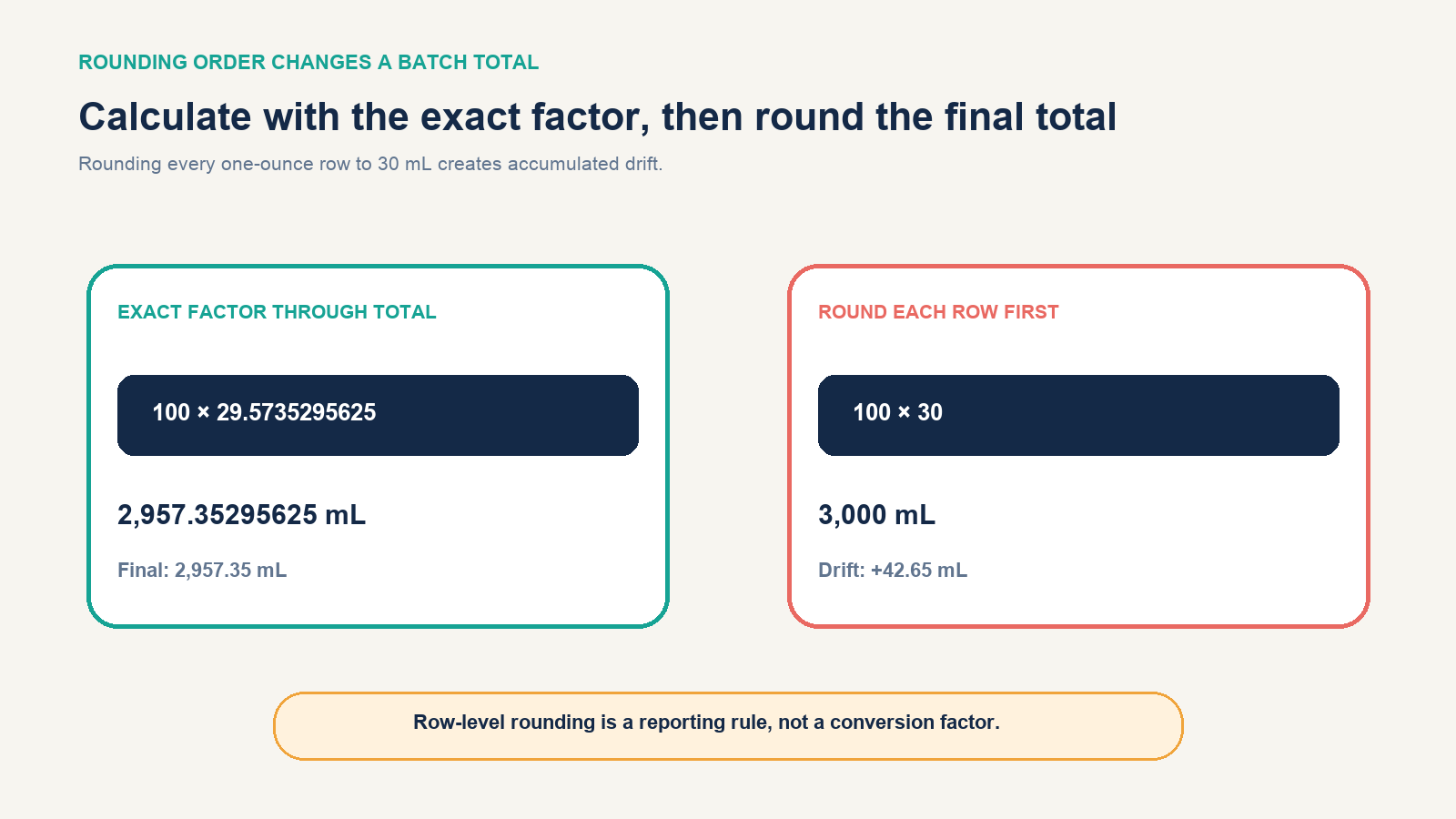
Suppose a batch contains 100 rows of 1 U.S. fl oz. Using the exact factor through the sum gives 2,957.35295625 mL, reported as 2,957.35 mL at two decimals. Replacing every row with the kitchen approximation 30 mL gives 3,000 mL—a difference of about 42.65 mL.
There are two defensible workflows, depending on the task:
- Calculate, sum, then round: best when the batch total represents one combined physical volume or analytical calculation.
- Round each row, then sum: appropriate only when every row is an independently reported or dispensed item whose rounded value is the governing record.
Document which rule applies. Do not mix raw values for some rows and label-rounded values for others in the same total without an explicit reconciliation field.
Reconcile a label that already lists mL
A U.S. package might show 1 fl oz and 30 mL. Your exact conversion returns 29.5735… mL. That does not automatically mean the label is wrong: regulations and presentation rules can define rounding for particular contexts. Store both values:
- Calculated mL: amount produced from the exact conversion factor
- Declared mL: amount printed in the source
- Difference mL: declared minus calculated
- Difference percent: difference divided by calculated
Then compare the gap with the applicable labeling rule and your review threshold. NIST distinguishes exact conversion factors from approximate cooking equivalents, while FDA guidance uses context-specific metric equivalents for nutrition labeling and net-quantity declarations. A rounded declaration is evidence about the label’s rule, not a replacement for your underlying factor.
Add reverse and reasonableness checks
A round-trip test should reproduce the source before output rounding:
=D2/C2
Compare that result with A2 using a small tolerance, for example:
=ABS((D2/C2)-A2)<0.000001
Also test these invariants:
- Zero fluid ounces should produce zero milliliters.
- A positive U.S. value and an equal positive Imperial value should not produce the same mL result.
- For equal positive inputs, the U.S. result should be larger than the Imperial result.
- Blank, text and unknown-system rows should not become zero without a warning.
- Negative values should be rejected unless the dataset intentionally represents adjustments or returns.
Use conditional formatting or an exception column to surface failed checks, but preserve the actual Boolean or error result. Color alone is easy to miss and difficult to audit after export.
Worked batch
| Source fl oz | System | Raw mL | Reported mL (2 dp) |
|---|---|---|---|
| 0.25 | US | 7.393382390625 | 7.39 |
| 0.5 | US | 14.78676478125 | 14.79 |
| 1 | US | 29.5735295625 | 29.57 |
| 2.5 | US | 73.93382390625 | 73.93 |
| 8 | US | 236.5882365 | 236.59 |
| 1 | Imperial | 28.4130625 | 28.41 |
| 8 | Imperial | 227.3045 | 227.30 |
These rows demonstrate that the formula, not a copied table, drives the output. Add a total of the raw-mL column and round that total separately. If the sheet reports individual package declarations, add another total for the declared or row-rounded output and label the two totals clearly.
Test the sheet before relying on it
Use a small release set that covers 0, 1, a decimal such as 2.5, a large value, one Imperial row, a blank input, text in the amount field, an unknown system and a negative number. Manually calculate at least one U.S. and one Imperial row. Sort the data, insert a row and paste a block to confirm formulas and validation still follow the records.
Protect formula columns if other users should edit only inputs, but do not use protection as a substitute for version history and review. Label the factor source and checked date in the workbook. If a downstream export accepts only values, retain the calculation workbook as the audit record.
The governing decision rule is simple: use 29.5735295625 for confirmed U.S. fluid ounces and 28.4130625 for confirmed Imperial fluid ounces; calculate raw mL with that exact factor; apply rounding in a separate output step; and stop any row whose system or volume-versus-mass status is unresolved.